Zapier Review

Table of Contents
What is Zapier?
Zapier is a no-code automation and AI orchestration platform that connects more than 8,000 apps into automated workflows. It allows users to build Zaps, which are automated sequences that move data between tools like CRMs, email platforms, chat apps, and databases. Recently, Zapier has expanded into AI workflows, agents, and chatbots, positioning itself as an orchestration layer for AI across the modern tech stack.
The platform now includes Tables for structured data, Interfaces for custom forms and internal tools, and Canvas for visually mapping workflows with AI assistance. Zapier emphasizes that it is trusted by 3.4 million businesses, from Fortune 500 companies to small startups. Its website highlights use cases across RevOps, marketing, IT, HR, sales, and customer support, making it a horizontal solution rather than a niche tool.
Zapier’s core promise is to help teams scale AI and automation without heavy engineering. Users can start with simple two-step automations and grow into complex, multi-step workflows with conditional logic, webhooks, and AI-powered steps. This makes Zapier appealing to both non-technical business users and technical teams that want to move faster than traditional development cycles allow.

Core Value Proposition: AI Orchestration for Everyday Apps
Zapier’s main value proposition is that it acts as the most connected AI orchestration platform for everyday business apps. Instead of building custom integrations or agents from scratch, teams can connect AI tools and SaaS apps through Zapier’s visual builder. The platform supports over 400 AI tools and nearly 8,000 apps, allowing AI agents and workflows to interact with CRMs, support tools, marketing platforms, and internal systems.
Zapier positions itself as the place where innovators put AI to work, not just experiment with it. The site emphasizes outcomes like automated lead routing, AI-assisted IT support, and AI-driven sales coaching, rather than abstract AI capabilities. Customer stories highlight tangible results such as millions in recovered revenue, thousands of hours saved, and dramatic reductions in manual work.
A key differentiator is Zapier’s combination of workflows, data storage, interfaces, and AI in a single platform. With Zaps, Tables, Interfaces, Canvas, and Zapier MCP, teams can design end-to-end systems that collect data, trigger AI actions, and surface results in custom dashboards or tools. This integrated approach reduces the need to stitch together multiple point solutions for automation and AI.

Key Features and Capabilities
Zapier’s foundation is Zaps, which are automated workflows triggered by events in one app that perform actions in others. On the Free plan, users can build two-step Zaps with one trigger and one action, ideal for simple handoffs like sending new form submissions into a CRM. On paid plans, users unlock multi-step Zaps, allowing complex sequences with multiple actions, filters, and branches.
The platform now bundles Tables and Interfaces into Free, Professional, and Team plans at no extra cost. Tables act as workflow-focused databases to store leads, tickets, or operational data, while Interfaces let teams build custom forms and internal tools on top of those datasets. This combination turns Zapier from a pure integration layer into a lightweight internal tooling platform.
Zapier’s AI capabilities are extensive and tightly integrated. Zapier Copilot helps users build and troubleshoot Zaps using natural language, while AI fields let teams enrich records in Tables using connected AI providers like OpenAI. Newer features such as AI Workflows, AI Agents, and AI Chatbots allow teams to build agents that qualify leads, answer FAQs, summarize emails, coach sales calls, and more, all orchestrated through Zapier’s automation engine.
For advanced users, Zapier offers webhooks, code steps, and the Functions beta, which provides a web IDE for writing custom logic. Zapier MCP connects AI agents to thousands of apps, acting as an action layer for external AI systems. Combined with Canvas for visual planning and Lead Router for complex routing, Zapier becomes a comprehensive toolkit for building sophisticated automation and AI systems without fully custom engineering.
- No-code **Zaps** for building automated workflows across 8,000+ apps
- Support for **two-step** and **multi-step** workflows with conditional paths and filters
- Built-in **AI Workflows, AI Agents, and AI Chatbots** for intelligent automation
- **Zapier Copilot** for AI-assisted Zap creation, troubleshooting, and documentation
- **Tables** for workflow-centric data storage and record management
- **Interfaces** for building custom forms, dashboards, and internal tools
- **Canvas** for planning and mapping workflows visually with AI assistance
- **Zapier MCP** to connect external AI agents to thousands of apps
- **Functions** beta for writing custom logic in a web IDE
- Support for **webhooks**, **code steps**, and premium app integrations
- Enterprise features like **SAML SSO**, advanced admin controls, VPC peering, and observability
- Task-based pricing with flexible limits up to **2M+ tasks per month**
Pricing and Plans
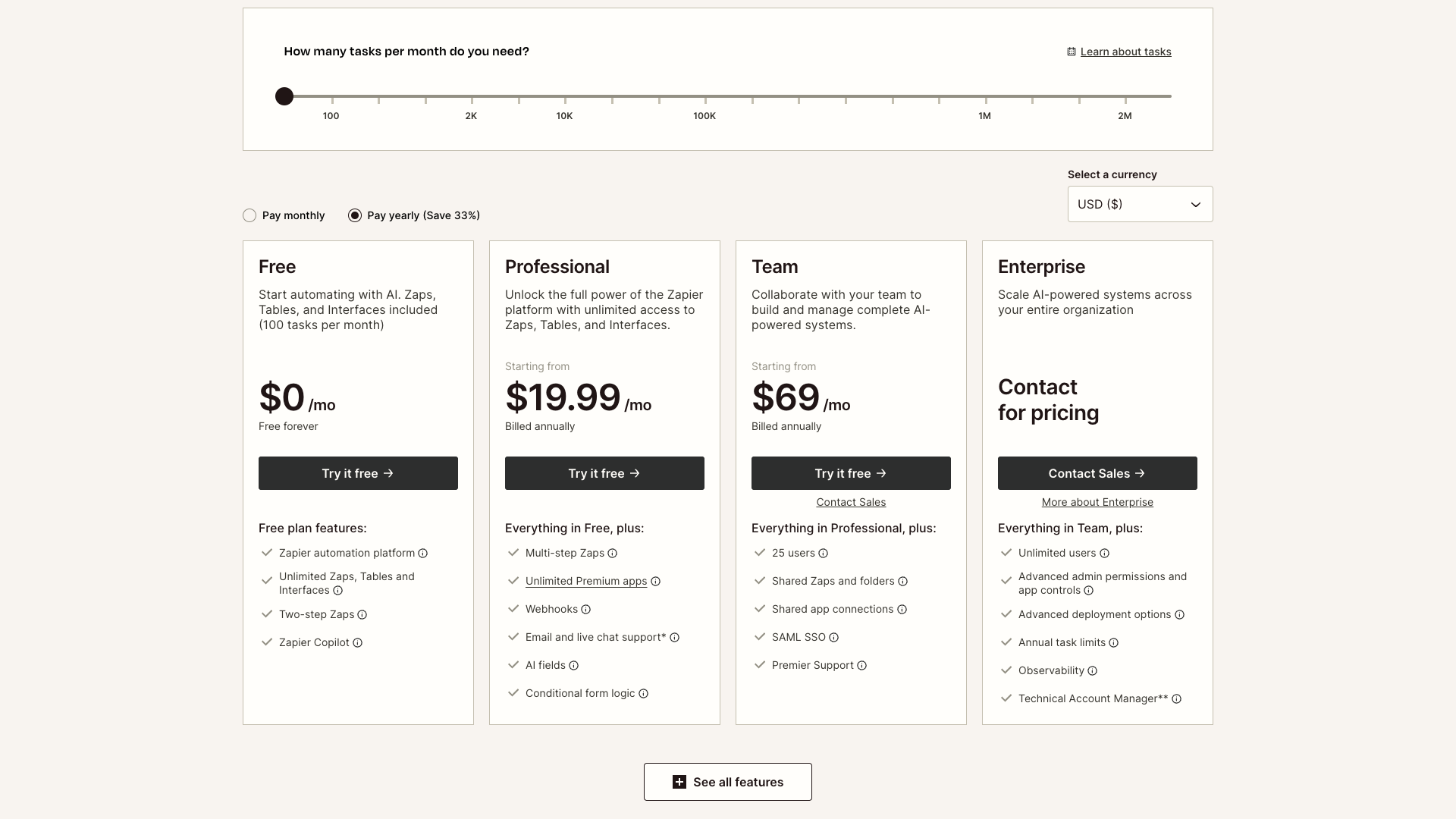
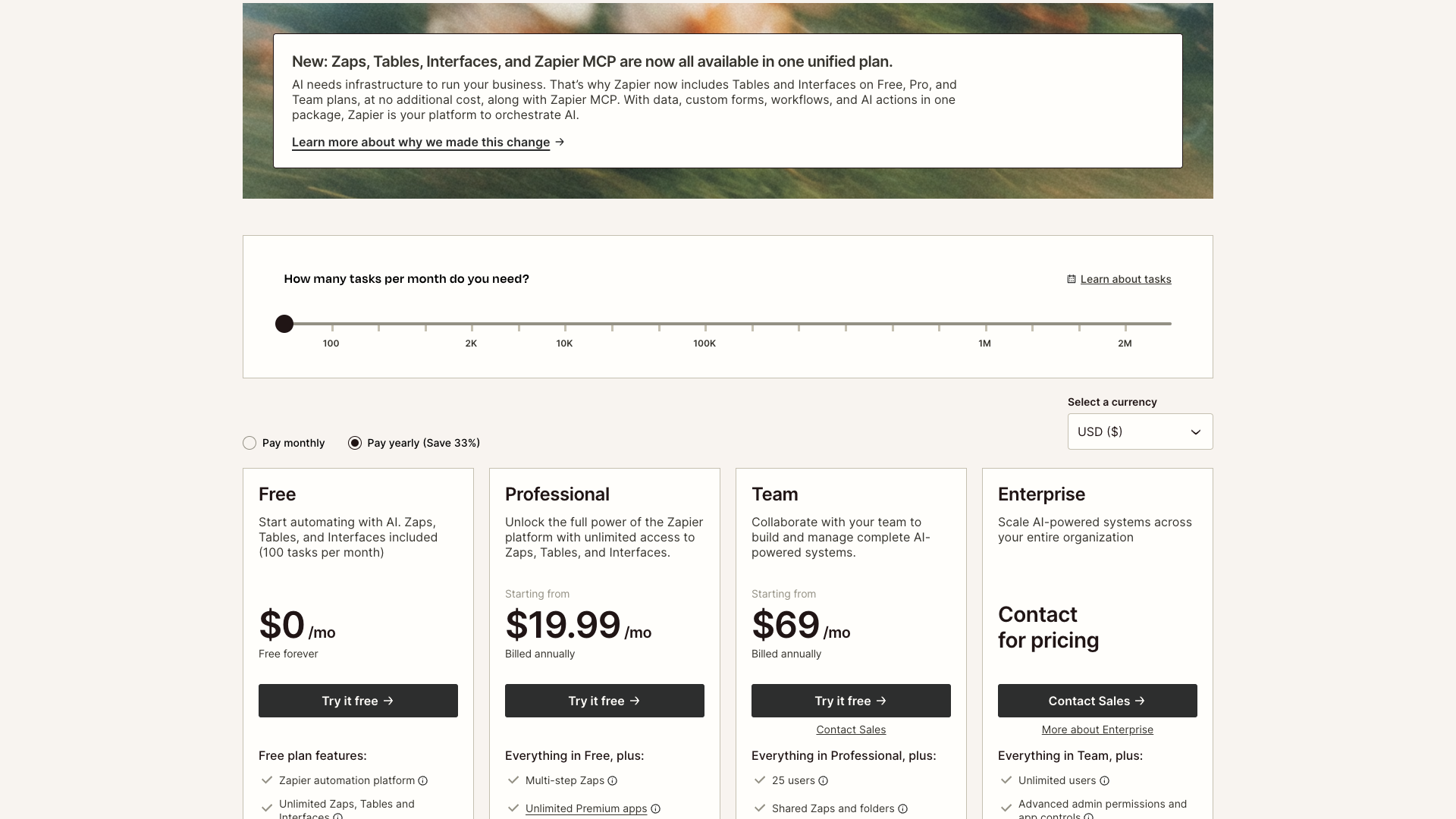
Zapier uses a task-based pricing model with four main plans: Free, Professional, Team, and Enterprise. Tasks are the individual actions your Zaps perform, and each plan can be configured with different monthly task limits. The pricing page allows users to select from 100 to 2 million tasks per month, with higher tiers and custom limits available for large organizations.
The Free plan is positioned as a way to start automating with AI, including Zaps, Tables, and Interfaces with 100 tasks per month. The Professional plan, starting at $19.99 per month billed annually, unlocks multi-step Zaps, premium apps, webhooks, AI fields, and conditional form logic. The Team plan, starting at $69 per month billed annually, adds collaboration features like shared Zaps, shared app connections, SAML SSO, and Premier Support.
The Enterprise plan is quote-based and designed for organizations that need advanced governance and scale. It includes unlimited users, advanced admin permissions and app controls, VPC peering, annual task limits, observability, and access to a Technical Account Manager at certain thresholds. All paid plans include the full building power of Zapier’s visual editor, unlimited app integrations, and access to the broader toolkit including Interfaces, Tables, Canvas, and MCP.
Free
- 100 tasks per month
- Zaps, Tables, and Interfaces included
- Unlimited Zaps, Tables, and Interfaces within task limit
- Two-step Zaps (one trigger and one action)
- Zapier automation platform access
- Zapier Copilot for AI-assisted Zap building
Free forever; ideal for starting with basic automation and AI.
Professional
- All Free plan features
- Multi-step Zaps with unlimited actions per trigger
- Advanced workflow features like conditional paths and scheduling
- Unlimited premium apps access
- Webhooks for custom integrations
- Email support and live chat support on 2,000+ task tiers
- AI fields to enrich Table records via connected AI
- Conditional form logic in Interfaces
Price shown is billed annually; monthly billing is available at a higher rate.
Team
- All Professional plan features
- 25 included users for building and managing automations
- Shared Zaps and folders for collaboration
- Shared app connections for centralized credentials
- SAML SSO for secure access management
- Premier Support with prioritized responses
Price shown is billed annually; designed for collaborative teams scaling automation.
Task limits can be configured from 100 to 2M+ tasks per month; yearly billing offers approximately 33% savings compared to monthly billing.
Customer Stories and Feedback
Zapier’s Customer Stories hub showcases how 3.4 million businesses use automation as the backbone of their work. Case studies span industries like automotive, media, real estate, SaaS, insurance, and nonprofits, emphasizing measurable outcomes. Many stories highlight how Zapier helps teams scale without adding headcount, reclaim manual hours, and unlock new revenue.
For example, Toyota of Orlando reports that AI and automation keep sales running even during CRM outages, saving over 20 hours per week and managing 30,000+ lead records. Slate’s branded content team describes using AI-powered Agents to generate over 2,000 leads per month while saving more than 100 hours. Other customers, such as Vendasta and Arden Insurance Services, attribute millions in recovered pipeline and tens of thousands of work hours automated to Zapier.
Across these stories, users consistently praise Zapier’s flexibility, reliability, and speed of experimentation. However, some narratives imply that building sophisticated systems requires thoughtful design and ongoing maintenance, which can be challenging for very small teams. Overall, the sentiment on Zapier’s own site is strongly positive, with customers framing automation as a strategic advantage rather than a tactical convenience.
- It was reported that insights were surfaced by Zapier Agents that leadership had not known to request, saving hours weekly. — Spencer Siviglia, Director of Operations, Toyota of Orlando
- It was shared that overwhelming marketing workflows became scalable with Zapier, allowing both quality and volume to increase. — Andrew Harding, VP of Marketing and Content Partnerships, Slate
- It was noted that support escalations were automated by 13%, saving around ten minutes per escalation. — Korey Marciniak, Senior Manager of Customer Support Strategy and Operations
- It was stated that about $1 million in potential revenue was recovered because sales reps could focus on closing deals instead of admin work. — Jacob Sirrs, Marketing Operations Specialist, Vendasta
- It was reported that automation contributed to overhead savings of more than $500,000 annually. — Tyler Diogo, Operations Manager, Arden Insurance Services
- It was shared that AI-powered automation helped clients report over $134 million in revenue without a full-time development team. — Ben Leone, CTO, Contractor Appointments

Our In-Depth Review
From a product perspective, Zapier stands out as a mature, battle-tested automation platform that has successfully integrated AI into its core offering. The breadth of app integrations and AI connections is unmatched, making it a strong choice for teams that live across many different tools. Its move to bundle Tables, Interfaces, and MCP into core plans significantly increases the value for businesses building internal systems.
However, Zapier’s power can also introduce complexity, especially for users who only need a narrow solution like social content creation or simple reporting. Designing robust multi-step workflows with branching logic, error handling, and data normalization still requires thoughtful planning. Smaller teams may find themselves investing time in architecture and maintenance that they had hoped to avoid with a no-code tool.
For organizations that want to operationalize AI across departments, Zapier is one of the strongest options available. It excels when used as a central automation layer that connects marketing, sales, support, and operations into cohesive systems. For focused use cases like AI-generated LinkedIn content, a specialized tool such as PostFlow can be more efficient and easier to adopt, while still integrating with Zapier later if broader automation is needed.
Pros
- Extremely large ecosystem with 8,000+ app integrations and 400+ AI tools
- Powerful AI features including AI Workflows, Agents, Chatbots, and Copilot
- Tables and Interfaces included on Free, Professional, and Team plans at no extra cost
- Flexible task-based pricing that scales from small to very large workloads
- Strong enterprise capabilities such as SAML SSO, VPC peering, and observability
- Visual, no-code editor that is accessible to non-developers
- Rich library of templates and use-case guides to accelerate adoption
- Customer stories demonstrate significant time savings and revenue impact
Cons
- Can feel complex and overwhelming for very simple or narrow use cases
- Task-based pricing requires careful monitoring to avoid overages at scale
- Building robust multi-step workflows still demands thoughtful design and maintenance
- Some advanced features (webhooks, Functions, complex branching) have a learning curve
- Best results often require cross-team coordination, which smaller teams may lack

Final Verdict
Zapier has evolved into a comprehensive AI orchestration and automation platform that serves everyone from solo founders to global enterprises. Its combination of Zaps, Tables, Interfaces, Canvas, and AI tools enables teams to design sophisticated, end-to-end workflows without writing full applications. The platform’s reliability, ecosystem depth, and strong customer outcomes justify its role as a backbone for modern operations.
The trade-off is that Zapier can feel overpowered for narrow or content-specific use cases, and its task-based pricing requires careful monitoring at scale. Teams that only need AI-generated posts or simple campaigns may prefer a streamlined tool and then connect it to Zapier later if needed. Still, for organizations serious about automation and AI, Zapier remains one of the best-in-class options available today.
Overall, Zapier earns a strong score for its capabilities, ecosystem, and continuous innovation. It is particularly compelling for RevOps, marketing, IT, and support teams that want to automate cross-tool workflows and embed AI into everyday processes. When paired with specialized tools like PostFlow for content, it can form the backbone of a highly efficient, AI-driven tech stack.

Alternatives
If Zapier isn't the right fit, consider these similar tools:
Last updated: 17.11.2025

