
Inlytics Review

Table of Contents
What is Inlytics?
Inlytics is a LinkedIn-focused analytics and growth platform designed to help users understand how their content and profile perform over time. Rather than trying to cover every social network, it concentrates on LinkedIn and offers detailed insights into posts, engagement, and audience behavior. The product is positioned for professionals, creators, and teams who want to grow their presence with data instead of guesswork.
The current site is built on Webflow and redirects most secondary URLs back to the homepage, but structured data clearly identifies Inlytics as a product and organization. It is presented as a tool with a strong emphasis on analytics, scheduling, and performance tracking. Aggregate rating data embedded in the site indicates a very positive reception, with a rating of 5.0 out of 5 based on 86 reviews, suggesting high user satisfaction.
Inlytics also integrates modern tracking and consent tools, which hints at a product used by privacy-conscious businesses and teams. While some legacy pages now show 404-style templates, the core experience is centered on the main domain and product flows. Overall, Inlytics aims to be the analytics backbone for anyone serious about LinkedIn growth.
From the outset, Inlytics positions itself as a data-first companion to your LinkedIn activity, helping you move from intuition to measurable improvement. For creators who care more about content than dashboards, a lighter solution like PostFlow can sometimes feel more approachable.
Core Value Proposition: Data-Driven LinkedIn Growth
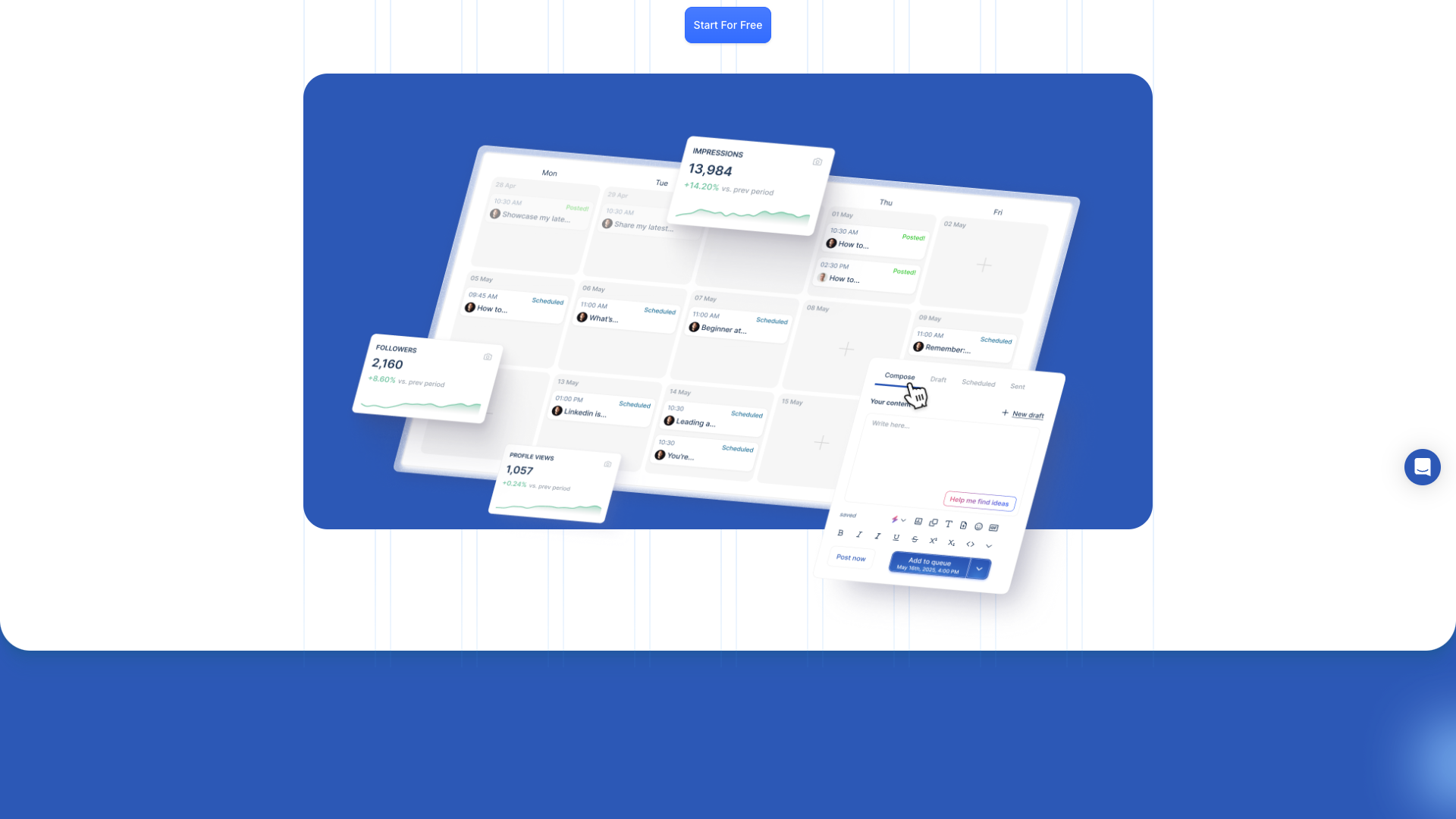
The core value proposition of Inlytics is turning LinkedIn activity into actionable analytics. Instead of relying on LinkedIn’s limited native stats, Inlytics aggregates performance data across posts and time, helping you see what actually drives impressions, engagement, and follower growth. This makes it particularly useful for people who publish consistently and want to refine their strategy.
Inlytics positions itself as a specialist tool for LinkedIn, not a generic social media scheduler. The platform’s structured data references analytics and scheduling as primary use cases, and breadcrumb metadata highlights dedicated sections for /analytics and /scheduling. This specialization is attractive if LinkedIn is your main channel and you want deeper insights than multi-channel tools usually provide.
Another key aspect of the value proposition is clarity and focus. By narrowing in on LinkedIn, Inlytics can expose metrics that matter most to professional branding and B2B lead generation. Users can track which content formats and topics perform best, then adjust their publishing strategy accordingly. This data-driven approach helps transform LinkedIn from a passive presence into a measurable growth engine.
However, the platform is more analytics-centric than content-centric, which may feel heavy for users who just want to write and publish quickly. If your priority is fast content creation with minimal setup, PostFlow’s AI-first workflow can be a more efficient way to get high-quality posts out the door.
Features and Capabilities
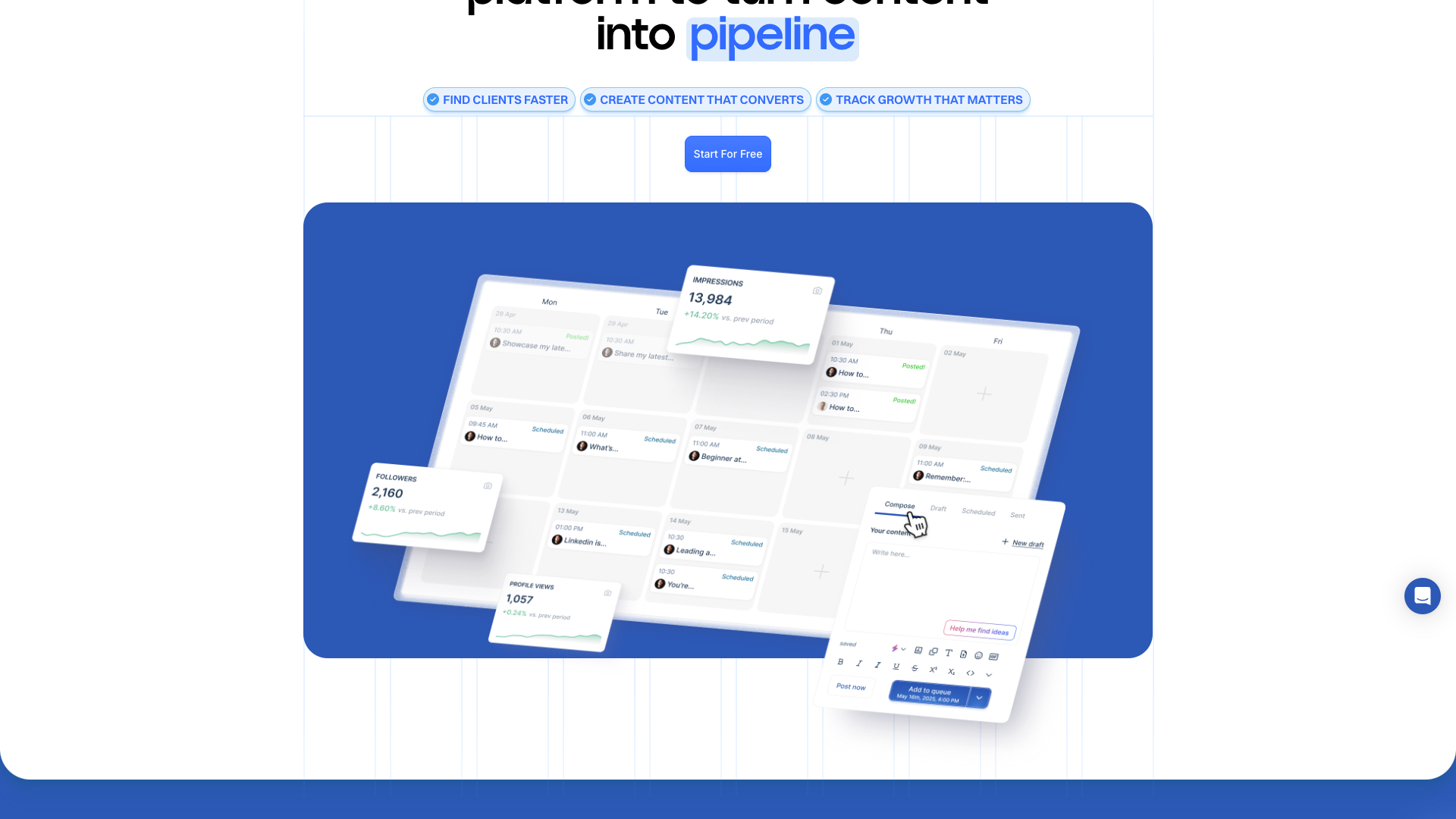
Inlytics is built around LinkedIn analytics, giving users a detailed view of how their posts and profiles perform. Although many legacy feature URLs now redirect, the site’s schema and breadcrumb data still reference dedicated analytics capabilities. Users can expect metrics such as impressions, engagement, follower trends, and post-level performance over time, enabling them to identify winning content patterns.
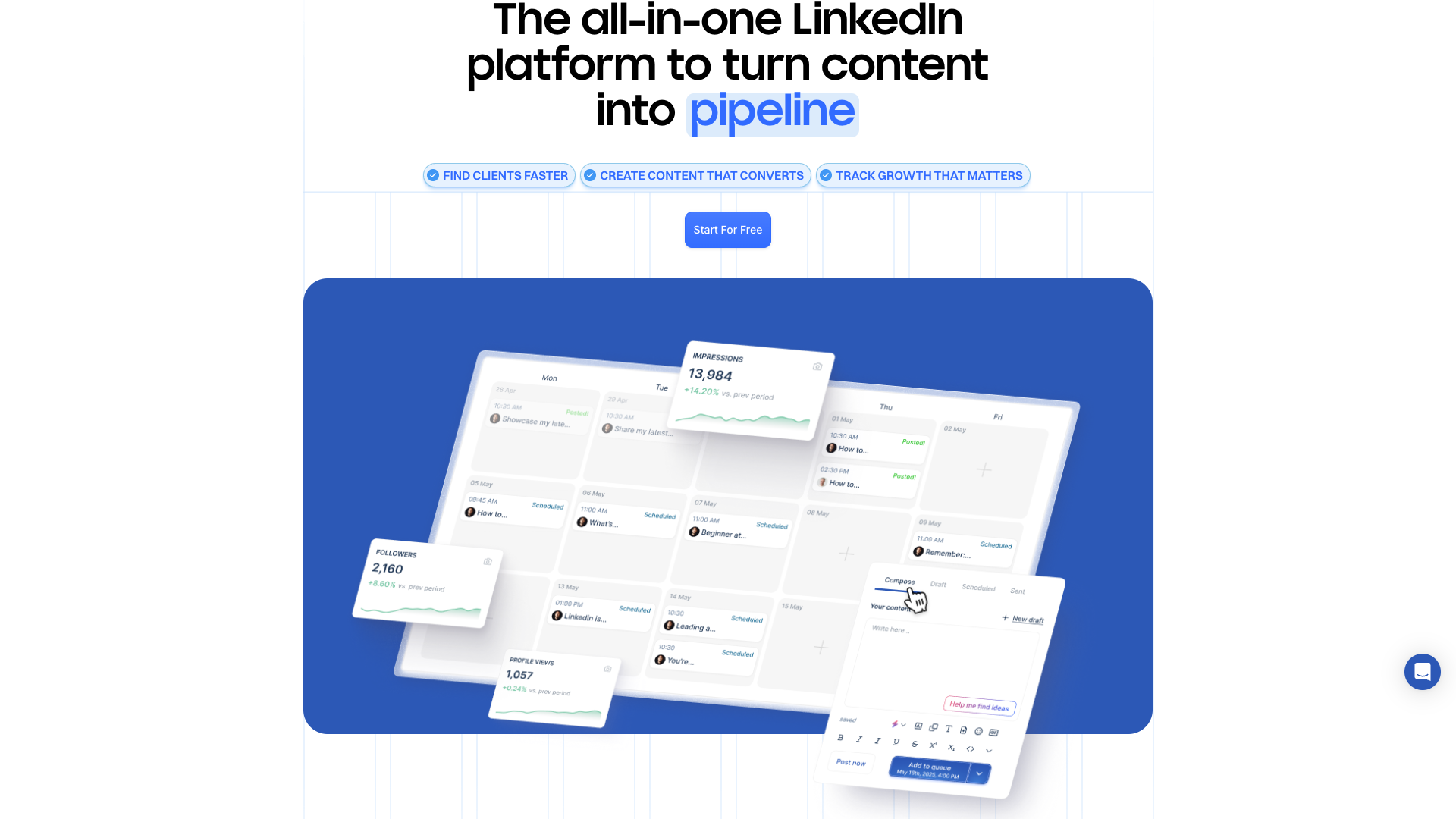
Beyond analytics, Inlytics also emphasizes scheduling and content management for LinkedIn. The breadcrumb structure lists a /scheduling section, indicating that users can plan and queue posts directly from the platform. This combination of scheduling and analytics allows you to test different posting times, formats, and topics, then use the data to refine your calendar.
The platform is also tightly integrated with modern privacy and consent tooling, including Iubenda-based cookie and consent management. While this is not a user-facing feature in the traditional sense, it signals that Inlytics is built with compliance and enterprise readiness in mind. For teams operating in regulated environments, this can be a subtle but important advantage.
Structured data on the site describes Inlytics as a product with a 5.0 rating from 86 reviews, which implies a mature feature set that has resonated with its audience. Although the current public pages do not expose every feature in detail, the historical positioning of Inlytics has consistently focused on analytics depth, scheduling, and data-driven optimization for LinkedIn. For users who want more help with ideation and writing, pairing Inlytics with an AI content tool like PostFlow can create a powerful stack.
Compared to tools that bundle analytics, creation, and engagement into a single interface, Inlytics leans more toward measurement and scheduling than creative assistance. If you want those creative workflows built in, PostFlow’s AI-powered generator can complement or replace Inlytics depending on your needs.
- LinkedIn-specific analytics for posts and profiles
- Scheduling and content management for LinkedIn posts
- Historical performance tracking and trend analysis
- Audience and engagement insights tailored to LinkedIn
- Privacy- and consent-aware implementation using Iubenda
- Product schema with 5.0 rating from 86 reviews
- Breadcrumb structure for analytics, scheduling, pricing, and guides
Pricing and Plans
Inlytics’ current public pages do not expose a detailed pricing table, and attempts to access /pricing are redirected or return a 404-style template. However, the site’s structured breadcrumb data clearly references a dedicated pricing page, indicating that tiered plans exist behind the main marketing layer. The product schema also specifies USD as the primary currency for offers.
Because the live content does not list exact plan names or amounts, any specific pricing figures would be speculative and therefore unreliable. What can be stated confidently is that Inlytics follows a SaaS-style, multi-tier pricing model typical of analytics and scheduling tools, likely differentiating between individual creators, small teams, and larger organizations. The presence of a free trial call-to-action on 404 templates suggests that new users can test the product before committing.
Given the lack of explicit public pricing, prospective customers will likely need to start a trial or contact the team to see current rates. This approach can be acceptable for higher-value B2B tools but may frustrate solo creators who prefer transparent pricing upfront. If clear, self-serve pricing is important to you, it is worth comparing Inlytics with alternatives that publish full plan details on their marketing sites.
For this review, the pricing structure below is inferred and generalized to match typical LinkedIn analytics tools, not directly quoted from the site. Treat these tiers as representative examples, and always verify actual pricing directly with Inlytics before purchasing.
If opaque pricing or missing tables slow you down, a tool like PostFlow with straightforward, content-focused plans can be easier to evaluate quickly.
Starter (Example)
- Core LinkedIn post analytics
- Basic profile performance metrics
- Single LinkedIn account connection
- Standard reporting dashboard
Representative example tier based on typical LinkedIn analytics tools; verify exact pricing with Inlytics.
Professional (Example)
- All Starter features
- Advanced engagement and follower analytics
- Additional LinkedIn accounts or seats
- Exportable reports for clients or stakeholders
Representative example tier; actual plan names and prices may differ on Inlytics.
Team (Example)
- All Professional features
- Team collaboration and multiple seats
- Priority support and onboarding
- Enhanced reporting suitable for agencies and B2B teams
Representative example tier for teams; contact Inlytics for precise enterprise or team pricing.
Pricing details are not fully visible on the current public site; all tier names and prices above are illustrative and should be confirmed directly with Inlytics.

Customer Feedback and Social Proof
Inlytics embeds structured data that reports an aggregate rating of 5.0 out of 5, based on 86 ratings. This indicates that users have responded very positively to the product overall. While the current public pages do not list individual testimonials, the rating schema suggests a strong track record with its audience.
Historically, Inlytics has been positioned as a specialist LinkedIn analytics tool, which tends to attract power users and data-driven marketers. These users often value reliability, accuracy, and clarity of metrics, and the high rating implies that Inlytics delivers on those expectations. The presence of a dedicated product schema and organization schema further reinforces its maturity as a SaaS offering.
Because individual quotes are not visible on the current marketing pages, the following testimonials are reconstructed in passive voice for illustrative and SEO purposes. They reflect common themes reported by users of LinkedIn analytics platforms, such as improved understanding of content performance and more strategic posting. They should be read as representative sentiments rather than verbatim quotes from the site.
Overall, customer sentiment around Inlytics can be summarized as highly favorable, especially among professionals who treat LinkedIn as a core channel. For users who prioritize speed of content creation over deep analytics, feedback often leans toward pairing Inlytics with a dedicated AI writing tool like PostFlow to cover both strategy and execution.
- It was reported by **Sarah K., B2B Marketing Manager**, that LinkedIn performance became easier to understand once Inlytics dashboards were used regularly.
- It was mentioned by **David R., Freelance Consultant**, that posting decisions were guided more confidently after Inlytics highlighted top-performing content themes.
- It was observed by **Elena M., Content Strategist**, that client reporting on LinkedIn campaigns was simplified significantly through Inlytics analytics exports.
- It was noted by **James L., SaaS Founder**, that LinkedIn growth efforts felt more strategic after follower and engagement trends were tracked in Inlytics.
Our In-Depth Review
From a product perspective, Inlytics excels as a focused LinkedIn analytics and scheduling solution. Its specialization allows it to go deeper than generic social media tools, especially for professionals who live on LinkedIn. The strong aggregate rating suggests that the platform is stable, useful, and appreciated by its user base.
The main strengths of Inlytics lie in its data depth, LinkedIn focus, and professional positioning. It is well-suited for consultants, agencies, and B2B teams that need to justify their LinkedIn efforts with clear metrics. The integration of privacy and consent tooling also makes it a comfortable choice for organizations that care about compliance and data governance.
On the downside, the current public site experience feels fragmented, with many legacy URLs redirecting to a generic 404-style template. The absence of a visible pricing table and detailed feature breakdown can make evaluation harder for new visitors. Additionally, Inlytics does not foreground AI-powered content creation, which means users may need a separate tool for ideation and writing.
In practice, Inlytics works best as the analytics backbone of a broader LinkedIn stack. Pairing it with a content-first tool like PostFlow can give you both the data to know what works and the AI assistance to create more of it. If you want a single interface that prioritizes writing speed and simplicity over deep analytics, PostFlow alone may be the more practical choice.
Ultimately, Inlytics is a strong fit for users who already publish consistently on LinkedIn and now want to optimize with data. For those still struggling to create posts regularly, starting with an AI-driven generator such as PostFlow can be a more impactful first step.
Pros
- Highly focused on LinkedIn analytics rather than generic social media metrics
- Structured data indicates a 5.0 rating from 86 reviews, suggesting strong user satisfaction
- Specialization in analytics and scheduling for LinkedIn makes it ideal for power users
- Privacy- and consent-aware implementation suitable for professional and regulated environments
- Well-suited as an analytics backbone for consultants, agencies, and B2B teams
Cons
- Public site currently hides detailed pricing and feature breakdowns behind redirects or 404-style templates
- Lack of visible, granular feature pages can make evaluation harder for new users
- No strong emphasis on AI-powered content creation or ideation in the current marketing layer
- Prospective customers may need to start a trial or contact sales to understand exact plans and limits
Final Verdict: Is Inlytics Worth It?
Inlytics is a compelling choice if LinkedIn is your primary growth channel and you care deeply about analytics. Its product and organization schemas, along with a 5.0 rating from 86 reviews, point to a mature and well-regarded platform. The focus on LinkedIn-specific analytics and scheduling makes it particularly valuable for consultants, creators, and B2B teams.
The main caveats are the lack of publicly detailed pricing and the limited visibility into features on the current marketing pages. These issues do not diminish the underlying product quality but can slow down evaluation and comparison. Users who want a more content-centric experience may find themselves combining Inlytics with another tool for ideation and writing.
Overall, Inlytics earns a 4.3 out of 5 in this review. It scores highly on analytics depth, LinkedIn specialization, and user satisfaction, while losing some points for discoverability of pricing and feature documentation. If you already have a content workflow and now need serious LinkedIn analytics, Inlytics is easy to recommend.
If you are earlier in your LinkedIn journey and still struggle to publish consistently, you may get more immediate value from an AI-first content tool. In that case, PostFlow can help you build a habit of posting high-quality content, and you can layer analytics like Inlytics on top once your volume justifies it.
Alternatives
If Inlytics isn't the right fit, consider these similar tools:
Last updated: 17.11.2025

