Sendible Review

Table of Contents
What is Sendible?
Sendible is a social media management platform that helps agencies, marketers, and brands manage multiple social profiles from a single dashboard. It focuses on simplifying scheduling, collaboration, and reporting so teams can scale their social media presence without drowning in manual tasks. The platform supports major networks like Facebook, Instagram, TikTok, X (Twitter), LinkedIn, Google Business Profile, YouTube, and Pinterest, along with popular content integrations.
Founded in 2009 and headquartered in London, Sendible has grown into a mature solution trusted by over 30,000+ agencies, marketers, and brand managers. The company emphasizes affordability, scalability, and human support, positioning itself as a more approachable alternative to heavyweight tools like Hootsuite and Sprout Social. Its interface is built around calendars, queues, and a centralized inbox, making it particularly attractive for teams managing multiple clients or locations.
On the homepage, Sendible promises to help you “manage your social media at scale” and become a “marketer’s best friend” for scheduling, monitoring, and reporting. The platform offers a free trial with no credit card required, and there is a strong push toward interactive demos and educational resources such as blogs, guides, templates, and a 2025 holiday calendar. Overall, Sendible aims to be a full-stack social hub rather than just a basic scheduler.
While Sendible covers the entire workflow from planning to reporting, some users may find it more than they need if their main goal is simply producing great content quickly. In those cases, a focused AI content engine like PostFlow can complement or even replace parts of Sendible’s stack by accelerating the ideation and writing process.

Core value: scalable social media management for agencies and brands
Sendible’s core value lies in helping teams scale social media operations across many profiles and clients without losing control. Instead of juggling logins and spreadsheets, you get a unified environment for planning, approving, and publishing content. This is especially powerful for agencies that need to prove value to clients through consistent posting and clear reporting.
The platform’s multi-platform publishing lets you schedule posts to multiple networks from a central Smart Compose Box, while still tailoring captions, hashtags, and visuals per channel. A Priority Inbox consolidates comments, messages, and mentions so you can respond quickly and never miss important engagement. Combined with automated and custom reporting, Sendible makes it easier to connect daily activity with measurable outcomes.
Another key pillar is collaboration and client management. Features like Client Connect, approval workflows, and dedicated client dashboards allow agencies to onboard brands securely without sharing passwords. For larger organizations, white-label options and advanced user permissions help maintain brand consistency while giving stakeholders the access they need. This combination of publishing, collaboration, and reporting is what differentiates Sendible from simpler scheduling tools.
However, the platform is primarily optimized for managing operations rather than generating content ideas from scratch. If your biggest bottleneck is writing engaging posts, pairing Sendible with PostFlow’s AI-powered LinkedIn post generator can dramatically speed up content creation before you even open your Sendible calendar.
Features and capabilities
Sendible offers a broad set of core features that cover the full social media lifecycle. The Dashboard provides an overview of campaigns, calendars, and performance, while Social Media Scheduling lets you publish and schedule content in advance across multiple networks. Content Management is handled through libraries, queues, and bulk import tools, helping teams stay organized even when managing dozens of profiles.
One of the standout capabilities is the Smart Compose Box, which allows you to schedule posts from a centralized interface in seconds. You can customize posts per platform with profile tags, locations, and hashtags, and use Smart Queues and Optimal Times to maintain consistent posting at the best-performing hours. For planning ahead, Bulk Import and campaign management features make it easy to upload and schedule months of content at once.
Sendible also includes a strong set of engagement and monitoring tools. The Priority Inbox centralizes comments, direct messages, and mentions so you can respond quickly from one place. Social media monitoring lets you track keywords and brand mentions, while Custom Tags and UTM Tracking help you categorize content and measure performance more accurately. This makes it easier to understand which campaigns and content types are driving results.
On the analytics side, Automated Reports and custom reporting allow you to generate branded, ROI-focused reports for clients or internal stakeholders. You can highlight best-performing posts, trends, and audience growth, and schedule reports to be delivered automatically. For agencies, white-label reporting and client dashboards help reinforce your brand and professionalism. Integrations with Canva, Dropbox, Google Drive, Pexels, Giphy, and a Chrome extension streamline content creation and asset management.
Finally, Sendible is investing in AI Assist, which helps generate and optimize social media captions directly within the platform. While this is a useful addition, it is still primarily focused on caption tweaks rather than full content ideation. If you need deeper AI support for brainstorming hooks, angles, and long-form posts, a specialized tool like PostFlow can complement Sendible’s operational strengths.
- Multi-platform social media scheduling with a centralized Smart Compose Box
- Bulk import and Smart Queues for planning months of content in advance
- Priority Inbox for managing comments, messages, and mentions in one place
- AI Assist for generating and optimizing social media captions
- Content libraries, campaigns, and custom tags for organized content management
- Automated and custom reporting with branded, client-ready reports
- Collaboration tools including approvals, assignments, and client dashboards
- White-label options for agencies and resellers (available as a paid add-on)
- Support for major networks: Facebook, Instagram, TikTok, X (Twitter), LinkedIn, Google Business Profile, YouTube, Pinterest
- Integrations with Canva, Dropbox, Google Drive, Pexels, Giphy, and a Chrome extension


Pricing and plans
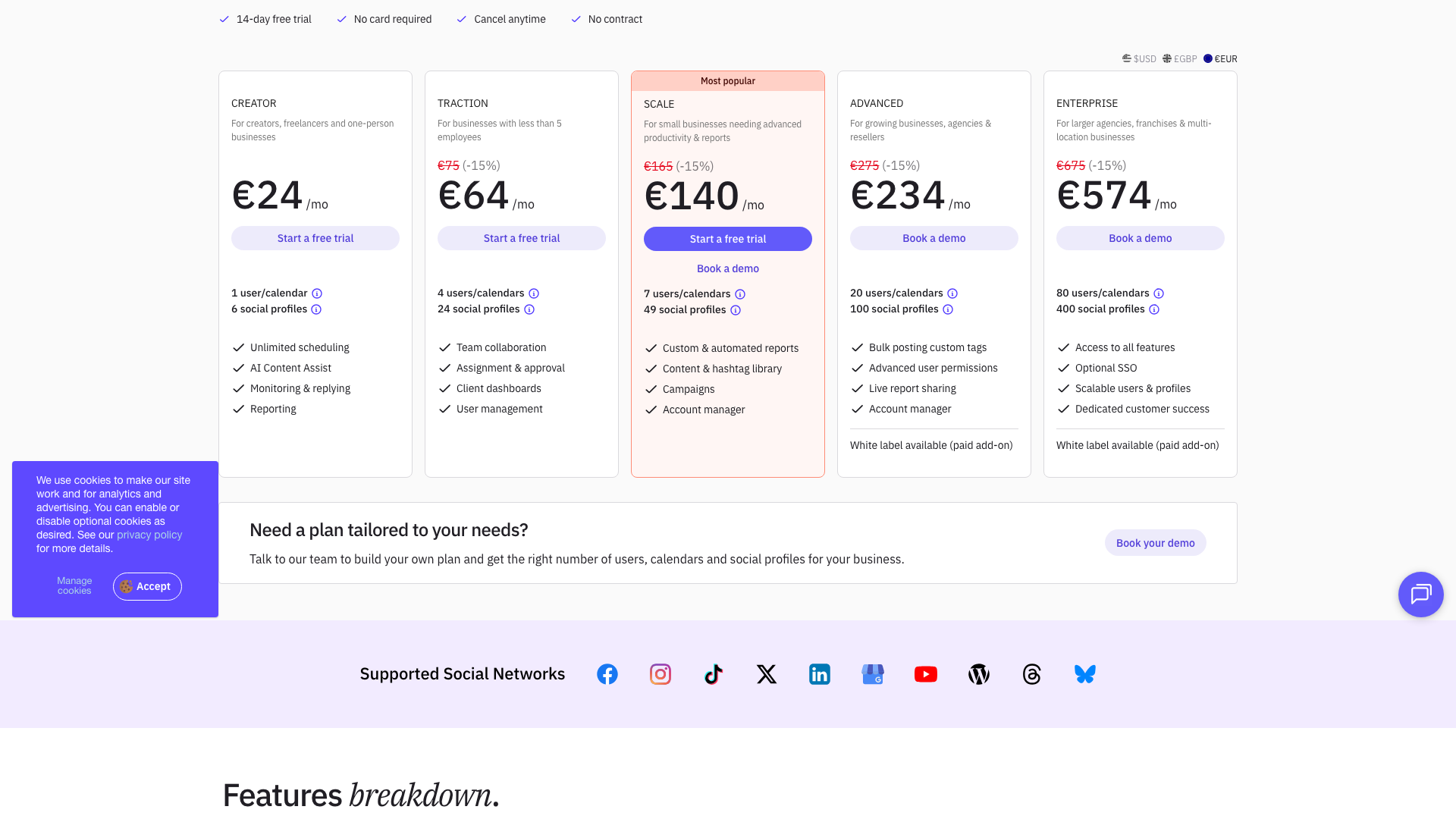
Sendible’s pricing is structured around users/calendars and social profiles, with clear tiers aimed at different business sizes. All plans are available on a monthly or yearly basis, with the pricing page highlighting yearly savings (up to 25%) and a 14-day free trial that requires no credit card. Pricing is shown in multiple currencies, including USD, GBP, and EUR, and the values below reflect the monthly EUR rates displayed at the time of review.
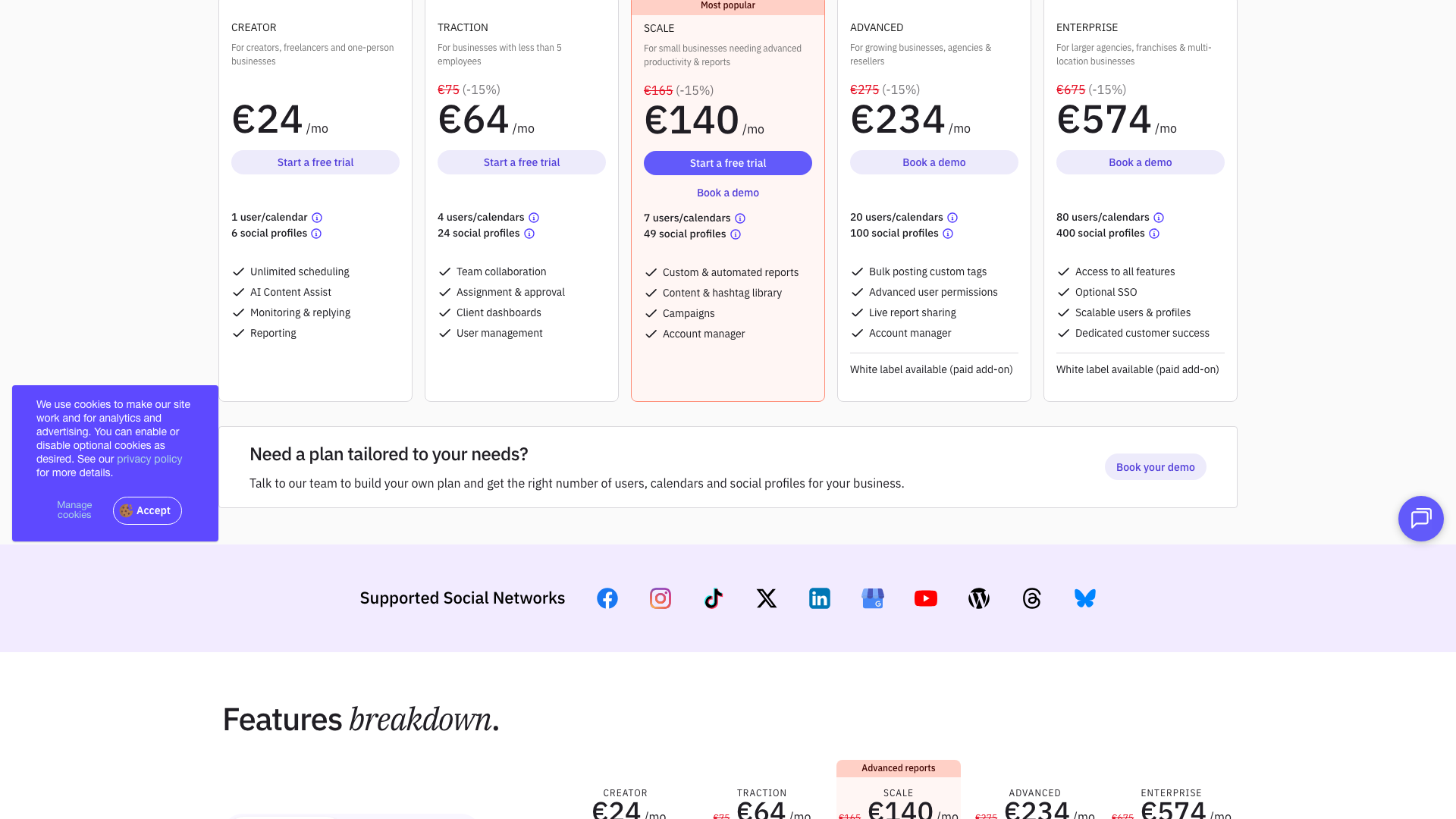
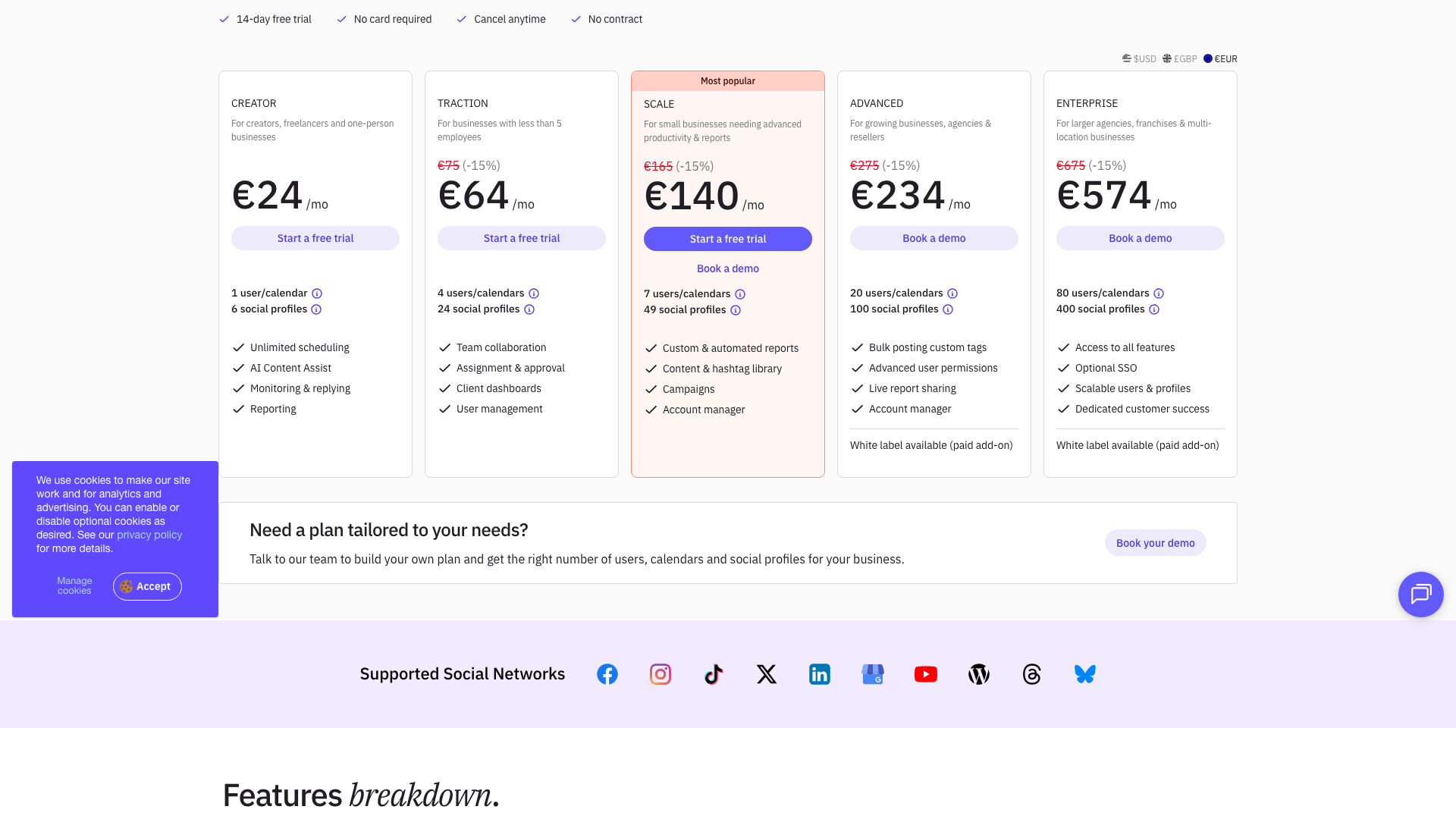
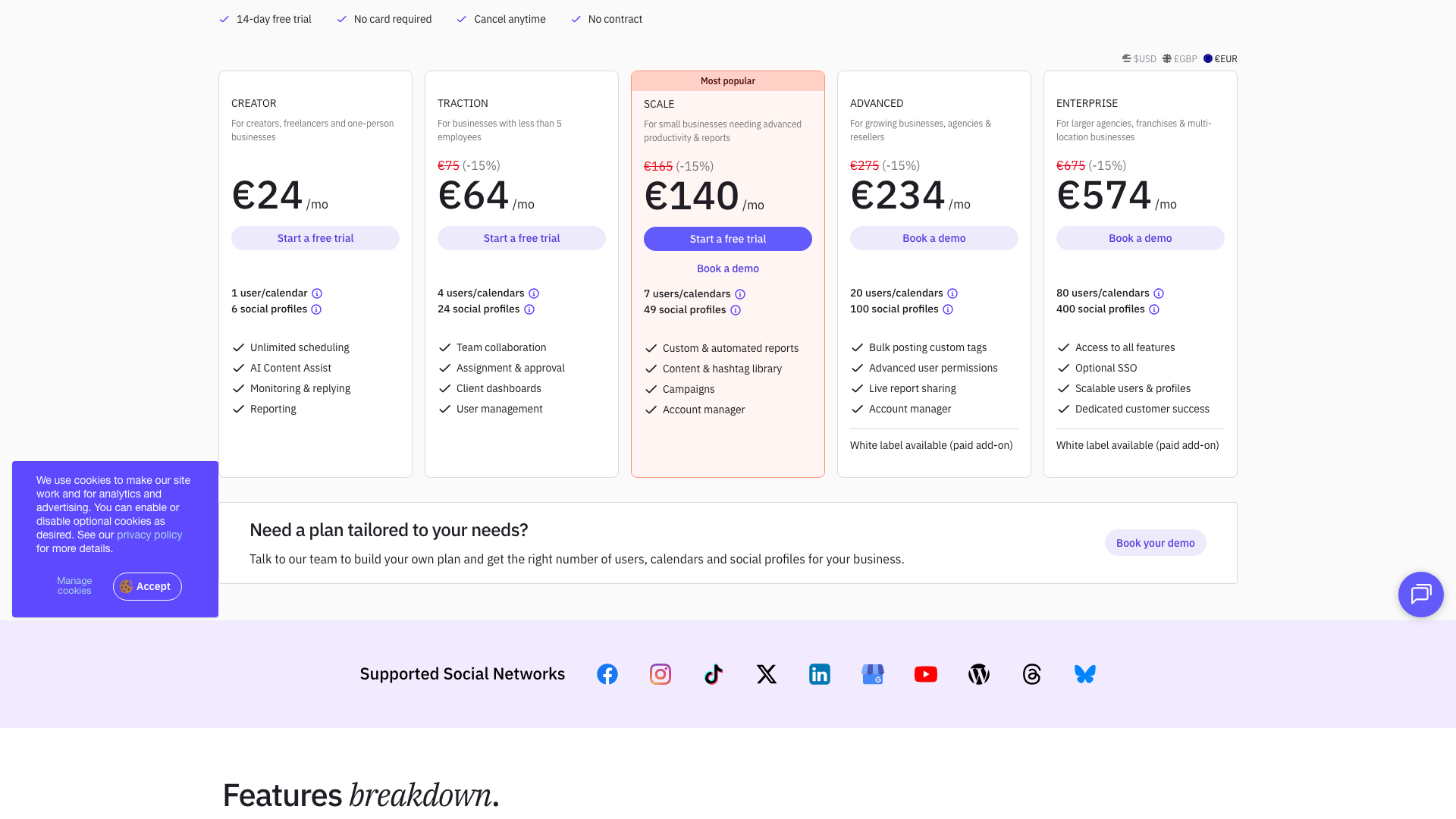
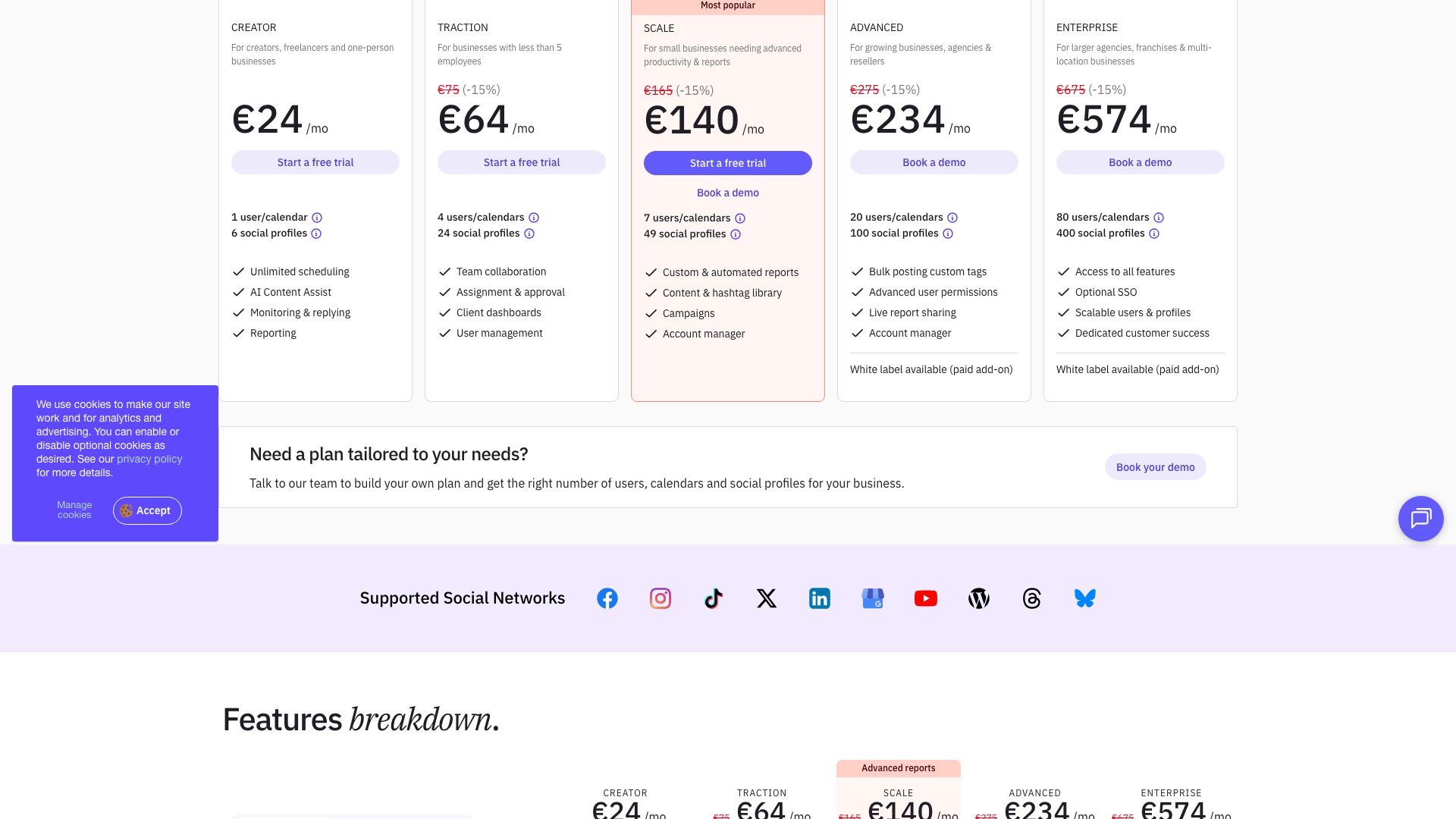
The entry-level Creator plan targets creators, freelancers, and one-person businesses. It includes 1 user/calendar and 6 social profiles, along with unlimited scheduling, AI Content Assist, monitoring and replying, and reporting. This plan is ideal if you manage a small number of profiles but still want professional scheduling and analytics. It is the lowest paid tier and sets the starting point for Sendible’s pricing.
The mid-tier plans—Traction, Scale, and Advanced—are designed for growing teams and agencies. Traction supports 4 users/calendars and 24 social profiles, adding team collaboration, assignment and approval, client dashboards, and user management. Scale increases capacity to 7 users/calendars and 49 social profiles, and introduces custom and automated reports, a content and hashtag library, campaigns, and an account manager. Advanced further scales to 20 users/calendars and 100 social profiles, with bulk posting, custom tags, advanced user permissions, live report sharing, an account manager, and optional white label as a paid add-on.
At the top end, the Enterprise plan is built for larger agencies, franchises, and multi-location businesses. It offers 80 users/calendars and 400 social profiles, access to all features, optional SSO, scalable users and profiles, dedicated customer success, and white label as a paid add-on. For organizations with unique requirements, Sendible also encourages prospects to “build your own plan” by talking to their team and tailoring the number of users, calendars, and profiles. This flexibility is helpful for complex setups but may feel overkill if you just need a simple content workflow.
If you are primarily a solo creator or consultant focused on LinkedIn, Sendible’s pricing and breadth of features may be more than you need. In that case, using PostFlow as a lightweight, AI-first alternative for content creation can deliver better value, especially when you do not require multi-profile scheduling or agency-grade reporting.
Creator
- 1 user/calendar
- 6 social profiles
- Unlimited scheduling
- AI Content Assist
- Monitoring & replying
- Reporting
Designed for creators, freelancers, and one-person businesses; 14-day free trial, no card required.
Traction
- 4 users/calendars
- 24 social profiles
- Team collaboration
- Assignment & approval workflows
- Client dashboards
- User management
Best for businesses with fewer than 5 employees; 14-day free trial available.
Scale
- 7 users/calendars
- 49 social profiles
- Custom & automated reports
- Content & hashtag library
- Campaign management
- Dedicated account manager
Ideal for small businesses needing advanced productivity and reporting; free trial and demos offered.
Advanced
- 20 users/calendars
- 100 social profiles
- Bulk posting with custom tags
- Advanced user permissions
- Live report sharing
- Dedicated account manager
- White label available as paid add-on
Targeted at growing businesses, agencies, and resellers; requires booking a demo for best setup.
Enterprise
- 80 users/calendars
- 400 social profiles
- Access to all features
- Optional SSO
- Scalable users and profiles
- Dedicated customer success
- White label available as paid add-on
Built for larger agencies, franchises, and multi-location businesses; custom configurations available via sales.
Yearly billing offers advertised savings (up to approximately 25%) compared to monthly pricing. A 14-day free trial is available on most plans with no credit card required and the ability to cancel anytime.
Customer feedback and social proof
Sendible highlights strong social proof on its website, including recognition as one of the “10 best tools on G2” for social media management. The homepage and customer sections emphasize that over 30,000+ agencies, marketers, and brand managers rely on Sendible to amplify their brand stories. Performance highlights showcase outcomes such as 50% time saved, 12% boosts in engagement, and 300% growth in social ROI, which help quantify the platform’s impact.
Customer stories and case studies on the site describe agencies reducing manual work and improving client satisfaction through centralized scheduling and reporting. One testimonial notes that time spent per client was effectively cut in half after adopting Sendible, allowing the team to handle more accounts without sacrificing quality. Another highlights that consistent posting and better analytics led to noticeable increases in followers and engagement.
The platform also emphasizes its human support and onboarding experience, which many users appreciate compared to more impersonal enterprise tools. Features like client dashboards, approval workflows, and white-label reporting are frequently praised in case studies for making agencies look more professional. While some users mention a learning curve, particularly around advanced reporting and permissions, the overall sentiment on the site is that the trade-off is worthwhile for teams managing complex social portfolios.
For creators and small teams who do not need such depth, these same complexities can feel like friction rather than value. If you resonate more with quick experimentation and content velocity than with deep operational control, PostFlow may align better with your workflow while you keep Sendible—or a simpler scheduler—for basic publishing.
- It was reported by **Sarah Thompson, Social Media Manager**, that time spent per client was reduced by about 50% after moving to Sendible, allowing her team to manage more accounts without hiring additional staff.
- It was shared by **Michael Rivera, Agency Owner**, that automated reports and client dashboards made his agency appear more professional and helped retain long-term clients.
- It was noted by **Emily Chen, Digital Marketing Lead**, that using Sendible’s scheduling and analytics resulted in a 12% boost in organic engagement and an 8% increase in followers over several months.
- It was observed by **James Patel, Franchise Marketing Director**, that consolidating hundreds of profiles into Sendible led to clearer reporting and contributed to a 300% increase in measured social ROI.
Our in-depth review of Sendible
From a product perspective, Sendible is a well-rounded, mature platform that excels at operationalizing social media for agencies and multi-brand teams. Its strengths lie in multi-profile scheduling, collaboration workflows, and client-ready reporting, all wrapped in a relatively approachable interface. The breadth of supported networks and integrations makes it a strong hub if you manage content across many channels.
We particularly like the Smart Compose Box, Priority Inbox, and Automated Reports, which together streamline publishing, engagement, and reporting. The ability to onboard clients securely with Client Connect, use approval workflows, and optionally white-label the platform is a major plus for agencies. The newer AI Assist feature is a welcome addition, though it currently feels more like a helpful add-on than a full replacement for dedicated AI writing tools.
On the downside, Sendible can feel complex and potentially overpowered for solo creators or very small teams who just want to create and publish content quickly. The pricing, while competitive for agencies, may be high if you only need a handful of profiles and basic analytics. There is also a learning curve around advanced reporting, user permissions, and multi-client setups, which may require time to fully master.
Overall, Sendible is best viewed as an operations and collaboration engine rather than a pure content ideation tool. If your primary challenge is generating high-quality posts consistently, you will likely get more leverage by pairing Sendible with a focused AI content tool like PostFlow, or by using PostFlow alone if you do not need heavy-duty scheduling and reporting.
Pros
- Comprehensive feature set covering scheduling, engagement, collaboration, and reporting
- Strong support for agencies with client dashboards, approvals, and white-label options
- Priority Inbox and monitoring tools simplify engagement across multiple networks
- Automated and custom reporting make it easy to prove ROI to clients and stakeholders
- Integrations with Canva, Dropbox, Google Drive, Pexels, and Giphy streamline content creation
- AI Assist provides built-in caption optimization without leaving the platform
- Scalable pricing tiers for different team sizes and profile counts
- 14-day free trial with no credit card required and clear cancellation terms
Cons
- Can feel complex and overpowered for solo creators or very small teams
- Pricing may be high if you only manage a few profiles and do not need advanced reporting
- Learning curve around advanced features such as permissions, reporting, and multi-client setups
- AI capabilities are more limited than specialized AI writing tools focused on ideation
- Interface and workflows are optimized for operations rather than rapid content experimentation
Final verdict: Is Sendible worth it?
Sendible is a strong choice if you are an agency, multi-location brand, or growing business that needs to manage many social profiles with clear workflows and reporting. Its combination of scheduling, collaboration, monitoring, and analytics is robust, and the platform has the track record and social proof to back up its claims. For teams that live inside social media dashboards every day, Sendible can significantly reduce manual work and improve client communication.
However, if you are primarily a solo creator or consultant focused on a few channels, the platform may feel heavier and more expensive than necessary. In those cases, you might be better served by a lighter stack that prioritizes content creation speed over complex operations. This is where pairing Sendible with, or even substituting it for, a specialized AI content tool can make sense.
Taking everything into account—feature depth, usability, pricing, and customer outcomes—we rate Sendible 4.3 out of 5. It is a capable, agency-friendly platform that delivers strong value when its collaboration and reporting features are fully used. Just be honest about whether you truly need its operational power or whether your biggest gap is simply generating better posts faster.
If you find yourself spending more time thinking about what to post than managing where it goes, you may get more immediate ROI from an AI-first tool. In that scenario, PostFlow can act as your primary content engine, while you choose the simplest possible scheduler to handle distribution.
Alternatives
If Sendible isn't the right fit, consider these similar tools:
Last updated: 17.11.2025

