
ContentStudio Review

Table of Contents
What is ContentStudio?
ContentStudio is a unified social media management tool designed to help agencies, brands, and marketers create, schedule, publish, and analyze content across multiple networks from one place. The platform positions itself as an all-in-one hub for planning campaigns, collaborating with clients, and tracking performance without juggling separate tools. Its homepage highlights ContentStudio Home with AI Studio built in, emphasizing faster, on-brand post creation powered by AI.
The tool supports major networks like Facebook, Instagram, X (Twitter), LinkedIn, TikTok, YouTube, Pinterest, Google Business Profile, Bluesky, and WordPress, making it suitable for multi-channel strategies. It is marketed heavily toward agencies and marketing teams that need organized workspaces, approval workflows, and reporting for multiple clients. Solo creators and small businesses are also addressed through tailored solution pages, but the product DNA clearly leans toward professional social media operations.
ContentStudio’s interface revolves around a central calendar/planner, where users can visualize scheduled posts, campaigns, and content categories. Around this core, the platform layers AI assistance, media management, analytics, and a social inbox to handle engagement. The result is a robust environment that aims to reduce manual work and centralize everything related to social publishing.
The company also offers case studies, a video academy, and free tools like AI caption generators and video downloaders to attract and educate users. This ecosystem approach suggests a mature product that has evolved beyond basic scheduling into a broader social media operations suite. For teams that live inside social channels every day, ContentStudio can become a central command center.
However, this breadth can feel like overkill if your primary need is simply to generate strong posts quickly, especially for a single network like LinkedIn. In those scenarios, a focused, AI-first solution such as PostFlow can deliver faster results with less setup and complexity.
Core Value Proposition: Unified, AI-Assisted Social Media Operations
ContentStudio’s core value proposition is to be a single, unified platform where you can plan, create, schedule, and analyze social content across all major networks. Instead of switching between native apps and spreadsheets, teams can centralize their workflows in one calendar-driven interface. This is particularly compelling for agencies managing many clients and profiles simultaneously.
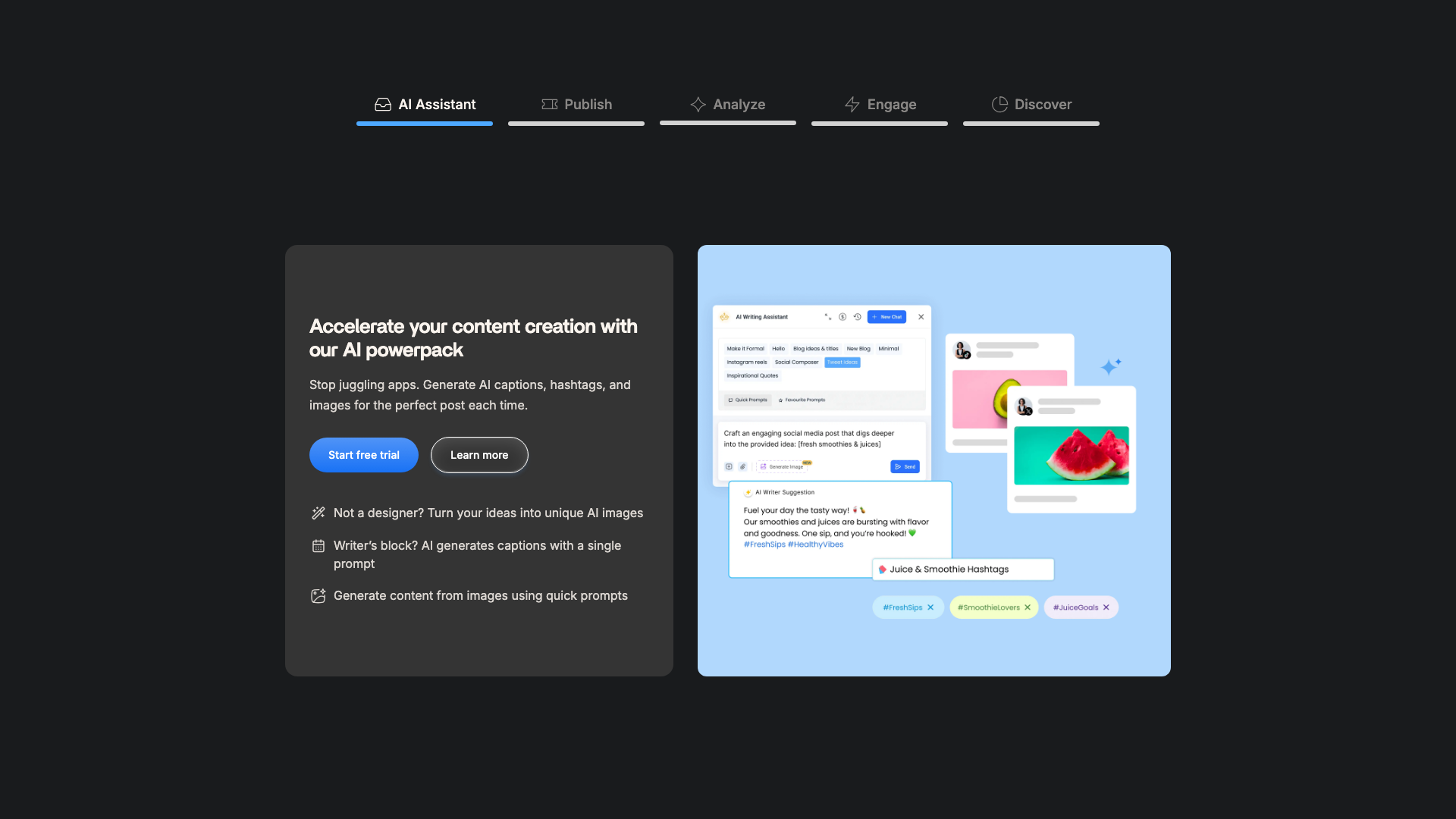
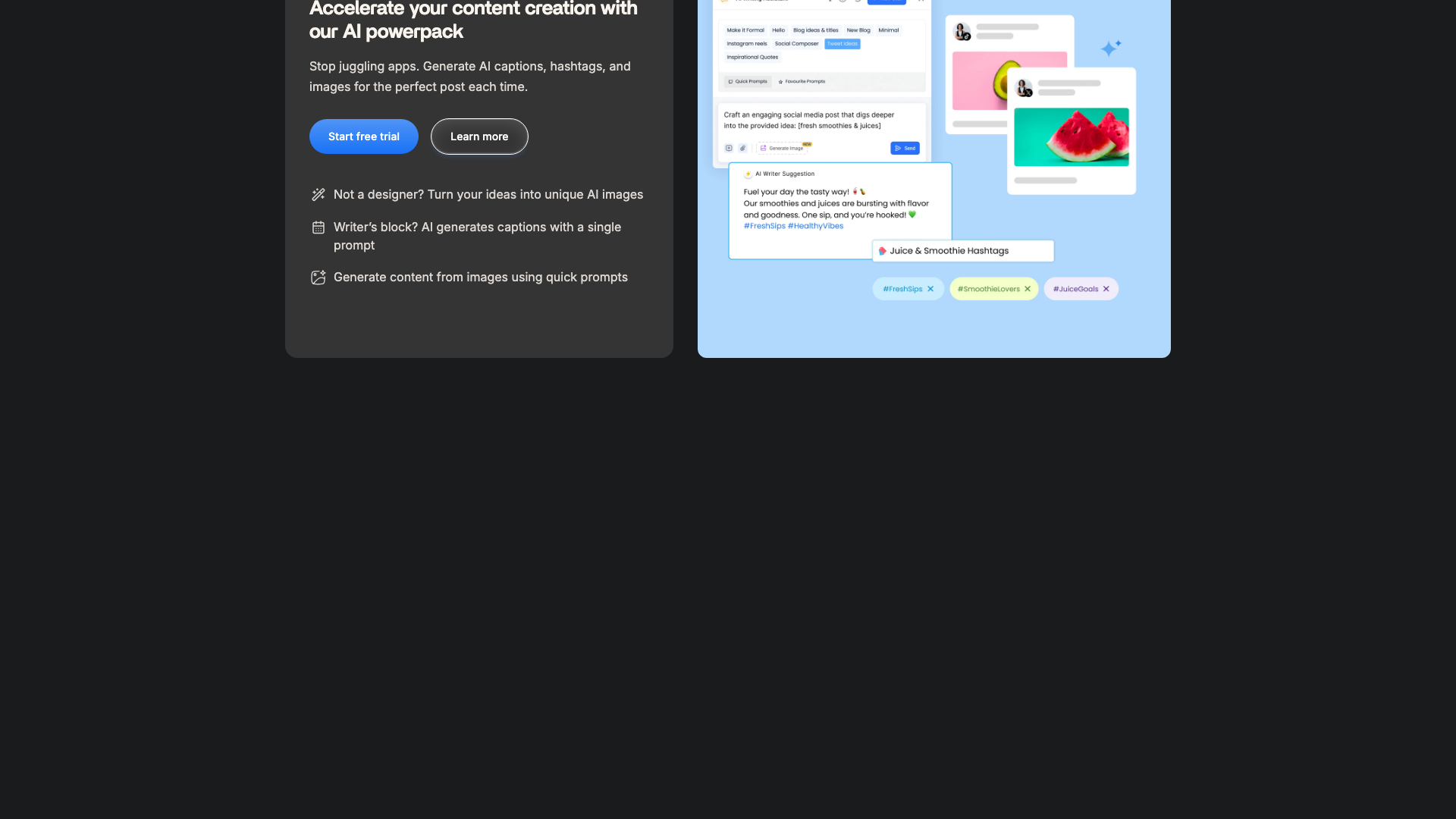
A major differentiator is the built-in AI assistant and AI Studio, which generate captions, images, and content ideas directly inside the composer. The platform also offers an AI content library that helps maintain brand-aligned, ready-to-publish posts, reducing the time spent drafting from scratch. Combined with features like best-time-to-post recommendations and hashtag suggestions, ContentStudio aims to optimize both speed and performance.
For collaboration-heavy environments, the platform emphasizes workspaces, approval workflows, and client dashboards. Each client or brand can have its own workspace with dedicated social accounts, planners, media, and team members, keeping operations organized and secure. White-label options and branded reports further position ContentStudio as a tool agencies can resell or present as part of their own service stack.
The pricing and feature tiers are structured to scale from solo users to large agencies, with flexible add-ons for social accounts, users, blogs, and API usage. This makes ContentStudio attractive for organizations that expect their social footprint to grow over time. The trade-off is that onboarding and configuration can be more involved than with lightweight tools.
If your main priority is rapid content creation rather than deep operational control, you may find ContentStudio’s depth more than you need. In that case, a streamlined tool like PostFlow can help you generate polished LinkedIn posts in seconds without navigating a full management suite.

Key Features and Capabilities
ContentStudio is organized around several core modules: Publish, AI assistant, Analyze, Engage, and Discover. The Publish module handles planning and scheduling, offering calendar, list, feed, and grid views for Instagram and TikTok. Users can create recurring posts, bulk upload via CSV, and customize posts per network, which is essential for multi-channel campaigns.
The AI assistant and AI content library are central to ContentStudio’s promise of faster creation. They generate captions, ideas, and images using AI text and image credits, with pre-made templates to automate workflows. Features like best time to post recommendations and hashtag suggestions help optimize performance without requiring deep analytics expertise.
For organization and scaling, workspaces allow separate dashboards for each brand or client, including social accounts, publishing schedules, media files, and team members. Team collaboration tools include planner notes, internal comments, and an approval workflow system where clients can review and sign off on posts via shareable links or dedicated approver dashboards. Agencies can also leverage white label capabilities to brand the platform and reports as their own.
On the analytics side, the Analyze module provides performance overviews, individual network analytics, historical data, demographics insights, and labels and campaign analytics. Higher tiers add competitor benchmark analytics, PDF exports, scheduled email reports, and whitelabel reports, giving agencies the reporting depth they need. An integration with Usermaven web analytics further connects social performance with website behavior.
The Engage module functions as a social inbox, allowing teams to monitor and reply to messages and comments across channels from one place. Features like team assignment, tagging and labels, saved replies, internal notes, and AI replies help streamline customer care. Additional capabilities include EasyConnect for secure client account connections, integrations with tools like Canva, VistaCreate, Feedly, PostNitro, Bitly, Pocket, and Replug, plus mobile apps and a Chrome extension for on-the-go management.
While ContentStudio covers nearly every aspect of social media operations, this breadth can feel overwhelming if you only need to generate and publish a few posts per week. In such cases, a focused AI content generator like PostFlow can deliver similar creative benefits with far less configuration and training overhead.
- Unified social media publishing calendar with list, feed, and grid views
- AI assistant and AI Studio for captions, ideas, and images
- AI content library for brand-aligned, ready-to-publish posts
- Workspaces for organizing multiple brands or clients
- Approval workflows and client/approver dashboards
- White-label platform and branded, whitelabel reports
- Multi-network support including Facebook, Instagram, X (Twitter), LinkedIn, TikTok, YouTube, Pinterest, Google Business Profile, Bluesky, and WordPress
- Bulk scheduling and CSV upload for high-volume posting
- Evergreen campaigns and auto-posting via RSS feeds
- Best time to post recommendations and hashtag suggestions
- Social inbox for messages and comments with team assignment and saved replies
- Competitor benchmark analytics and campaign-level reporting
- Integrations with Canva, VistaCreate, Feedly, PostNitro, Bitly, Pocket, Replug, and more
- Mobile apps for iOS and Android plus a Chrome extension
- EasyConnect for secure client social account connections


Pricing and Plans
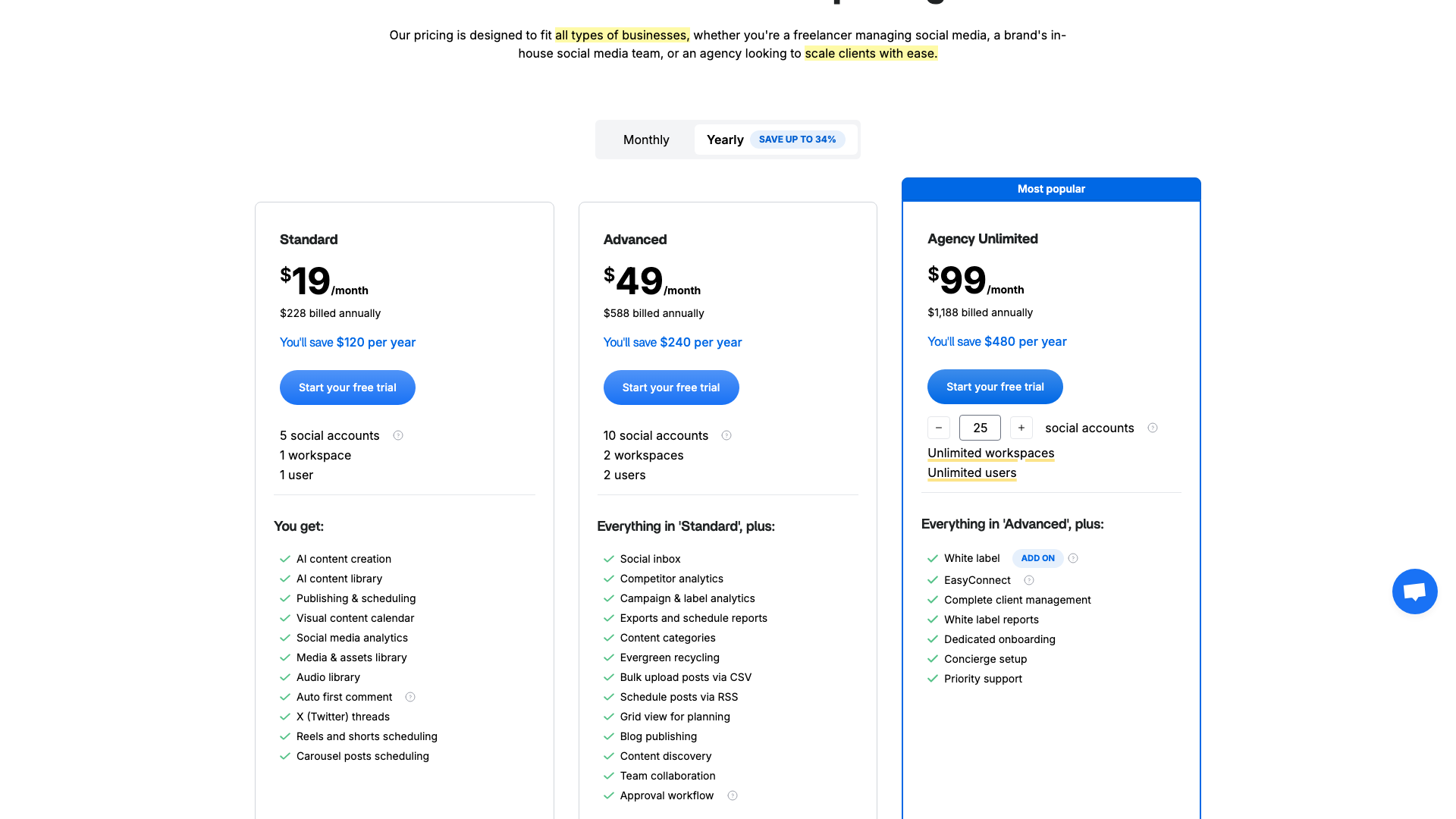
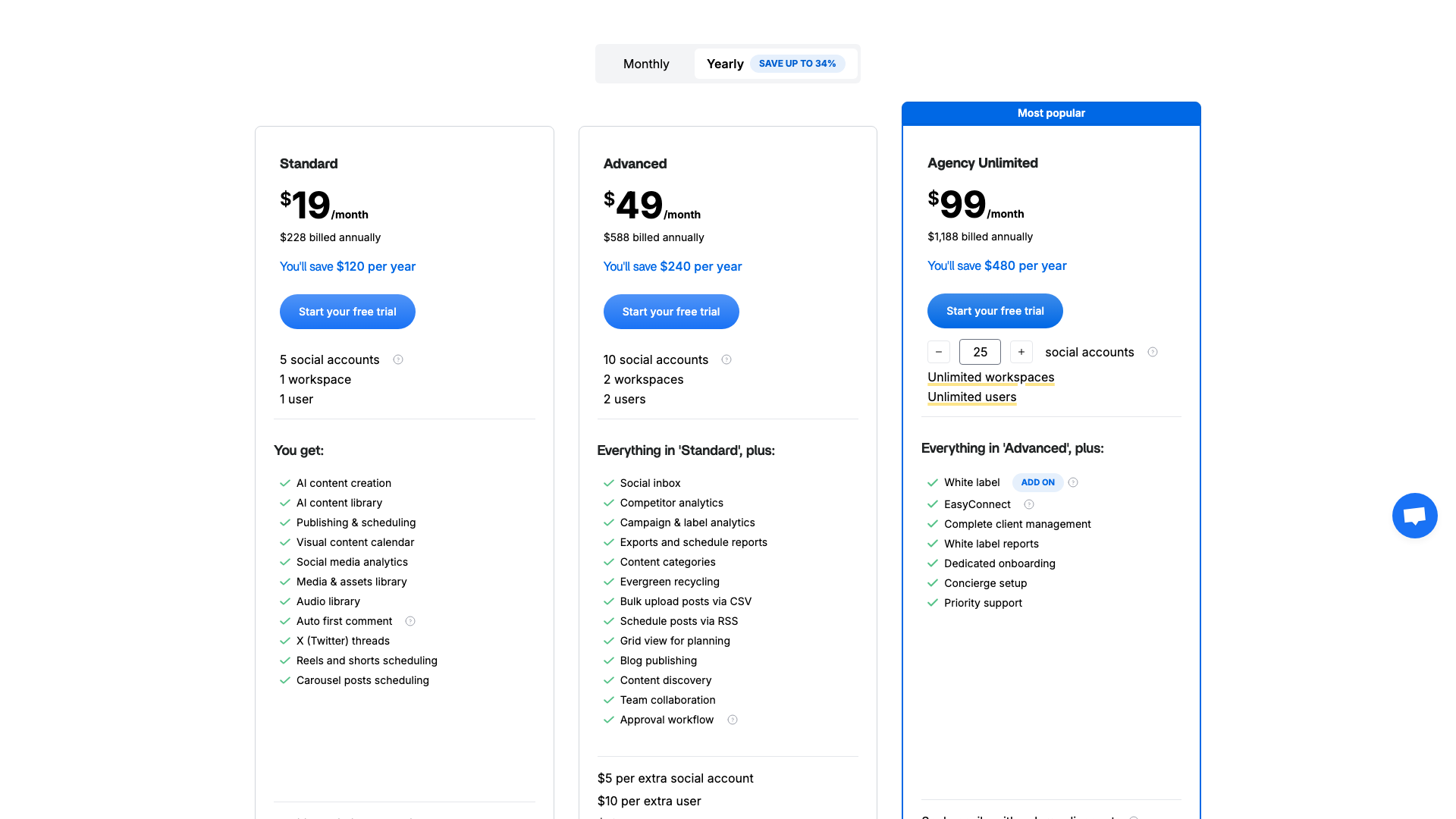
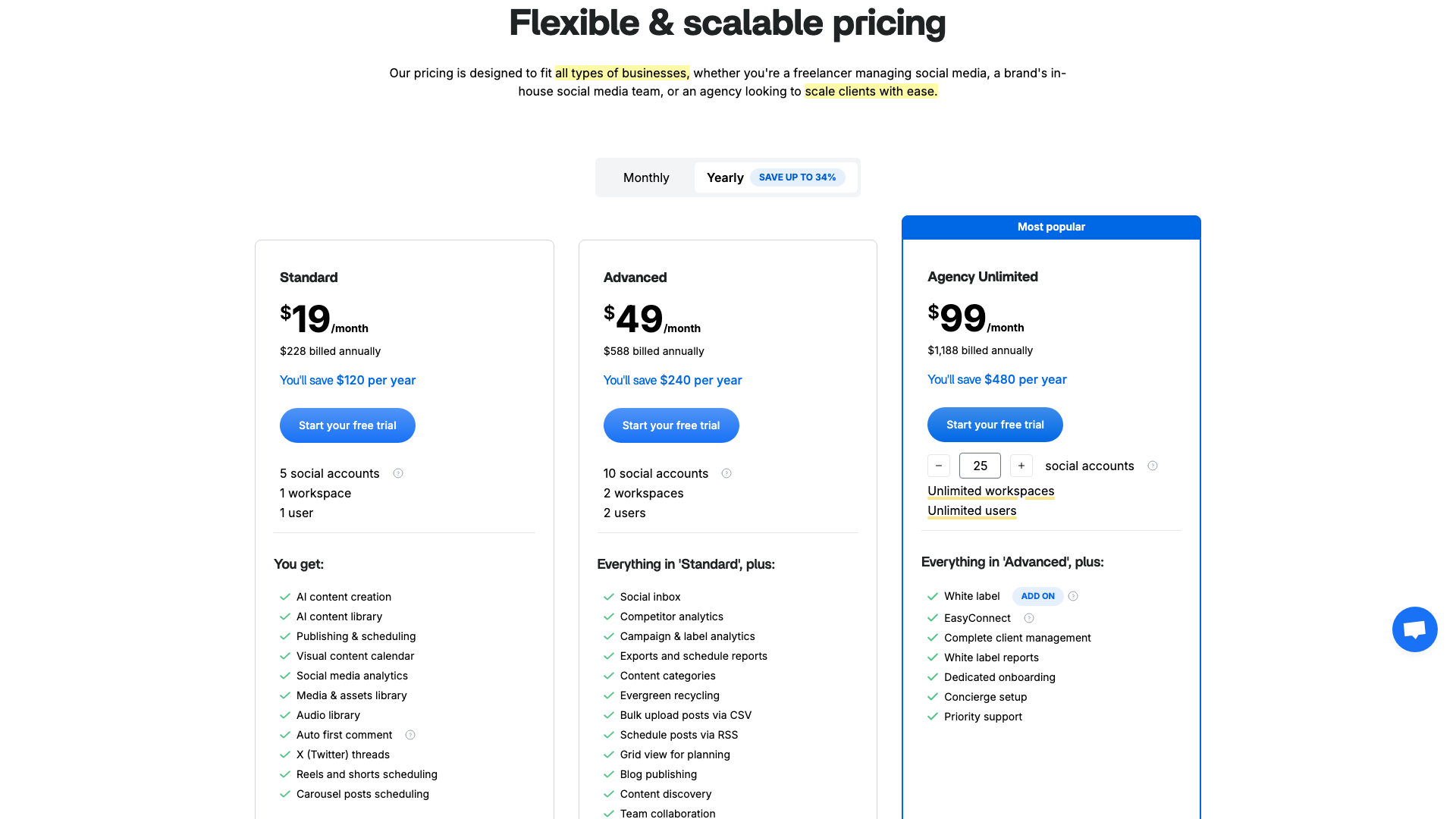
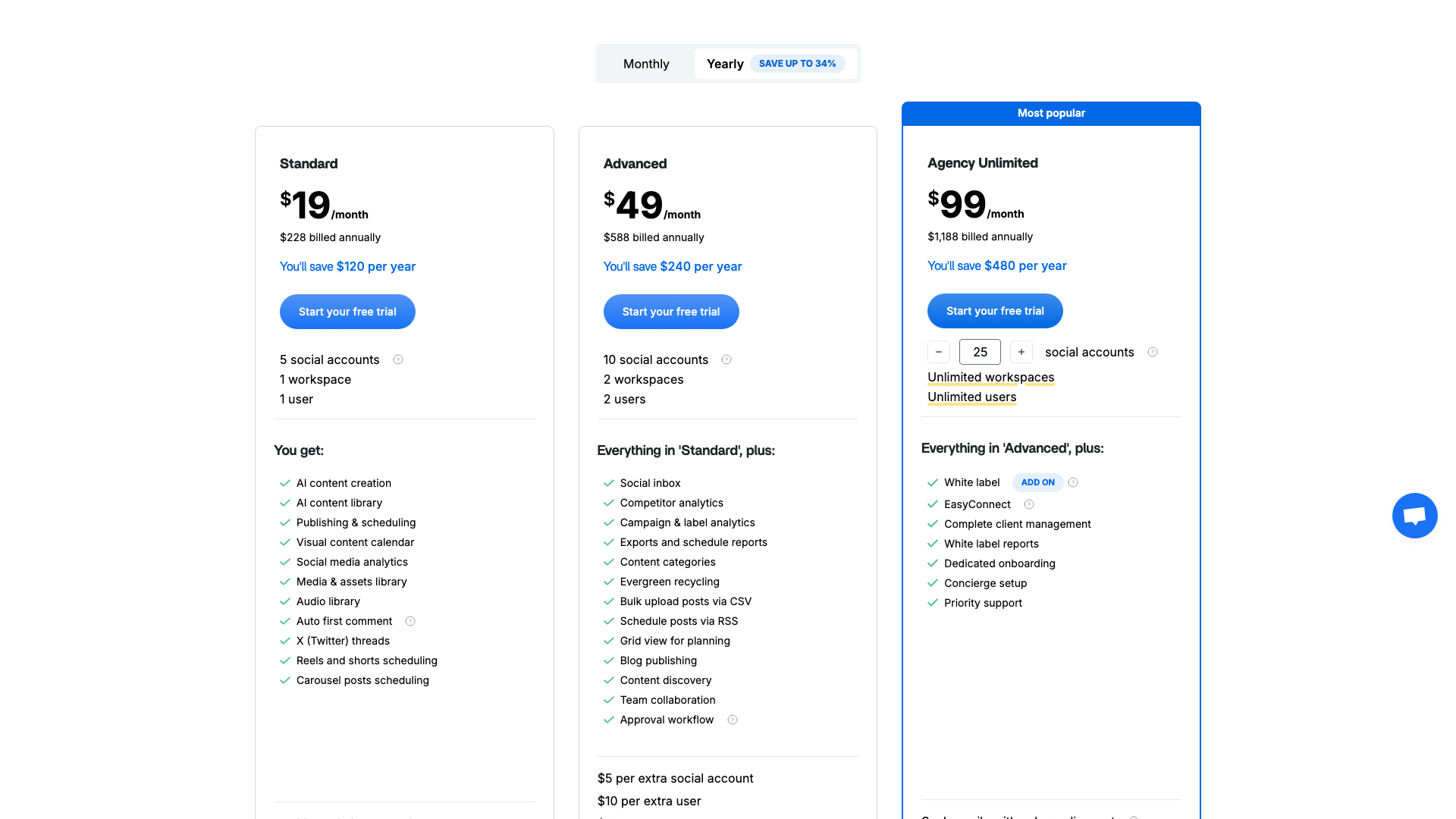
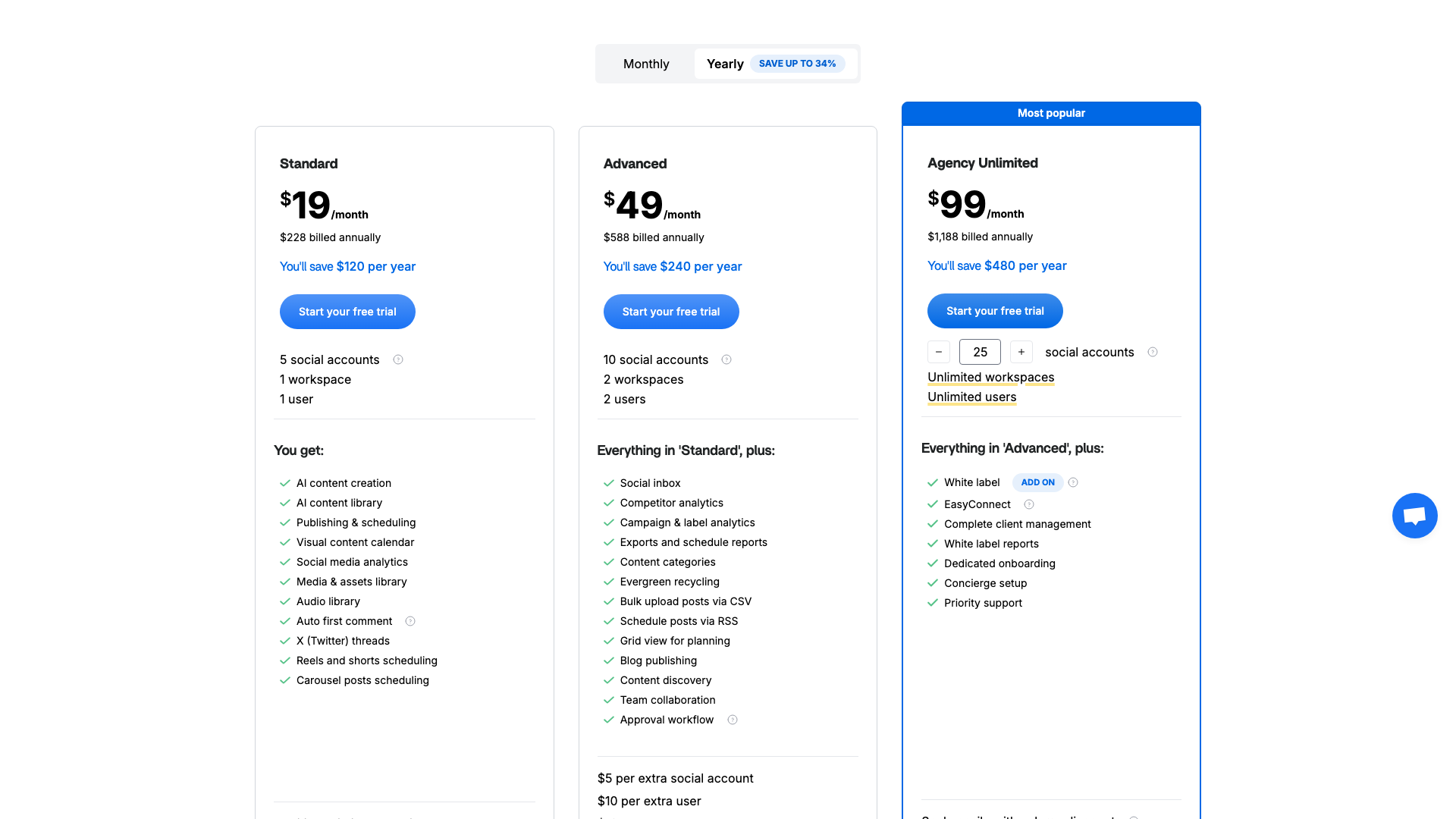
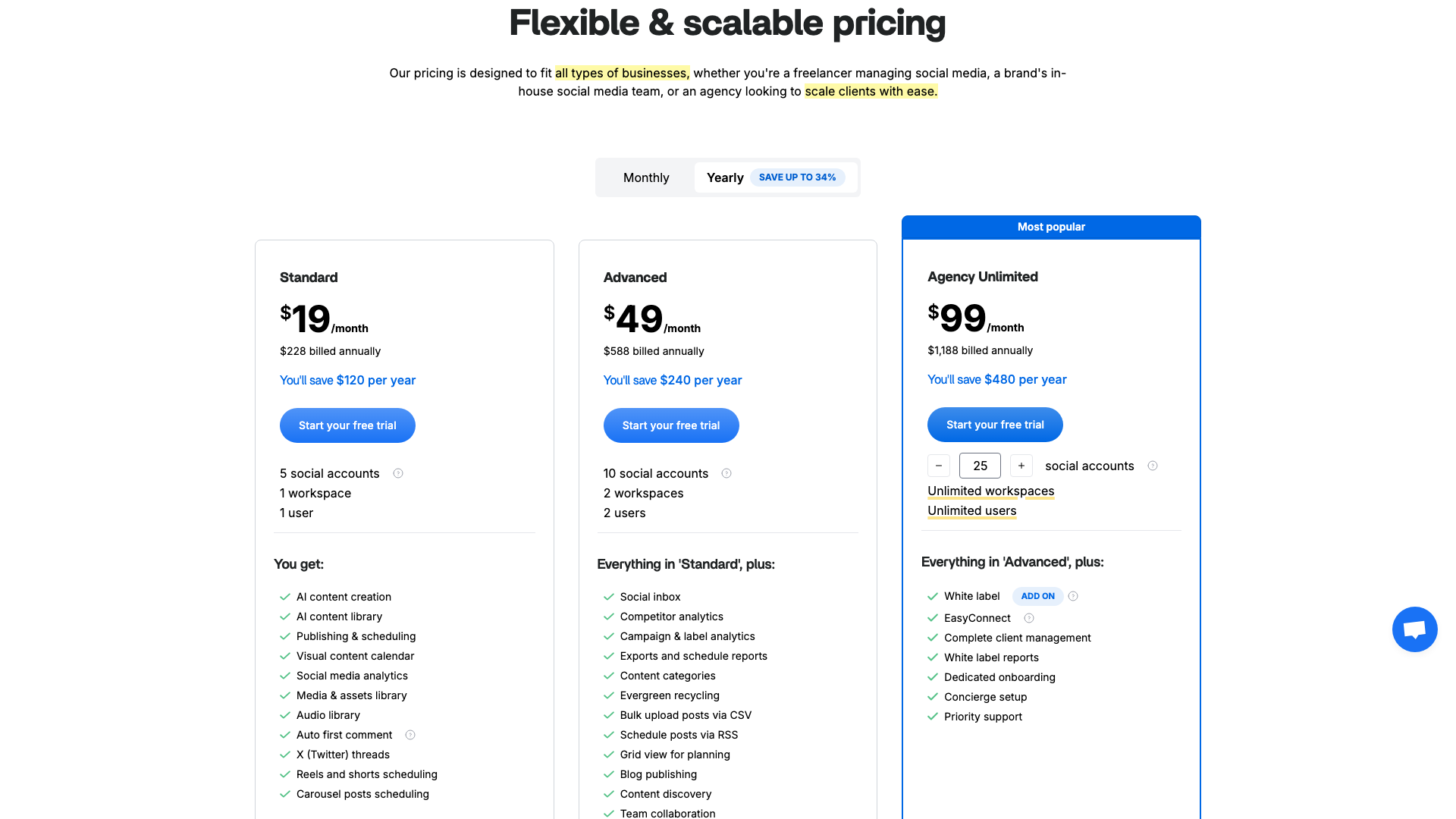
ContentStudio offers three main pricing tiers—Standard, Advanced, and Agency Unlimited—designed to scale from solo users to large agencies. Pricing is presented on a monthly basis, with the option to switch to yearly billing and “save up to 34%,” though exact annual prices are not fully itemized in the visible copy. All plans include a 14-day free trial with no credit card required, making it easy to test before committing.
The Standard plan is priced at $19 per month and targets freelancers or very small teams. It includes 1 workspace, 5 social accounts, 1 user, unlimited posts per month, and 10 GB of media storage. AI text and image credits are modest, and advanced features like competitor analytics, white-label reporting, and some collaboration tools are limited or absent.
The Advanced plan at $49 per month increases capacity to 2 workspaces, 10 social accounts, and 2 users, with options to add more workspaces and social accounts for additional fees. It introduces more robust publishing to blogs, higher AI credit limits, and expanded API request quotas. This tier is aimed at growing teams and small agencies that need more flexibility and automation.
The Agency Unlimited plan at $99 per month unlocks unlimited workspaces and users, with 25 social accounts included and scalable pricing for additional profiles. It offers the highest AI text and image credits, the most generous API limits, and access to advanced analytics, reporting, and white-label features. This plan is clearly positioned for agencies managing many clients and requiring a fully branded, scalable solution.
Beyond these core tiers, ContentStudio allows customization via add-ons such as extra social accounts, blog sites, AI image credits, and API requests. For organizations with unique needs or white-label requirements, the site encourages booking a demo to discuss custom enterprise or agency plans. This flexibility is valuable but can make the pricing structure feel complex compared to simpler, flat-fee tools.
If you primarily need AI-powered content generation rather than multi-client infrastructure, you may find that you are paying for features you rarely use. In that case, a leaner tool like PostFlow can deliver strong AI content at a lower operational and cognitive cost.
Standard
- 1 workspace for a single brand or client
- 5 social accounts included
- 1 user seat
- Unlimited posts per month
- 10 GB media storage
- Access to core publishing and scheduling tools
- AI assistant with 25,000 AI text credits
- 25 AI image credits per month
- Basic analytics and performance overview
- Access to mobile apps and Chrome extension
- Self-service knowledge base and standard support
14-day free trial available; no credit card required.
Advanced
- 2 workspaces included (with $10 per extra workspace)
- 10 social accounts included (with $5 per extra social account)
- 2 user seats (with $10 per extra user)
- Unlimited posts per month
- 15 GB media storage
- Publishing to up to 3 blog sites ($5 per extra blog)
- AI assistant with 50,000 AI text credits
- 50 AI image credits per month with $5 per additional 100 credits
- Increased ContentStudio API request limits (3000 per month, add 1000 for $5)
- Access to more advanced analytics and reporting options
- On-demand live training and standard support
Best suited for growing teams and small agencies; 14-day free trial with no credit card.
Agency Unlimited
- Unlimited workspaces for unlimited brands and clients
- 25 social accounts included with scalable pricing for more (tiered per extra social)
- Unlimited users for large teams and agencies
- Unlimited posts per month
- 25 GB media storage
- Publishing to up to 10 blog sites ($5 per extra blog)
- AI assistant with 125,000 AI text credits
- 125 AI image credits per month with $5 per additional 100 credits
- Highest ContentStudio API request limits (7500 per month, add 1000 for $5)
- Advanced analytics including competitor benchmark analytics
- Exportable PDF reports and scheduled email reports
- Whitelabel reports and white-label platform options
- Priority customer support and onboarding sessions
Designed for agencies and enterprises needing unlimited users and workspaces; 14-day free trial available.
Yearly billing is available with advertised savings of up to 34%, though exact annual prices are not fully itemized in the visible copy. All plans include a 14-day free trial with no credit card required.
Customer Feedback and Social Proof
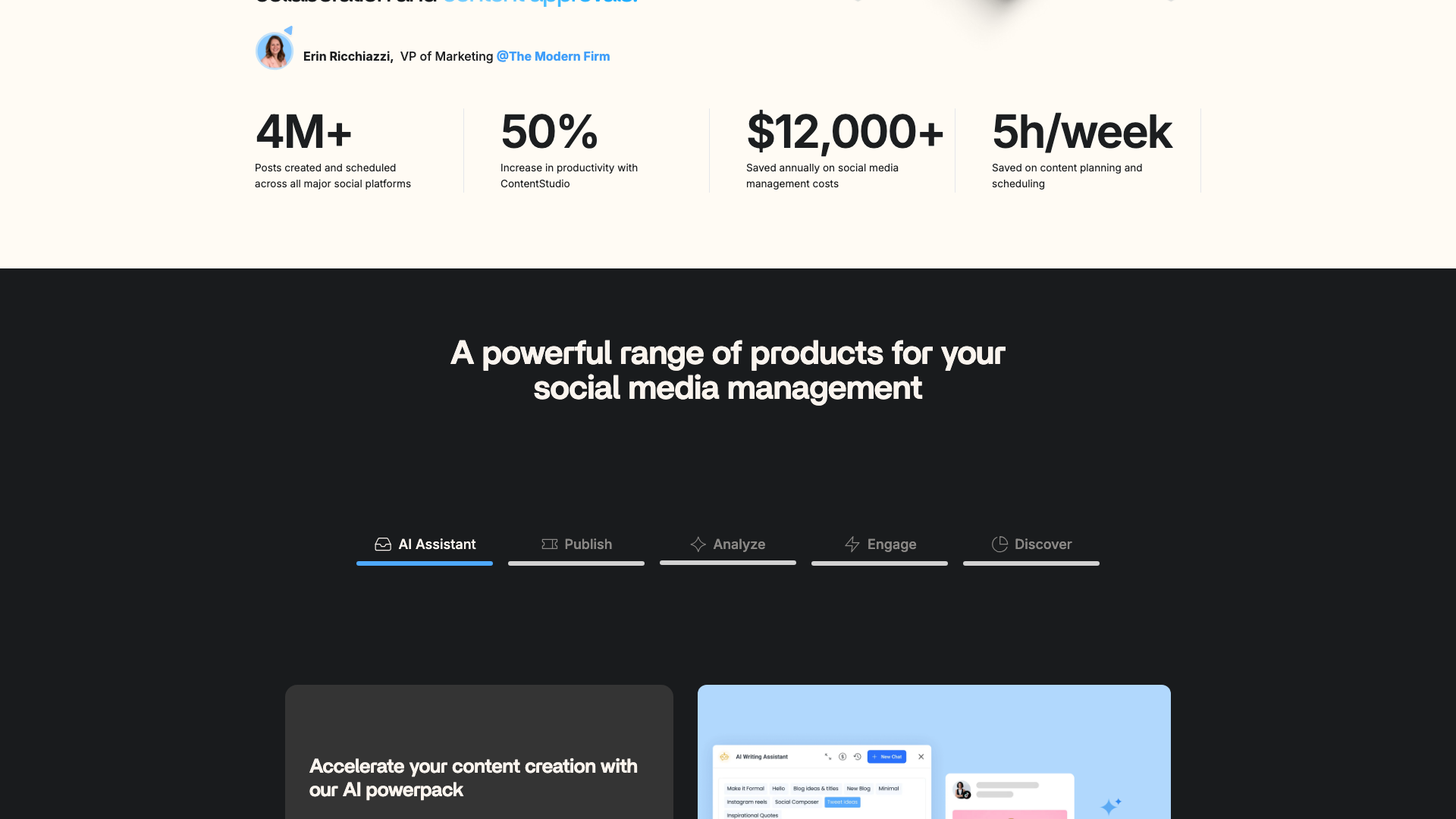
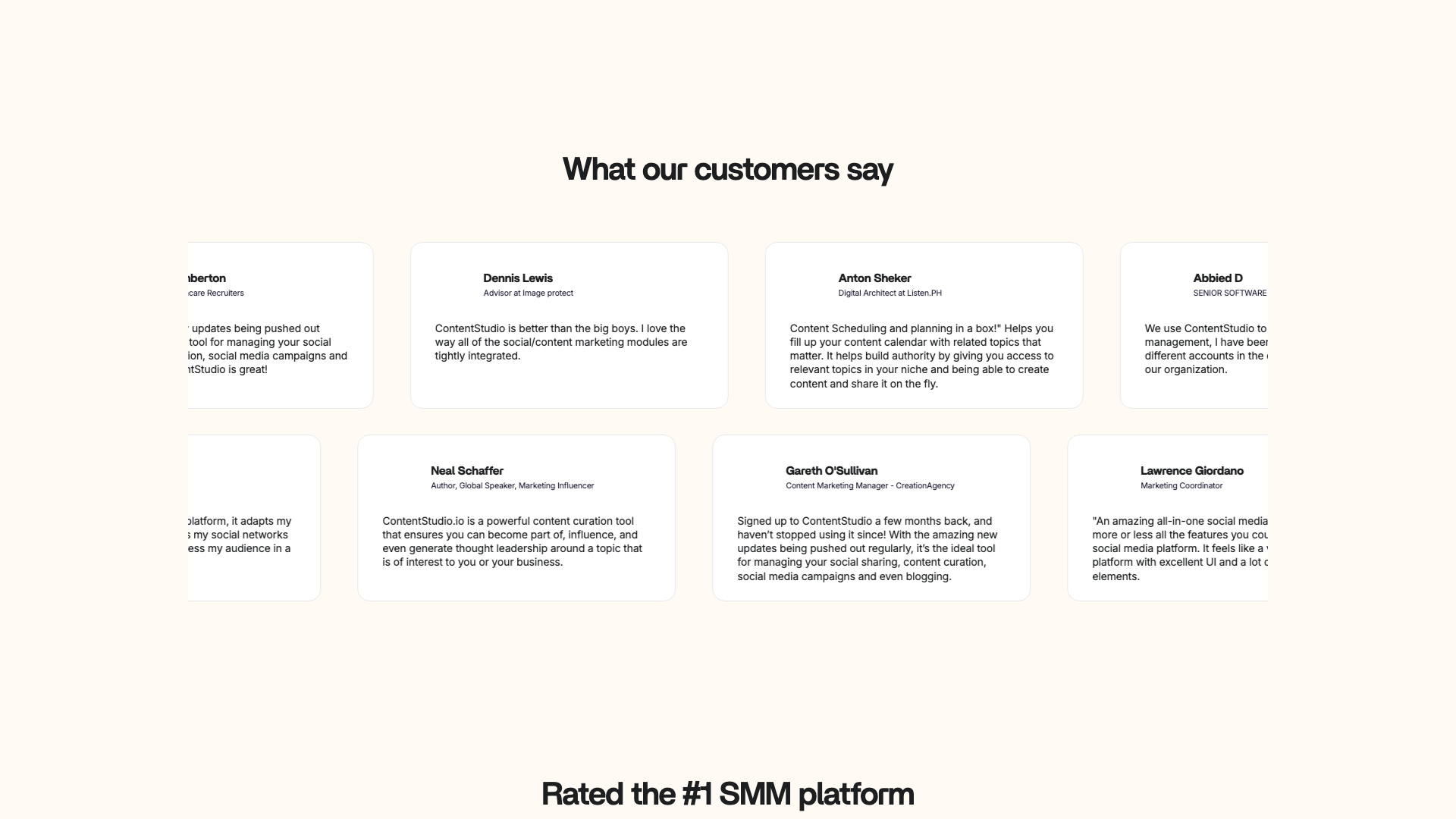
ContentStudio showcases several case studies and testimonials on its website, emphasizing time savings, improved collaboration, and better client outcomes. One highlighted story features The Modern Firm, where VP of Marketing Erin Ricchiazzi describes ContentStudio as “the perfect tool for agency-client collaboration and content approvals.” This reinforces the platform’s positioning as an agency-first solution.
Another case study highlights Qabiria, a language services provider, which used ContentStudio to manage multi-platform posting, organize team workflows, and discover fresh content. Similarly, Marinet, a hotel management company, is presented as having streamlined content organization and team collaboration across multiple accounts. These stories consistently emphasize reduced manual work and more efficient scheduling.
A prominent customer story focuses on Webeing, a marketing agency that reportedly achieved a 72% decrease in delivery speed by using smarter workflows with ContentStudio. The site also cites aggregate impact metrics such as 4M+ posts created and scheduled, a 50% increase in productivity, and $12,000+ saved annually on social media management costs. These numbers are clearly designed to reassure prospective agency customers about ROI.
While the on-site testimonials are overwhelmingly positive, they naturally reflect curated success stories rather than the full spectrum of user experiences. External review platforms (not detailed on the site itself) often mention a learning curve and occasional interface complexity, especially for smaller teams. Overall, the sentiment suggests that once teams are fully onboarded, ContentStudio delivers strong value for structured social media operations.
If you are wary of complex onboarding and want to see value within minutes rather than weeks, you might prefer a tool that focuses on instant content generation. This is where PostFlow can complement or replace heavier platforms by delivering quick wins for LinkedIn content without extensive setup.
- The platform was described as the perfect tool for agency-client collaboration and content approvals by Erin Ricchiazzi, VP of Marketing at The Modern Firm.
- Delivery speed for client content was reported to have decreased by 72% after adopting ContentStudio, according to Webeing, a marketing agency.
- Multi-platform posting and team workflows were said to be significantly easier to manage with ContentStudio by Marco Cevoli, Managing Director at Qabiria.
- Content organization and collaboration across multiple hotel accounts were described as being streamlined by the team at Marinet, a hotel management company.


Our In-Depth Review: Strengths and Limitations
From a capabilities standpoint, ContentStudio is a feature-rich, agency-grade social media management platform. Its strengths lie in unified scheduling, AI-assisted content creation, multi-workspace organization, and robust analytics and reporting. Agencies and larger in-house teams will appreciate the approval workflows, client dashboards, and white-label options that make it easier to deliver professional services at scale.
The built-in AI Studio is a meaningful advantage, allowing users to generate captions, ideas, and images without leaving the platform. Combined with best-time-to-post recommendations, hashtag suggestions, and evergreen campaigns, ContentStudio can significantly reduce the manual effort required to keep multiple channels active. Integrations with Canva, VistaCreate, Feedly, and link shorteners further streamline the content lifecycle.
However, the same breadth that makes ContentStudio powerful can also introduce complexity and a learning curve, especially for solo creators or small teams. The pricing structure, with add-ons for extra social accounts, blogs, AI credits, and API requests, may feel intricate compared to simpler tools. Users who only need fast content creation for one or two networks might find themselves paying for capabilities they rarely touch.
In terms of user experience, the calendar-centric interface is intuitive once configured, but new users may need time to understand workspaces, roles, and approval flows. Support resources like the ContentStudio Academy, help docs, and live training help mitigate this, yet onboarding still requires deliberate effort. For teams willing to invest that time, the payoff is a highly organized, scalable social media operation.
If your primary goal is to generate high-quality posts quickly, especially for LinkedIn, a specialized AI tool like PostFlow can be a better first step or companion. You can use PostFlow for rapid ideation and drafting, then bring finalized content into ContentStudio only if you truly need its advanced scheduling and reporting capabilities.
Pros
- Extremely comprehensive feature set covering publishing, analytics, engagement, and discovery
- Built-in AI assistant and AI Studio for captions, ideas, and images
- Workspaces, approval workflows, and client dashboards ideal for agencies
- White-label options and branded reports for professional client delivery
- Robust analytics including competitor benchmarking and campaign-level insights
- Flexible pricing with scalable add-ons for social accounts, blogs, AI credits, and API usage
- Supports a wide range of social networks and blogs, including emerging platforms like Bluesky and Threads
- Mobile apps and Chrome extension enable management on the go
- Extensive educational resources via ContentStudio Academy, blog, and help docs
Cons
- Breadth of features can feel overwhelming for solo creators or very small teams
- Pricing structure with multiple add-ons may be confusing for new buyers
- Learning curve around workspaces, roles, and approval workflows
- Some advanced analytics and white-label features are locked to higher tiers
- Users focused solely on rapid content creation may find the platform heavier than necessary
Final Verdict: Is ContentStudio Worth It?
ContentStudio is best suited for agencies, marketing teams, and growing brands that need a centralized platform to manage many social profiles, clients, and campaigns. Its combination of AI-assisted creation, structured workspaces, approval workflows, analytics, and white-label reporting makes it a strong contender in the social media management space. For organizations that live and breathe social media operations, the investment in setup and training is likely to pay off.
For solo creators and very small businesses, ContentStudio can still be valuable, but it may feel heavier than necessary if you do not fully exploit its collaboration and reporting features. In these cases, pairing or replacing it with a lighter AI content generator like PostFlow can deliver faster day-to-day benefits. Ultimately, the decision comes down to whether you need a full operational hub or primarily want rapid, high-quality content creation.
Overall, ContentStudio earns a 4.4 out of 5 in this review. It scores highly on breadth of features, scalability, and agency readiness, with minor deductions for complexity and pricing opacity around some add-ons. If you are ready to centralize your social media operations and leverage AI at scale, ContentStudio deserves a serious look.
If you decide that a full management suite is more than you need right now, you can still upgrade later as your operations grow. In the meantime, a focused tool like PostFlow can help you build momentum by making it effortless to publish consistent, professional LinkedIn content in under a minute.
Alternatives
If ContentStudio isn't the right fit, consider these similar tools:
Last updated: 17.11.2025

