
Writing a LinkedIn article is more than just another post. It's a strategic move to plant your flag as a thought leader, forge real connections, and build a digital asset that works for you long after you hit "publish."
Unlike a post that gets lost in the feed within hours, an article gives your best ideas a permanent home on your profile. The algorithm can keep surfacing it for months, even years. That makes it one of the most potent tools for professional growth on the platform.
Why Bother with LinkedIn Articles in a Crowded Feed?

I get it. The LinkedIn feed is all about quick takes and bite-sized content. So, is sinking time into a long-form article really worth it?
Absolutely, yes. Short posts are great for grabbing immediate attention, but articles serve a different, much more powerful purpose. They’re your chance to go beyond surface-level chatter and build a rock-solid reputation.
Think of it this way: posts are conversations, but articles are keynotes. They signal to your network—and more importantly, to LinkedIn's algorithm—that you have something substantial to say. This is your digital real estate, a space where you control the narrative and deliver serious value.
Establish Authority and Build Real Credibility
Anyone can fire off a quick tip. A well-researched, thoughtful article, on the other hand, shows you have a true command of your subject. It proves you've put in the hours thinking critically about your industry's biggest challenges and smartest solutions. That alone sets you apart.
When you consistently publish insightful articles, you're not just posting—you're building a library of expertise right on your profile. This becomes an incredible portfolio for potential clients, employers, or collaborators. They don't just see your job title; they see how you think.
"Your article is an invitation for conversation. It positions you as an expert in your field and can open the door for new business opportunities or jobs. It’s a chance to add color to an otherwise vanilla LinkedIn profile."
This isn't just theory; it translates into real results. Some data suggests profiles that publish articles can get up to 17 times more views than those that don't. This is especially true in competitive fields where recruiters are actively hunting for candidates who have demonstrated genuine thought leadership.
Forge Deeper Connections with Your Audience
A quick post might get you a "like," but an article invites a reader to spend several minutes immersed in your ideas. That extended engagement is where the magic happens—it creates a much stronger, more meaningful connection.
You’re not just dropping information; you’re guiding them through a story, sharing a personal experience, or offering a unique perspective they can't get anywhere else.
That deeper connection builds trust. Readers who get real value from your articles are far more likely to:
- Follow you because they want more of your insights.
- Leave thoughtful comments, sparking valuable discussions.
- Reach out directly for advice or to talk business.
- Share your content with their own networks, expanding your reach for you.
When choosing between a quick post and a detailed article, it helps to think strategically about your goal. Are you looking for quick engagement or to build lasting authority?
Short Posts vs Long-Form Articles A Strategic Comparison
This table breaks down the strategic purpose and typical outcomes of each format, helping you decide where to invest your time.
| Feature | Short Posts | Long-Form Articles (1900+ words) |
|---|---|---|
| Primary Goal | Immediate engagement, visibility, sparking conversation. | Establishing authority, building credibility, SEO. |
| Audience Interaction | Quick likes, comments, and shares. | In-depth comments, saves, and profile follows. |
| Content Depth | Surface-level tips, quick updates, and opinions. | Deep dives, case studies, and comprehensive guides. |
| Lifespan | 24-48 hours in the feed. | Evergreen; can be found for months or years. |
| Best For | Driving traffic to an event, asking questions, sharing news. | Showcasing expertise, explaining complex topics. |
While both formats have their place, articles are what separate the casual user from the serious professional.
Ultimately, writing LinkedIn articles is a core part of building a modern professional brand. To see how they fit into the bigger picture, it’s worth digging into these essential content marketing best practices. By dedicating time to this format, you’re not just posting—you’re building a professional legacy.
Laying the Groundwork for a Powerful Article
A killer LinkedIn article almost never starts with a random flash of inspiration. The ones that actually get traction—the ones that get shared, spark conversations, and build your authority—are built on a solid foundation long before a single word is written.
This groundwork is what separates an article that gets lost in the noise from one that truly connects.
It all starts with listening, not brainstorming. Your best ideas are already out there, hiding in plain sight within the conversations happening in your network. Pay close attention to the questions people are asking, the problems they’re stuck on, and the debates lighting up your industry. That’s your content goldmine.
Define Your Single Core Objective
Before you even think about an outline, you have to answer one non-negotiable question: What is the one thing I want this article to achieve?
Without a crystal-clear objective, your writing will wander, and your message will get muddled. This one goal dictates everything—the tone, the structure, and especially the call to action.
Maybe your objective is to:
- Generate leads by walking readers through a problem your service solves.
- Spark a meaningful conversation by dropping a controversial take on a new trend.
- Teach a complex skill by breaking it down into a ridiculously simple guide.
- Build your personal brand by sharing a raw, honest story about a lesson you learned the hard way.
Picking just one objective forces you to be sharp and focused. An article meant to generate leads is going to feel very different from one designed to start a debate. The first guides the reader to a solution; the second ends with an open-ended question to get people talking.
A focused article with a single goal is always more powerful than one trying to do three things at once. It gives your reader a clear path and makes your call to action feel natural and earned.
Staring at a blank page is a real hurdle, I get it. If you're stuck here, it's worth exploring a few structured ways for how to overcome writer's block before you try to force it.
Find Your Authentic Angle
Okay, you’ve got your topic and objective. Now, what’s your angle? Thousands of people are probably writing about the same subject, but they don't have your unique mix of experiences, failures, and wins. That's your edge.
Don't just report on a topic. Interpret it. Filter it through your own lens. Your personal stories and unique point of view are what make an article stick in someone's mind.
Ask yourself a few questions to find it:
- What's the common advice on this topic that I totally disagree with?
- What's a specific mistake I made that taught me a valuable lesson here?
- Can I draw a surprising connection between this topic and a completely different field?
Your angle is the narrative thread that pulls the whole piece together. It’s what turns a boring list of facts into a compelling story that only you can tell.
Structure Your Ideas with a Simple Outline
Last step before you write: get your ideas into a simple, logical structure. An outline doesn’t need to be some formal, complicated document. It's just a roadmap to make sure your argument flows smoothly. A disorganized article is an unread article. Simple as that.
Here’s a basic structure that just works:
- The Hook: Start with an intro that grabs them by identifying a pain point or dropping a surprising fact.
- The Core Argument: Lay out your 2-4 main points. Back each one up with real examples, data, or a personal story. Use subheadings so people can scan.
- The Conclusion: Briefly wrap up your main message and hit them with a clear call to action that circles back to your original objective.
Nail this planning phase, and you’ll transform a vague idea into a focused, structured, and impactful piece of content that's ready to make a real mark.
Writing Content That Connects and Persuades
Alright, you’ve done the prep work. Now it’s time to actually write the thing. This is where your strategy becomes a real, living piece of content that grabs your reader and doesn't let go. It's about turning ideas into a narrative that truly connects and persuades.
And it all starts with a killer headline and an opening that stops the scroll cold.
Your first few lines are everything. You have one shot to convince a busy professional that your article is worth their time. Forget the long, rambling intros. Hit them with a surprising stat, a pain point they know all too well, or a question that piques their curiosity. Make it impossible for them to look away.
Crafting Headlines That Demand a Click
Let’s be honest: your headline is 90% of the battle. It's not just a title; it's an ad for the value you’re about to drop. A great headline makes a specific promise and sparks just enough curiosity to make clicking irresistible.
I've seen these formulas work time and time again:
- The "How-To" Headline: "How to Write LinkedIn Articles That Actually Get Noticed"
- The "Mistake" Headline: "The 5 Common Mistakes You're Making in Your LinkedIn Content"
- The "Listicle" Headline: "7 Unconventional Ways to Boost Your Professional Brand on LinkedIn"
- The "Secret" Headline: "The One Thing Top Performers Do Differently on LinkedIn"
See the pattern? They're all specific and benefit-driven. They tell the reader exactly what they’ll get. A vague title like "Thoughts on LinkedIn" is a guaranteed scroll-past. Aim for clarity, not cleverness.
Structuring Your Article for Maximum Readability
Here's a hard truth: people don't read online—they scan. This is especially true on mobile, where most of your audience is hanging out. If they open your article and see a massive wall of text, they're gone.
Structure is just as crucial as the words themselves.
The key is making your content ridiculously easy to skim. Use short paragraphs. I’m talking no more than one to three sentences. This creates the white space that makes content feel approachable and guides the reader’s eye down the page. Use punchy subheadings to break up longer thoughts and signal what’s coming next.
Great formatting isn't just about looking pretty; it's about respecting your reader's time. A scannable article lets them find what they need fast, making them far more likely to stick around for the whole message.
By making your content easy to navigate, you’re creating a better experience. That simple act can dramatically increase how long people engage with your work, which tells the LinkedIn algorithm your stuff is valuable. For a different take on this, check out our guide on how to write LinkedIn posts for the feed.
Weaving in Your Authentic Voice and Stories
Facts and figures are fine, but they don't build trust. Stories do. Your unique experiences, your failures, those "aha!" moments—that's what makes your content stand out from the thousands of other articles on the exact same topic.
Instead of just stating a fact, tell the story behind it.
- Don't just say: "Networking is important."
- Instead, try this: "I once sent 50 generic connection requests and got crickets. Then, I tried a personalized approach with just five people, and three of them led to coffee meetings. Here’s what I learned..."
See the difference? That one little shift turns a dry piece of advice into something memorable and real. You're not just some expert on a pedestal; you're a real person sharing what you've learned the hard way. That vulnerability is what builds a genuine connection.
This is a core tenet of building effective written communication skills—it’s about connecting, not just informing.
The platform is rewarding this approach in a big way. We've seen a 44% year-over-year growth in engagement on LinkedIn articles. This is fueled by a massive user base of over 1.1 billion members and the rise of collaborative, AI-assisted content. The appetite for authentic, value-packed stories is higher than ever.
Ending with a Purposeful Call to Action
You’ve hooked them, delivered massive value, and shared a great story. Now what? Don't just let the article trail off into silence. Every single piece you publish needs a clear, specific call to action (CTA) that points back to your original goal.
Your CTA tells the reader exactly what to do next. Do you want them to:
- Join the conversation? Ask a question like, "What's one strategy that has worked for you?"
- Learn more? Point them to a relevant case study or another article.
- Connect with you? Invite them to follow you or reach out directly.
A strong CTA is what turns a passive reader into an active member of your community. It completes the journey and makes your article a tool for building real relationships.
Optimizing Your Article for Maximum Visibility
A brilliant article deserves an audience. Simple as that. After you've poured all your expertise into the content, the last thing you want is for it to sit there unseen. The next step is making sure it actually gets in front of people.
Optimizing your article isn't some black-hat trick to game the system. It's just smart publishing. Think of it as the final polish that makes your content accessible, engaging, and genuinely useful for both your human readers and the LinkedIn algorithm. It's the difference between a great piece that goes nowhere and one that sparks real conversations.
Harness the Power of Visuals
First impressions matter, and on LinkedIn, your header image is that first impression. It’s the billboard for your article, so a generic stock photo just won’t do.
Create a custom header image—744 x 400 pixels is the sweet spot—that reflects your brand and gives a hint about the article's core message. A compelling visual is often the only thing that will stop someone from scrolling right past.
But don't just stop with the header. You need to break up the text. We've all seen those daunting walls of words and immediately clicked away. Sprinkling in-line graphics, charts, or even relevant screenshots is essential for keeping your reader locked in. Visuals make complex ideas easier to process and give the reader a much-needed mental break.
"Visual elements do more than just decorate your article; they guide the reader's eye and improve comprehension. An article with well-placed images feels more professional, thoughtful, and respectful of the reader's time."
This visual strategy is a huge part of writing articles people actually finish. The workflow diagram below really brings this to life, showing how a great headline, a clear structure, and a compelling story all work together.
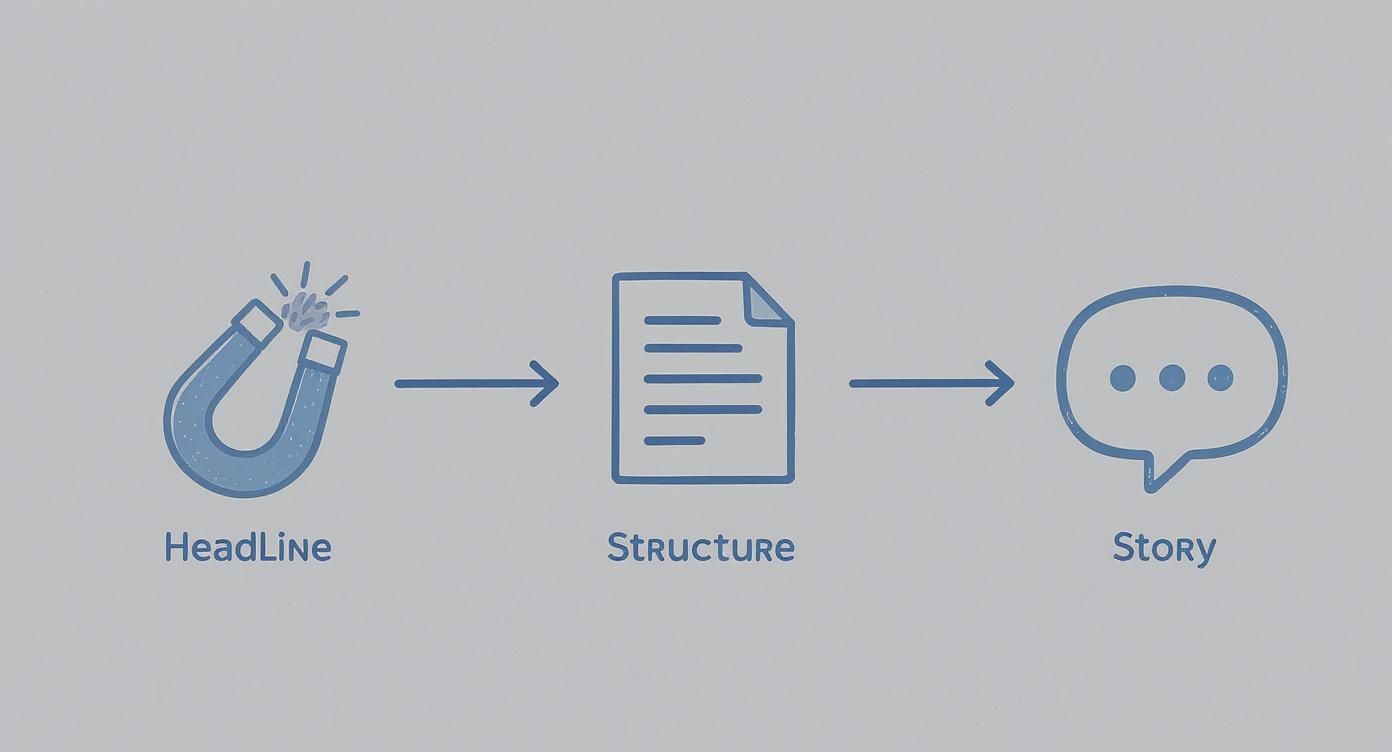
As you can see, a persuasive article is a journey. It starts with a hook and moves through a well-organized narrative, all held together by your unique story and expertise.
Strategize Your Hashtag Usage
Hashtags are your article's distribution engine. They’re how you get your content discovered by people outside your immediate network. But just throwing a bunch of random or overly popular tags at the end of your post is a rookie mistake. A smart hashtag strategy is all about balance and relevance.
I recommend aiming for a mix of tags that cover different levels of specificity:
- Broad Tags: Use 1-2 high-volume tags to get broad reach (like #Marketing or #Leadership).
- Niche Tags: Add 2-3 super-specific tags that are hyper-relevant to your topic (like #B2BContentStrategy or #StartupGrowth).
- Branded Tags: Always include one unique tag for your brand or company to start building your own content library (e.g., #YourBrandInsights).
This approach casts a wide net but also makes sure you’re attracting a highly relevant audience that’s actively looking for what you have to say. And please, don't overdo it. A focused set of 3-5 powerful hashtags is way more effective than a dozen random ones.
Master Scannable Formatting
Readability is everything. Most people are scanning your article on their phone while waiting for a coffee. Long, dense paragraphs are an instant turn-off. You absolutely have to format your content for a modern reader's attention span.
Keep your paragraphs short. I’m talking one to three sentences, maximum. This creates the white space that makes your text feel less intimidating and way easier to follow.
Beyond short paragraphs, lean on other formatting tools to guide your reader through the piece:
- Subheadings (H2, H3): Break your article into logical, skimmable sections with clear headings.
- Bold Text: Use bolding strategically to make key takeaways, stats, or important terms pop.
- Bullet Points and Lists: These are perfect for presenting information in a structured, easy-to-digest way.
The data backs this up. A detailed analysis of over 3,000 LinkedIn articles revealed that longer, well-structured articles actually perform best. The sweet spot? Articles between 1,900 and 2,000 words got significantly more views. That same study found that articles with eight images saw the highest performance, confirming that depth combined with strong visual formatting is a winning formula.
To make sure you don't miss a thing, I've put together a quick checklist. Run through this before you hit "Publish" on any article.
Your LinkedIn Article Optimization Checklist
This simple checklist will help you make sure every single article is primed for maximum visibility and engagement on the platform.
| Optimization Element | Best Practice | Why It Matters |
|---|---|---|
| Custom Header Image | Create a branded 744x400 px image that previews the topic. | This is your article's "first impression" and is crucial for stopping the scroll. |
| In-Line Visuals | Add at least 3-5 relevant images, charts, or screenshots. | Breaks up text, improves readability, and makes complex info digestible. |
| Strategic Hashtags | Use a mix of 3-5 broad, niche, and branded hashtags. | Helps your article get discovered by relevant audiences beyond your network. |
| Short Paragraphs | Keep paragraphs to 1-3 sentences maximum. | Creates white space, making the content scannable and mobile-friendly. |
| Clear Subheadings | Use H2 and H3 headings to structure the content logically. | Allows readers to skim and find the sections most relevant to them. |
| Bold & Bullet Points | Emphasize key points with bold text and use lists for clarity. | Guides the reader's eye to the most important information. |
| Word Count | Aim for depth, ideally 1,900+ words for comprehensive topics. | Longer, high-value articles tend to perform better in LinkedIn's algorithm. |
| Engaging Headline | Write a compelling, clear headline that promises value. | It’s the single most important factor in getting someone to click. |
By making this checklist part of your workflow, you give your valuable content the best possible chance to connect with the right people and make a real impact.
Your Post-Publish Promotion Strategy
Hitting “publish” feels like crossing the finish line, but let’s be real—it’s the starting gun. Your work has just begun.
A brilliant article with no promotion plan is like a billboard in the middle of the desert. It’s got value, sure, but almost no one will ever see it. What separates a conversation-starting article from one that just disappears into the feed is a smart, proactive distribution strategy.
The first few hours are absolutely critical. This is your window to build that initial momentum and signal to the LinkedIn algorithm that your content is worth sharing. That means timing your launch for when your network is actually online—for most of us, that's midweek, either in the morning or during a lunch break.
Craft a Compelling Companion Post
Your article doesn't just show up in the feed by itself; it gets introduced by a standard post. Think of this companion post as your movie trailer. You can't just dump the link and hope for the best. You need to write a teaser that makes clicking irresistible.
Pull out a surprising quote, a provocative stat, or a powerful question from your article. Your goal is to spark just enough curiosity to get the click, without giving the whole story away.
A simple structure that I've seen work time and time again is:
- The Hook: Kick things off with a strong statement or question that gets right to the heart of your article.
- The Context: Briefly explain the problem your article solves or the key insight it offers.
- The Call-to-Click: End with a clear, direct invitation to read the full piece.
This short, punchy intro is your best shot at driving that first wave of traffic. If you really want to get a handle on how the feed works, understanding the dynamics of impressions on LinkedIn is a solid next step.
Tag Relevant People and Companies
Tagging isn't about spamming everyone you know. It’s about strategic amplification.
Did you quote an expert? Mention a company's case study? Reference a specific tool? If you did, make sure to tag them in your companion post. When you tag someone thoughtfully, you're not just sending them a notification; you're inviting them into the conversation. If they engage with a like or a comment, your article gets exposed to their entire network. This is one of the fastest ways to break out of your own bubble.
A single, relevant share from an influencer or company in your niche can generate more visibility than all of your other efforts combined. Be strategic and genuine.
Share in Niche LinkedIn Groups
Don't sleep on LinkedIn Groups. These are hyper-focused communities full of professionals who are already interested in your topic. Find a few active, relevant groups and share your article there.
But again, don't just drop a link and run. Frame it with a question or a quick summary that adds to the group's ongoing discussions. When you position your article as a helpful resource instead of self-promotion, people are far more likely to check it out.
Engage With Every Single Comment
Alright, your post is live and the first comments are trickling in. Now your job is to fuel the fire. Respond to every single comment, especially in the first 24-48 hours.
This is a massive signal to the LinkedIn algorithm that your content is sparking a real conversation.
Ask follow-up questions. Thank people for sharing their thoughts. Acknowledge different points of view. The more back-and-forth you can generate, the more LinkedIn will push your article to a wider audience. Your post-publish strategy isn’t a one-and-done task; it’s an active process that gives your hard work the launch it deserves.
Your Top LinkedIn Article Questions, Answered
Even with the best strategy, hitting "publish" on a LinkedIn article can feel like a leap of faith. It's a different beast than a simple post, with its own quirks and unwritten rules.
Let's cut through the noise and tackle the practical questions I hear all the time—from word count and publishing cadence to dealing with the inevitable troll in the comments.
What’s the Magic Word Count for a LinkedIn Article?
Everyone wants a magic number, but the truth is a bit more nuanced. While there's no single "perfect" length, the data is clear: LinkedIn's algorithm rewards depth.
Articles that land in the 1,900 to 2,000-word range consistently pull in the most views and engagement. But hold on—that doesn't mean you need to write a novel every time. I've seen shorter, punchier articles around 700-800 words do incredibly well when they're laser-focused on a single, powerful idea.
Forget the word count obsession. The real goal is to cover your topic so thoroughly that your reader walks away with zero questions. If you can nail that in 800 words, fantastic. If it takes 2,000, even better. Value is the metric, not length.
How Often Should I Be Publishing These Things?
When you're starting out, consistency beats frequency. Every single time. The fastest way to burn out and give up is to force yourself to publish a massive article every week. It's a recipe for failure.
Aim for one high-quality, well-researched article per month. That's it. It’s a manageable goal that lets you produce something you’re genuinely proud of without killing yourself. It also sets a reliable pace for your audience and shows you're committed to quality.
"Your goal should be to create a sustainable publishing habit. A brilliant article once a month is infinitely more effective than three rushed, mediocre articles. Quality builds authority; quantity just adds to the noise."
Once you find your rhythm, you can think about bumping it up to twice a month. But never, ever sacrifice the quality of your work just to hit a more frequent schedule.
How Do I Handle Negative Comments?
First, take a breath. A negative comment isn't a personal attack; it's often just a sign that your work is making people think. Handled correctly, it can actually be a good thing. The golden rule is simple: always respond with professional grace, no matter how sharp the comment.
Here’s a simple framework I use:
- Acknowledge and Disarm: Start with something like, "Thanks for sharing your perspective on this," or "I appreciate you taking the time to read and share your thoughts." It immediately lowers the temperature.
- Address the Point (If It's Valid): If they’ve found a genuine flaw in your argument, own it. It shows confidence. If you simply disagree, state your position calmly and briefly explain why.
- Exit Gracefully: Don't get sucked into a back-and-forth war in the comments. Make your one professional reply and move on. Your community will see you handled it like a pro.
Remember, deleting comments (unless they're pure spam or personal attacks) usually looks worse than the comment itself.
Can I Edit an Article After I’ve Published It?
Yes, you can and you absolutely should! LinkedIn makes it incredibly easy to go back and polish your work. Found a typo after hitting publish? Want to swap in a newer statistic? Realized you could phrase a point more clearly? Go for it.
Here’s how to do it:
- Just go to the article from your profile.
- Click the "Edit article" button you see at the top.
- Make your changes.
- Hit "Publish" again to save the updates.
This is also a fantastic pro-tip for your best-performing content. Going back to your old "greatest hits" and refreshing them with new insights or data is a killer strategy for keeping them relevant and driving new traffic.
Turn your expertise into influence on LinkedIn without the writing grind. PostFlow and its AI content strategist, Emilia, interview you to capture your unique insights and craft them into compelling articles and posts. Stop staring at a blank page and start building your authority. Discover how PostFlow makes content creation effortless.

