
At its core, a social media content calendar is just a plan for what you're going to post and when. But honestly, it's so much more than that. It’s the one tool that pulls you out of that chaotic, last-minute scramble for content and into a proactive marketing strategy that actually gets results.
Why Your Strategy Needs a Content Calendar
Let's get past the obvious "it keeps you organized" part. A well-kept content calendar is the central nervous system for your entire social media operation. It's what shifts your team from being reactive to being truly strategic, making sure every single post serves a purpose and ties back to your bigger business goals.

Without a calendar, you're constantly chasing ideas, digging for visuals, and posting whenever you happen to remember. This ad-hoc mess usually leads to inconsistent messaging, tons of missed opportunities, and a social feed that just feels... random. A calendar provides the framework you need to build a cohesive brand story that people can actually follow.
Foster True Brand Consistency
Consistency is the bedrock of brand recognition and trust. Think of your calendar as the single source of truth that keeps your tone of voice, visual style, and core messages aligned across LinkedIn, Instagram, or wherever else you show up.
When everyone—from the copywriter to the designer—is working from the same playbook, you create a seamless experience for your audience. Every post reinforces who you are and what you stand for.
Streamline Team Collaboration and Workflows
Imagine a world with no more endless email chains asking, "Has this been approved?" or "Where's the graphic for tomorrow's post?" That's what a content calendar brings to the table: a clear, transparent workflow.
It provides absolute clarity on who is responsible for what, from drafting copy to approving the final design and hitting "schedule." This kind of accountability kills bottlenecks and empowers your team to work more efficiently.
Organizations that get this right see massive improvements. I've seen reports showing they can achieve up to a 35–50% improvement in on-time campaign execution. Even better, they see a 20–40% uplift in engagement compared to teams still stuck in disorganized posting habits. If you want to dive deeper, there are some great insights on the power of a social media calendar.
This structured process frees up an incredible amount of time and mental energy. Instead of managing chaos, your team can focus on what really matters: creating killer content that connects with your audience. This is exactly why we built platforms like PostFlow—to bring this entire workflow under one roof, connecting your content ideas directly to your calendar and analytics.
Laying the Groundwork for Your Calendar
Before we jump into templates and tools, let's talk strategy. I see it all the time: people dive straight into scheduling posts without a plan, and then wonder why they're not getting results. A great content calendar isn't just a schedule; it's a direct line to your business goals. Without that strategic foundation, you're just filling space.
This initial work is what separates the pros from the amateurs. It’s the difference between chaotic, last-minute posting and a thoughtful marketing machine that actually drives leads and builds authority.
Give Each Platform a Job
A huge mistake is treating all social media platforms the same. Your goals for LinkedIn should be completely different from your goals for Instagram. Trying to do the same thing everywhere just leads to bland, ineffective content.
Think of it this way: each channel needs a primary job.
For a B2B consultant, this might look like:
- LinkedIn: The goal is clear: lead generation and professional authority. This means the content is all about deep-dive industry analysis, solid case studies, and getting into real conversations in the comments.
- Instagram: Here, the goal shifts to brand awareness and showing the human side of the business. The content could be behind-the-scenes Reels, client shout-outs in Stories, or visually appealing carousels that simplify complex ideas.
When you have this level of clarity, deciding what to post becomes so much easier. Your goals act as a filter for every single content idea.
Do a Quick Content Audit
You can't know where you're going if you don't know where you've been. "Content audit" sounds like a massive, scary project, but it doesn't have to be. Just take a quick look back at your posts from the last 30-60 days.
Seriously, don't overthink it. Pop open a spreadsheet and log your top 10-15 posts, noting a few key things:
- Topic: What was it about?
- Format: Was it text-only, a single image, a video, a carousel?
- Key Metric: How was the engagement rate, share count, or number of clicks?
Once you have this data, patterns will jump out at you. You might find that your short, educational videos on LinkedIn are getting double the engagement of your text posts. That’s gold. It’s a direct insight you can build your entire calendar around.
This isn't about getting lost in analytics. It’s about finding what your audience already loves and doing more of it. That’s the quickest path to better performance.
Lock In Your Core Content Pillars
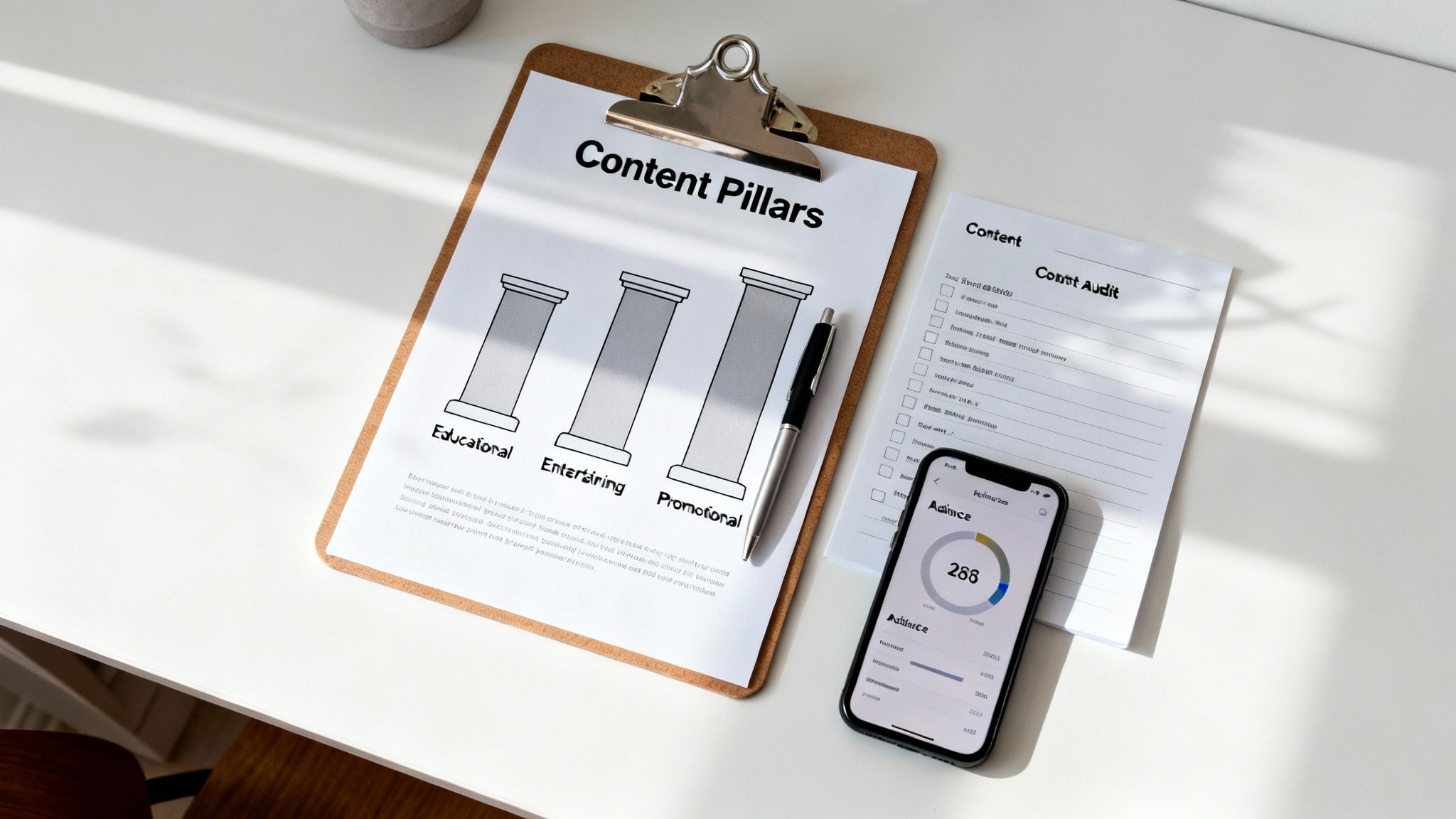
Okay, you have your goals and you know what’s worked in the past. Now it’s time to define your content pillars. These are the 3-5 core themes you'll talk about over and over again. Think of them as the backbone of your content strategy, keeping your feed focused while still offering variety.
Your pillars should live at the intersection of what you know (your expertise), what your audience needs (their pain points), and who you are (your brand values).
For a startup founder, the pillars might be:
- Pillar 1: Startup Growth Tactics. Actionable advice on scaling.
- Pillar 2: Leadership & Team Culture. Real talk on building a great team.
- Pillar 3: Industry Innovation. Analysis and predictions for their niche.
- Pillar 4: Behind the Scenes. The unfiltered journey of building a company.
These pillars save you from the "what should I post today?" panic. They ensure you have a balanced content mix and prevent your feed from becoming a one-note sales pitch. Nailing this down is also a critical first step in figuring out your ideal social media posting schedule, as it helps you map out a rhythm for hitting each theme. With these foundational pieces in place, you’re finally ready to build a calendar that works.
Designing Your Calendar Template and Choosing Tools
Alright, you’ve got your strategy locked in. Now comes the fun part: building the actual tool that will turn those big ideas into a daily, manageable workflow.
This is where your content pillars and goals get a home. The right social media content calendar isn't just a fancy spreadsheet; it’s the command center for your entire content operation. Your choice—whether it's a simple Google Sheet or a dedicated platform—boils down to your team size, budget, and how you like to work. There’s no "best" answer, only what’s best for you.
The Anatomy of a Great Calendar
Whether you're bootstrapping with a spreadsheet or investing in a tool like PostFlow, every functional calendar needs a few non-negotiable pieces of information. These are the core components that bring clarity to the chaos and keep your content engine humming.
Think of these as your must-haves:
- Post Date and Time: The exact moment your post is set to go live.
- Platform: Where is this headed? (LinkedIn, Instagram, etc.)
- Post Copy: The final, approved text, hashtags and all.
- Visual Asset: A link to the final image, graphic, or video file.
- Link: The URL you're sending people to, if there is one.
- Status: A simple way to track where things are—think Draft, In Review, Approved, or Scheduled.
Honestly, these six columns in a basic spreadsheet are enough to bring immediate order to even the most frantic posting schedule.
Leveling Up Your Calendar with Advanced Fields
Once you have the basics down, you can start adding more layers to your calendar. This is how it evolves from a simple schedule into a powerful strategic tool that helps you make smarter decisions.
I recommend adding columns for:
- Campaign Tag: This lets you group posts tied to a specific initiative, like "Q3 Product Launch" or a "Hiring Push."
- Content Pillar: Connecting each post back to your core themes keeps you honest and on-strategy.
- Performance Metrics: Add columns for impressions, engagement rate, or clicks. A week after a post goes live, drop the numbers in.
Suddenly, your calendar isn’t just for planning; it’s a living document that tracks what works and what doesn't, creating a tight feedback loop for constant improvement.
Choosing Your Tool: Spreadsheet vs. Platform
This is the big fork in the road. Where will your calendar actually live? For a solo founder, a spreadsheet can be a lean, mean, content machine. But for a growing team, it can quickly become a bottleneck.
A simple spreadsheet gives you total control and costs nothing. But a dedicated platform offers automation, collaboration, and analytics that will save you a ton of time as you scale.
Let's break down the most common options.
Spreadsheets (Google Sheets, Excel, Airtable)
Spreadsheets are the ultimate blank canvas. They're free, completely customizable, and everyone knows how to use them. You can build a calendar that is perfectly suited to your specific needs.
- Pros: No cost, insanely flexible, and easy to share.
- Cons: Version control can become a nightmare, no built-in scheduling, and all your analytics are manual entry.
Dedicated Social Media Management Platforms (PostFlow, Buffer, Sprout Social)
These tools are purpose-built for planning, scheduling, and analyzing content. They roll the calendar, scheduler, and analytics into one dashboard.
A platform like PostFlow takes it a step further by integrating the entire process—from AI-powered brainstorming to a voice-to-post workflow and performance tracking—all inside the calendar. This kills the need to juggle multiple docs and apps, which is a huge pain point for busy experts and founders.
When you're building out your system, think about your whole content ecosystem. If video is a big part of your strategy, you’ll need to explore essential content marketing video tools and resources that can feed assets into your pipeline. A dedicated platform centralizes everything, making sure your videos, copy, and schedule all live happily in the same place.
Comparing Popular Social Media Calendar Tools
To help you decide, here’s a feature-by-feature comparison of some leading tools. Think about your team size, budget, and specific needs to find the right fit.
| Tool | Best For | Key Features | Pricing Model |
|---|---|---|---|
| Spreadsheets | Solopreneurs & Small Teams | Ultimate flexibility, no cost, familiar interface. | Free |
| Airtable | Teams Needing a Database | Hybrid spreadsheet-database, powerful filtering, customizable views. | Freemium |
| PostFlow | LinkedIn-Focused Founders & Experts | AI content strategist, integrated voice-to-post workflow, analytics. | Subscription |
| Buffer | Small Businesses | Simple scheduling, clean interface, affordable entry-level plans. | Freemium |
| Sprout Social | Larger Teams & Agencies | Advanced analytics, social listening, robust collaboration tools. | Subscription |
Choosing the right tool from the start saves massive headaches down the road. A simple spreadsheet might feel right today, but think about where you want to be in six months. Planning for that future growth now is one of the smartest moves you can make.
Filling Your Calendar with High-Impact Content
An empty calendar template is a great start, but let's be real—it's just a blank canvas. The real magic happens when you start filling those slots with content that actually connects with people. This is where a simple spreadsheet transforms from a glorified to-do list into a strategic asset that actually drives growth.
The goal isn't just to "post something" every day. It's about building a narrative, creating a rhythm your audience comes to expect and even look forward to. You have to look past the daily grind and start mapping out the bigger picture.
Anchor Your Strategy with Key Dates
Before you even think about individual posts, zoom out and look at the whole year. Your calendar needs anchors—those big, unmissable dates that give you natural opportunities to create relevant content. This gives your entire strategy a solid foundation so you're never scrambling for ideas last minute.
I always start by plotting these "big rocks" first:
- Company Milestones: Think product launches, company anniversaries, or big team announcements. These are your internally-driven moments to shine.
- Industry Events: Got a major trade show, conference, or annual industry report coming up? Perfect. These are prime opportunities to position yourself as an expert.
- Holidays and Observances: Plot out the major public holidays, but also look for the smaller, fun ones relevant to your niche (like #NationalCoffeeDay if you're a café). It shows personality.
Mapping these milestones first gives your monthly and weekly planning a clear direction. A product launch in Q3 isn't just a single post on launch day. It's a multi-week campaign with teasers, behind-the-scenes content, and customer stories—all planned well in advance.
A social media calendar should tell a story over time. Anchoring it with key dates and events ensures your narrative has a clear beginning, middle, and end, making your content feel intentional rather than random.
Establish Your Posting Cadence and Timing
With your key dates locked in, you can now figure out a posting frequency that's both effective and realistic for you. I've seen it a thousand times: consistency beats volume, every single time. It's far better to publish three high-quality, thoughtful posts a week than ten mediocre ones that nobody engages with.
Your ideal cadence really depends on the platform and your own bandwidth. For a consultant focused on LinkedIn, a sustainable rhythm might look something like this:
- Monday: A text-and-image post sharing a key industry insight.
- Wednesday: A short video or carousel breaking down a complex topic.
- Friday: A more personal post about a business lesson you've learned.
This kind of schedule is manageable and gives each piece of content room to breathe and spark conversation.
But when you post is just as crucial. Getting your timing right is a low-effort way to get more eyes on your hard work. The data is clear: posting during peak windows for a specific platform can lift engagement rates by 10–60%. For professional networks like LinkedIn, that sweet spot is usually weekday mornings and lunch hours. Find out more about the best times to post on social media.
Create a Balanced Content Mix
The final piece of this puzzle is variety. If every single post is a hard sell, you're going to burn your audience out fast. A healthy content calendar balances different types of posts designed to educate, entertain, and engage, with promotional content woven in naturally.
A simple framework I love is the 70-20-10 rule:
- 70% of your content should be valuable and educational. This is the stuff that solves your audience's problems, offers unique insights, and builds your authority. Think "how-to" guides, industry analysis, or quick tips.
- 20% should be shared or curated content. This shows you're dialed into your industry. Share a great article from another expert (but always add your own commentary) or celebrate a partner's success.
- 10% can be promotional. This is where you talk about your product or service. Because you've spent the other 90% of your time delivering value, this ask feels earned and is way more likely to be well-received.
When you have these buckets to fill, populating your calendar becomes so much easier. This approach guarantees your feed becomes a go-to resource, not just a digital billboard. If you need more help sourcing topics, check out our guide on how to find content ideas that resonate with your audience. By combining strategic anchors, a smart cadence, and a balanced mix, you'll fill your calendar with content that truly connects.
Creating a Workflow That Eliminates Chaos
Your social media content calendar should be more than just a schedule—it needs to be the control center for a predictable, stress-free creative process. But I've seen it a hundred times: a great calendar with a chaotic workflow behind it is like having a map but no idea how to drive. The real power comes from building a seamless system that guides every piece of content from a spark of an idea to a published post.
This is the system that finally kills the frantic DMs, the last-minute scrambles for approval, and the nagging feeling that something is about to fall through the cracks. It brings order to the creative process, ensuring every post is polished, approved, and on-brand before it ever sees the light of day.
Defining Your Content Production Stages
First things first, you need to map out the journey of a single post. This can vary depending on your team, but a solid workflow usually has a few key stages. Using simple status tags or columns in your calendar for each stage gives the entire team instant visibility into where everything stands.
A common flow I've used with clients looks something like this:
- Idea/Brief: The concept gets logged with a clear objective. What's the point of this post?
- Drafting: The copywriter gets to work, creating the post text and any notes for the designer.
- Design: The visual asset—whether it’s an image, video, or carousel—is created.
- Internal Review: The draft and visual are checked by the core marketing team for quality and alignment.
- Stakeholder Approval: The finished piece goes to the key decision-makers (like a founder or client) for the final sign-off.
- Scheduled: Once approved, the content is officially plugged into your publishing tool.
To truly get rid of the chaos in your planning, it helps to understand what is workflow automation and how it can handle the handoffs between these stages. This is exactly where platforms like PostFlow shine, by automating notifications and moving content along the pipeline without you having to chase anyone down.
From Single Idea to a Full Campaign
One of the most efficient ways to fill your content calendar is through smart repurposing. Stop thinking of content creation as a one-and-done task. Instead, look at every significant piece of content you create—like a blog post or a case study—as the raw material for an entire mini-campaign.
For example, a single comprehensive blog post can easily be deconstructed into a week's worth of high-impact LinkedIn content. It’s a game-changer for content velocity.
A single 2,000-word article isn't just one asset; it's a content goldmine. It contains the quotes, statistics, key takeaways, and visual concepts for at least five to seven unique social media posts, all planned within your calendar.
This diagram breaks down a simple process for turning your core content into a steady stream of social posts.
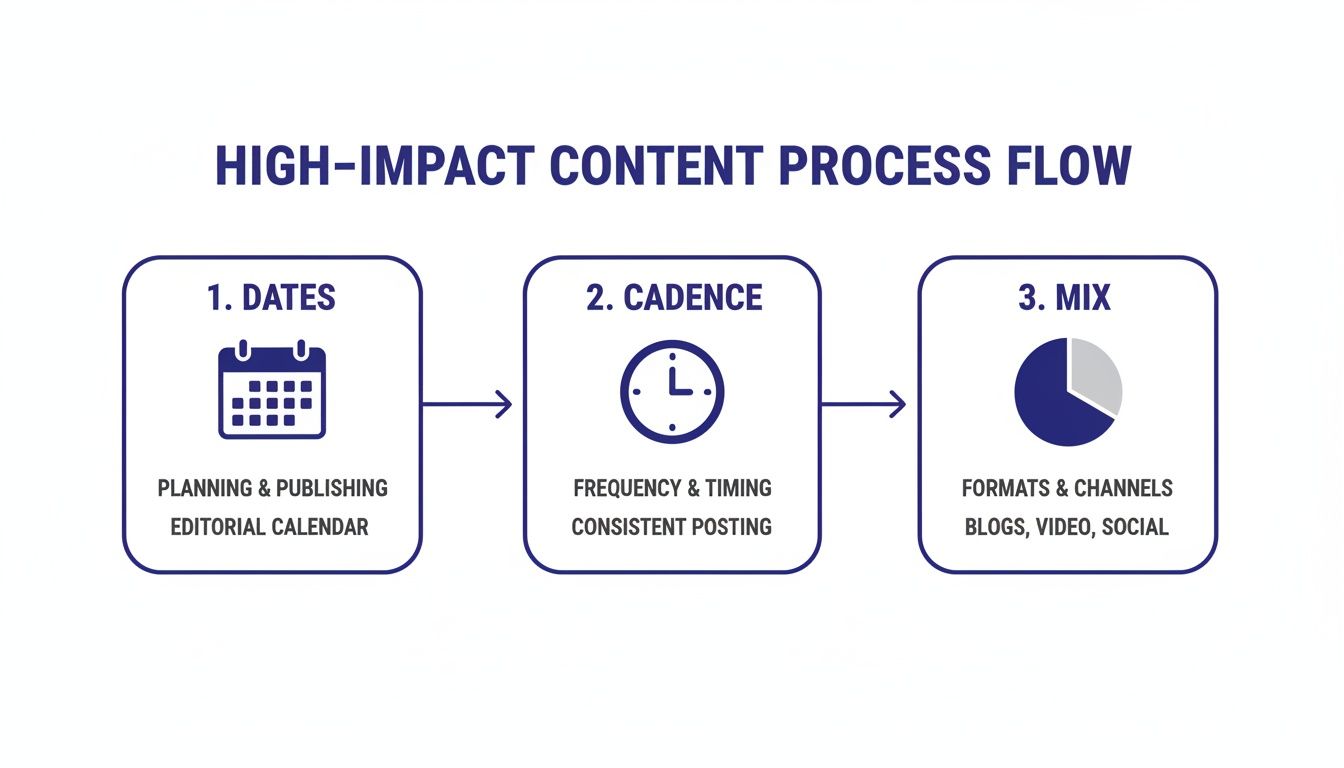
As you can see, a successful flow starts by anchoring your plan to key dates, establishing a consistent cadence, and ensuring you have a balanced mix of content types going out.
Weaving In Seasonal and Cultural Moments
A static workflow is a missed opportunity. Your process needs to be agile enough to jump on timely events and conversations. Building annual and cultural dates into your calendar can drive a serious lift for seasonal campaigns. Brands that plan around holidays, shopping seasons like Black Friday, and industry events report conversion uplifts from 12% to over 100% on those specific campaigns.
By building a clear, repeatable workflow, you turn your content calendar from a passive schedule into an active management tool. This kind of systematic approach is absolutely essential, especially when you're managing complex content like ghostwritten posts for founders. If you want to go deeper on this, we've put together a complete guide on how to build a content scheduling system that feels like magic.
Your Top Content Calendar Questions, Answered
Even with a killer strategy and the perfect template, things come up. Your content calendar isn't a static document you set in stone; it's a living, breathing guide for your social media. It has to bend and flex with new ideas, sudden industry news, and the natural shifts in your business priorities.
I get these questions all the time, so let's walk through some of the most common hurdles I see people facing. Getting these right is the difference between just filling a calendar and truly owning your social media game.
How Far Out Should I Actually Plan My Content?
This is the big one, and the real answer is a mix of long-range vision and on-the-ground agility.
As a solid rule of thumb, I always recommend planning your specific, day-to-day posts one month in advance. This gives your team enough time to actually create, review, and approve everything without feeling rushed. More importantly, it keeps you from getting locked into a plan that's too rigid to adapt if something changes.
Now, for your bigger pushes—think a major product launch, a conference, or a big holiday campaign—you need to be sketching out those core themes and anchor dates three to six months ahead. This is your high-level roadmap. It ensures your most important initiatives get the strategic thinking they need, while your monthly calendar handles the detailed execution. It’s the best of both worlds.
What's the Best Free Content Calendar Tool Out There?
Honestly, for most folks just starting out, the best free tool is probably one you already use: a well-organized spreadsheet. Something like Google Sheets or a more visual database like Airtable is perfect. Their biggest strength is their total flexibility—you can build a system that maps exactly to how you work, not how a tool thinks you should.
You can find a ton of free templates online to get a head start, so you’re not staring at a blank page. If you need free scheduling features on top of planning, tools like Buffer or Later have free tiers that give you a basic calendar view for a few social profiles.
The "best" free tool is the one you'll actually stick with. Don't get lost in a sea of features. Start simple with a spreadsheet and only look for a dedicated tool when you feel a specific pain point it can solve.
How Do I Handle Breaking News or Last-Minute Changes?
Your calendar should be a guide, not a straitjacket. I've seen too many teams freeze up when something unexpected happens. The secret is to build that flexibility right into your plan from day one. I like to leave one or two "flex slots" open each week that can be filled with timely content or easily moved.
When relevant breaking news drops, the very first thing you should do is pause any scheduled evergreen content that might suddenly feel out of touch or even tone-deaf. Your calendar is your command center—it makes it easy to see what's in the queue so you can reschedule with a couple of clicks.
To stay nimble without creating total chaos, have a simple process ready for your team:
- Who's on watch? Designate one person to keep an eye on industry news and trends.
- Who gives the green light? Have a single decision-maker who can approve a reactive post fast.
- What's our turnaround? Set a realistic goal, like getting a response out within a couple of hours.
This way, you can jump into important conversations and stay relevant without putting your brand's reputation at risk.
How Often Should I Review and Tweak My Calendar Strategy?
A "set it and forget it" mindset is the fastest way to kill your momentum. A great social media strategy is all about the feedback loop—you have to constantly review your performance and let those insights shape what you create next.
Here’s a simple rhythm I've seen work wonders:
- Weekly Check-In: A quick, 15-minute glance at your top posts from the last week. What really landed with your audience? Double down on that.
- Monthly Analysis: This is a deeper dive. Compare your metrics against the goals you set. Are your content pillars actually delivering? This is when you make informed tweaks for the month ahead.
- Quarterly Strategic Review: Time to zoom all the way out. Are your big-picture goals still the right ones? Has your audience's behavior or needs changed? This is the full health check that keeps your strategy sharp and effective for the long haul.
Ready to stop juggling spreadsheets and start creating consistent, high-impact content on LinkedIn? PostFlow gives you an AI content strategist, a streamlined voice-to-post workflow, and a powerful calendar all in one place. Turn your expertise into growth at https://gopostflow.com.

