
Using AI for LinkedIn posts isn't just about cranking out content faster anymore. It’s a real strategy for founders, freelancers, and consultants who want to build a memorable, consistent personal brand.
The trick is to stop thinking of AI as a content mill and start treating it like a strategic partner. It’s there to help you turn your hard-won expertise into engaging posts, day in and day out, without the soul-crushing grind of staring at a blinking cursor. This way, your posts always feel authentic and actually make an impact.
The New Playbook for LinkedIn Success with AI
Welcome to the new way of doing LinkedIn content. Forget the hype about AI replacing creators—we're here to show you what actually works. Think of this guide as your practical playbook for turning content creation from a chore into a high-impact part of your professional brand.
When you use it right, AI helps you maintain a strong presence without spending hours trying to come up with ideas. The whole thing hinges on a simple mindset shift: your ideas, your voice, and your expertise always lead the charge. AI is just the tool that helps you structure, refine, and scale that message.
This modern workflow breaks down into a simple, repeatable system. The visual below lays out this four-step process, from capturing your raw ideas to analyzing what actually connects with your audience.
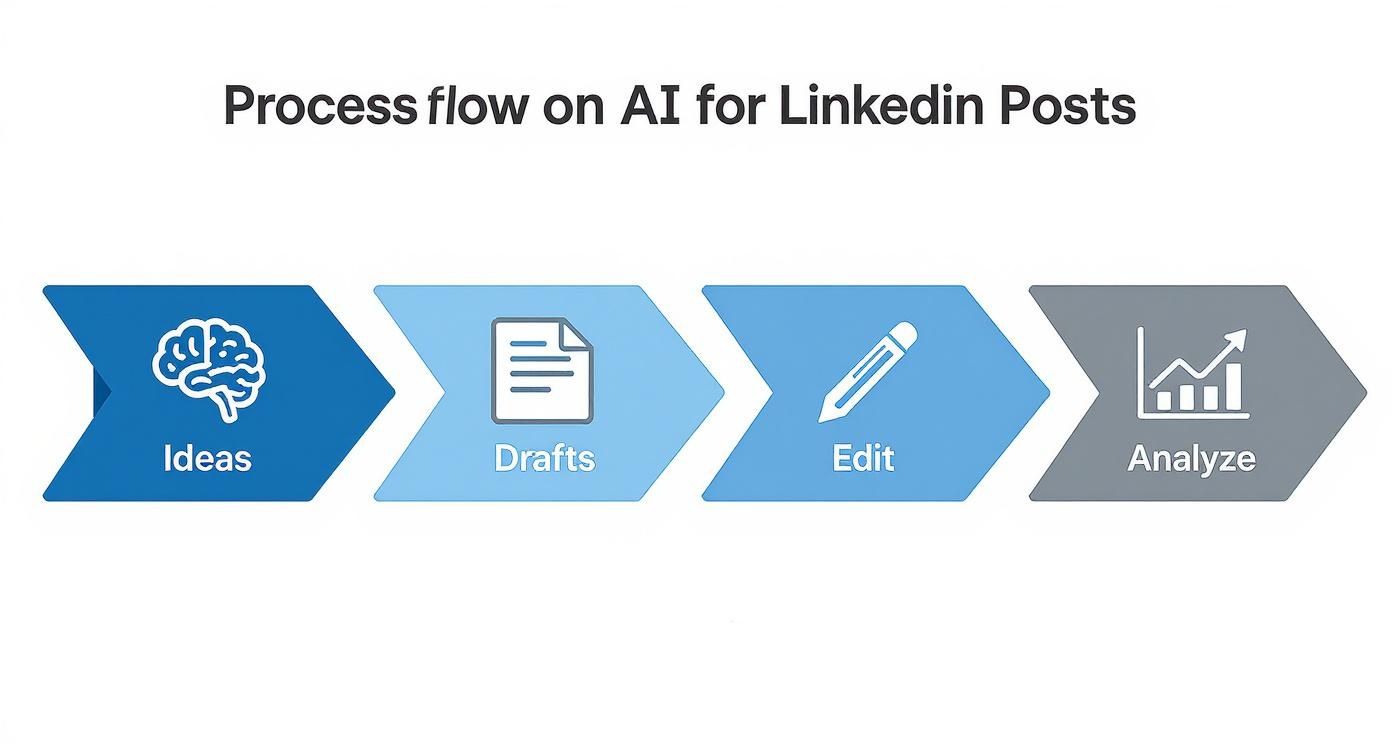
As you can see, success isn't about finding one "magic" prompt. It's about creating a continuous loop of creation, feedback, and iteration. Following this system ensures your content strategy just keeps getting smarter.
Why This AI-Assisted Approach Works
So, why bother with this? It's not just about being more efficient; it's about being more effective. Some forecasts even predict that by 2025, over 50% of LinkedIn posts will be AI-assisted in some way, and that trend is being driven by better engagement and real networking results.
The benefits are pretty clear:
- Consistency: It kills the friction of daily writing, helping you show up for your audience without fail.
- Authenticity: Because you start with your unique insights, the final posts always sound like you, not a generic robot.
- Scalability: You can spin up multiple post variations, test different angles on the same idea, and repurpose content without starting from scratch.
The goal is not to automate your personality but to amplify it. Treat AI as your creative intern—it handles the grunt work, so you can focus on high-level strategy and genuine connection.
This table breaks down how AI is flipping the script on the old, manual way of creating content for LinkedIn.
How AI Is Changing LinkedIn Content Creation
| Content Stage | Traditional Method (Manual) | AI-Assisted Method (Strategic) |
|---|---|---|
| Ideation | Staring at a blank page, brainstorming sessions. | Interviewing yourself, turning voice notes into themes. |
| Drafting | Writing from scratch, struggling with structure. | Getting multiple first drafts based on your ideas. |
| Editing | Self-editing, getting feedback from colleagues. | Refining tone, creating A/B test versions instantly. |
| Scheduling | Manually planning posts and timing. | Getting data-backed suggestions for optimal post times. |
| Analysis | Guessing what worked based on likes and comments. | Identifying top-performing themes and formats with data. |
It's a shift from pure manual labor to a more strategic, data-informed process where you're the director, not just the writer.
To get started, it helps to know what tools are out there. If you want to see how different platforms stack up, you can compare AI-powered content tools. For a really deep dive into options built specifically for LinkedIn, check out our guide on The Definite LinkedIn AI Tools Directory. This playbook will show you how to get the most out of them.
Uncovering Your Best Ideas with AI Interviews
The best LinkedIn content—the stuff that actually stops the scroll—comes from your unique experiences and stories, not some generic prompt. I see so many people get this wrong. They try to use AI for LinkedIn posts by asking it to create from scratch instead of asking it to listen.
This is where the "AI Interview" technique completely changes the game.
Instead of a vague command like, "Write a post about sales," you start a conversation with the AI. Treat it like a curious colleague or an inquisitive journalist whose only job is to pull your best insights out of you. This simple shift turns the AI from a mediocre writer into an expert extractor, making sure the raw material for your posts is 100% you.
Getting into the Interview Mindset
The whole point of an AI interview is to pull out the personal anecdotes, hard-won lessons, and unique opinions you probably overlook. It’s about turning the knowledge stuck in your head into tangible content assets.
This works so well because it forces you to articulate your thoughts out loud, just like in a real conversation. The AI’s follow-up questions can uncover angles you hadn't even considered, leading to far more authentic and compelling post ideas. You’re the expert; the AI is just your Socratic partner.
The biggest mistake is asking AI to have the ideas for you. The breakthrough comes when you use AI to help you explore the ideas you already have.
This technique is a lifesaver for busy professionals who have deep knowledge but almost no time to get it down on paper.
- For Founders: You could talk to the AI about a tough fundraising lesson, a recent product headache, or the core leadership principle that guides your company culture.
- For Freelancers: A designer could use the AI interview to walk through their creative process on a tricky client project, turning a routine task into a valuable case study.
- For Consultants: You can finally simplify that complex industry trend by "explaining it to the AI," which then helps you structure the explanation for a much broader audience.
A Reusable AI Interview Prompt Template
Getting started is easy. You don't need a complicated setup. Here’s a simple, effective prompt you can swipe to kickstart your own AI interview. Just copy, paste, and fill in the blanks.
Act as a curious podcast host and an expert content strategist. Your goal is to interview me to uncover unique insights, personal stories, and expert opinions for high-performing LinkedIn posts. My professional role is [Your Role, e.g., 'a B2B SaaS Founder'].
My core topic today is [Your Topic, e.g., 'the challenges of scaling a remote sales team'].
Start by asking me one open-ended question to get my initial thoughts. Then, ask me at least 5 follow-up questions, one at a time. Dig deeper into my responses, asking for specific examples, lessons learned, and contrarian opinions.
Do not write the post. Just conduct the interview. Let's begin.
Using this conversational approach ensures the foundation of your content is built on real expertise. And that’s exactly what works on LinkedIn. The algorithm actively favors content that showcases actionable advice and original insights. By using AI to unearth and structure these unique perspectives, you’re creating exactly what the platform and its users want to see—helping you build real authority. If you want to dive deeper, Kinsta has a great breakdown on how LinkedIn's algorithm prioritizes expert content.
From Raw Ideas to Polished LinkedIn Drafts
That AI interview you just did? It’s a goldmine. You’ve got a pile of raw material—your authentic stories, unfiltered opinions, and hard-won expertise, all transcribed and ready to go. Now, the real work begins: shaping that gold into compelling LinkedIn drafts.
This isn’t about hitting a button and hoping for the best. It’s about being the director, giving your AI specific, surgical instructions to act as a drafting partner. Your goal is to go from a jumble of thoughts to several solid draft options, fast. This is where using AI for LinkedIn posts becomes a true force multiplier, letting you explore different angles in minutes, not hours.

Turning Interview Notes into Structured Drafts
First things first, you’ll feed your interview notes directly into your AI tool. But don't just dump them in and ask it to "write a post." That's a recipe for generic content. The key is to provide clear context and a specific goal, guiding it toward a post structure that fits your message.
Here are a few proven formats you can prompt the AI to create from your notes:
- The Personal Story: Frame a key insight within a personal narrative.
- The Tactical List: Pull out the actionable steps into a numbered or bulleted list.
- The Contrarian Take: Find a common belief in your notes and build a post that challenges it.
For example, a founder’s notes on a rough fundraising round could become a story about resilience, a tactical list of "3 Pitch Deck Mistakes to Avoid," or even a contrarian post titled "Why Getting a 'No' From an Investor Was the Best Thing for Us."
The magic isn't in the AI writing for you. It's in its ability to rapidly structure your own ideas into different proven formats. You're the architect; the AI is your ridiculously fast construction crew.
Matching Your Unique Voice and Tone
Let's tackle the biggest fear: sounding like a robot. This only happens when you skip a critical step—giving the AI proper direction. The best way to get authentic-sounding drafts is to train the AI on your specific voice.
It's simple. Just provide the AI with 2-3 examples of your past writing that you’re happy with. This could be a solid LinkedIn post, a blog article, or even a well-written email. Then, use a prompt that explicitly tells the AI to analyze and adopt your style. This is a non-negotiable step for anyone trying to build a better workflow with an AI LinkedIn post generator, as it’s what closes the gap between automated assistance and genuine personal branding.
Generating A/B Versions to See What Clicks
Why settle for one draft when you can have three? One of the smartest ways to use AI for LinkedIn is to generate multiple versions of the most important parts of your post: the hook and the call-to-action (CTA). These two elements have a massive impact on your post's performance.
Prompt the AI to give you a few options to test:
- For Hooks: "Generate three different opening hooks for this post. Make one a question, one a bold statement, and one a personal anecdote."
- For CTAs: "Create two different calls-to-action. One should ask a question to spark comments, and the other should encourage readers to share their own experience."
This A/B testing approach shifts you from guessing what might work to strategically testing what actually does. To see how this fits into the broader picture of modern content strategy, you can learn more about how AI is being used for content creation in SMB. By the end of this process, you'll have strong, well-structured drafts that are ready for your final human touch.
The Human Edit That Makes Content Great
Let’s be real: using AI for LinkedIn posts is a fantastic shortcut. It gets you about 80% of the way there—fast. You get a solid structure, decent grammar, and a draft that doesn’t stare back at you like a blank page. But that last 20%? That’s where the magic happens. The human edit is what turns a decent, AI-generated draft into content that actually stops the scroll and builds your brand.
Never, ever just copy and paste directly from an AI tool. The raw output is often sterile. It lacks the specific flavor, the personal stories, and the warmth that makes someone feel like they know you. Your final pass is where you inject the personality that turns a generic post into your post.
This final editing stage has become more critical than ever. Recent tweaks to the LinkedIn algorithm are rewarding authentic posts that create real conversations. In fact, these changes caused a massive reach decline of around 50% for a lot of creators, proving that quality and genuine connection now beat sheer volume. Authenticity isn't just a buzzword anymore; it's a core part of your strategy, especially when you consider that pages posting weekly see 5.6 times more follower growth. You can see more LinkedIn statistics that back this up.
Refining the Hook and CTA
Your hook is everything. It's the one line that determines whether someone keeps scrolling or clicks "see more." AI can spit out some decent options, but you need to make them irresistible.
Read it out loud. Seriously. Does it sound like something a real person would say in a conversation? Tweak the wording until it feels natural, punchy, and intriguing.
The call-to-action (CTA) is just as vital. AI often falls back on lazy prompts like "What do you think?" or "Share in the comments." Your job is to make it specific and human.
Instead of a generic CTA, try one of these:
- For relatability: "Ever had one of those days after a tough client call?"
- For specificity: "What's the one tip you'd add to this list?"
- For storytelling: "Share a time a project went completely sideways on you."
These don't feel like a demand for engagement; they feel like an invitation to a real conversation.
Injecting Your Personal Voice
This is the most important part of the human touch. Scan the draft for any opportunity to add a small detail that could only come from you. Swap a generic business example for a quick, personal anecdote. Ditch bland adjectives for the words you'd actually use with a friend or colleague.
The goal of the final edit is simple: find and replace every phrase that sounds like it was written by a committee. If a sentence feels stiff, impersonal, or overly formal, rewrite it.
Keep an eye out for those classic "robot" phrases that sneak into AI drafts:
- "In the dynamic landscape of..."
- "It is crucial to note that..."
- "By delving into this topic..."
Cut them without mercy. Replace them with simpler, more direct language. This is how you make sure the final post doesn't just share information—it shares a piece of you.
Using Analytics to Sharpen Your AI Strategy

Creating great content with AI for LinkedIn posts is a solid start, but it's only half the story. The real growth kicks in when you stop guessing what works and start using data to make your strategy smarter.
This is where you close the loop—turning audience feedback directly into better AI prompts and, ultimately, content that actually performs.
Posting without checking your analytics is like talking into a void. LinkedIn Analytics is your direct line to understanding what your audience truly cares about. Instead of chasing vanity metrics, you need to focus on the numbers that signal genuine connection and interest.
Key Metrics to Guide Your AI Prompts
Don't just glance at the likes and move on. You've got to dig deeper into the metrics that tell a story about your content's real-world impact. These insights are pure gold for refining your entire AI-assisted workflow.
- Engagement Rate: This is your primary health score. A high engagement rate tells the LinkedIn algorithm your content is valuable, which means your topics, tone, and format are hitting the mark.
- Impressions: This is simply how many times your post was seen. If your impressions are high but engagement is low, your hook probably needs work—a perfect A/B testing opportunity for your AI.
- Audience Demographics: Pay close attention to the job titles and industries engaging with your posts. This is how you confirm you're actually reaching your ideal audience, not just random people.
Think of your analytics dashboard as a collection of answered questions. Each data point is a clue telling you what your audience wants more of. Your job is to translate those clues into better instructions for your AI partner.
Here’s a quick-reference table to help you track what matters in LinkedIn Analytics and use it to inform your AI content strategy.
Key LinkedIn Metrics and What They Mean
| Metric | What It Measures | Why It Matters for Your AI Strategy |
|---|---|---|
| Impressions | The total number of times your post was displayed on screen. | Helps you gauge reach. A sudden drop could mean the algorithm doesn't like your format. A spike can show you what to double down on. |
| Engagement Rate | (Likes + Comments + Reposts) / Impressions. | The single best indicator of content quality. Use this to identify winning topics and formats to feed back into your AI prompts. |
| Click-Through Rate (CTR) | The percentage of people who saw your post and clicked a link. | Crucial for posts driving traffic. If CTR is low, ask your AI to generate more compelling calls-to-action (CTAs). |
| Comments | The number of direct replies to your post. | Shows your content is sparking conversation. Analyze comments for recurring questions or pain points to create your next AI-generated post. |
| Audience Demographics | Job titles, industries, and locations of your viewers. | Confirms you're reaching the right people. If not, refine your AI's voice and topics to better match your target persona. |
By keeping an eye on these numbers, you move from "creating content" to "strategically engineering conversations" with your target audience.
Creating a Powerful Feedback Loop
Once you spot a pattern in your analytics, you can feed that intelligence directly back into your AI prompts. This creates a powerful, iterative cycle where your content strategy gets smarter with every single post.
This data-driven approach is fundamental. If you want to go deeper, you can explore more about how to analyze content performance to build an even more robust system.
Let’s see what this looks like in practice.
Imagine you notice that posts structured as numbered lists get 2x the engagement of your personal stories. Your next prompt to the AI wouldn't be generic. It would be laser-focused.
"My audience responds best to tactical, numbered-list posts. Take my recent interview notes about overcoming sales objections and turn them into a '5 Common Sales Mistakes and How to Fix Them' listicle. Make the tone direct, actionable, and helpful."
That single insight transforms your AI from a simple drafting tool into a strategic asset. You’re no longer just creating content; you’re systematically creating content you know your audience is waiting for.
Common Questions About Using AI on LinkedIn
Dipping your toes into using AI for your LinkedIn content is smart, but it's natural to have a few questions. I hear the same ones come up all the time from founders and consultants trying this for the first time. Let's clear the air on the big ones.
The first question is always the same: Will LinkedIn penalize me for using AI?
Short answer: No.
LinkedIn’s algorithm doesn’t care how you write your posts. It cares if people find them valuable. The platform is designed to reward content that sparks real conversations and provides genuine insight, not to play "spot the AI."
Think about it—their goal is to keep users on the platform. They do that by showing them interesting stuff. If your AI-assisted posts are thoughtful, helpful, and actually sound like you, they’ll get engagement and perform well. The only "penalty" comes from posting generic, low-effort content that falls flat, whether a human or a robot wrote it.
How Do I Make AI Content Sound Like Me?
This is the big one. How do you stop your posts from sounding like a bland corporate robot wrote them?
The secret is to stop thinking of AI as a ghostwriter and start treating it like a very capable, but very literal, junior assistant. It needs your direction, your voice, and your stories to do its job well. Your unique perspective is the most valuable part of your content, and that’s not something you can outsource.
First, you have to "train" the AI on your style. Feed it a few of your best-performing posts, a blog article you're proud of, or even a well-written email. This gives the model a concrete example of your tone, your vocabulary, and the way you structure your thoughts.
Then, you get super specific in your prompts.
- Be direct about your tone. Don't just say "professional." Say, "Write in a witty, direct, and slightly informal tone, like an experienced consultant talking to a peer."
- Give it your perspective. Add instructions like, "Frame this from the perspective of a founder who has bootstrapped a company and learned this lesson the hard way."
- Edit without mercy. This is where the magic happens. The first draft is just a starting point. Your job is to go in and slash every piece of corporate jargon and every phrase that makes you cringe. Weave in a personal anecdote or a specific client example that only you would know.
The AI gives you the clay; you have to be the sculptor. It can build the basic structure of a post in seconds, but you're the one who has to give it a soul.
Which AI Tools Should I Actually Use?
With a new AI tool popping up every week, it’s easy to get overwhelmed. Which one is right for creating LinkedIn content? Honestly, it depends on how you like to work.
For pure brainstorming and drafting, you can't go wrong with the big players like ChatGPT or Claude. They're incredibly flexible and act like fantastic creative partners when you're interviewing yourself for ideas.
But we're also seeing a new wave of specialized platforms built just for social media. These tools go a step further, often rolling in features like content scheduling, analytics, and even post ideas based on trending topics on LinkedIn. They can create a much smoother workflow, taking you from a raw idea to a scheduled post with performance tracking all in one place.
Ultimately, the "best" tool is the one that removes the most friction from your process, letting you spend less time wrestling with technology and more time refining your ideas.
Stop missing opportunities on LinkedIn. Let PostFlow help you turn your expertise into consistent, engaging content that grows your business. Get started with your AI content strategist today.

