
Let's be honest, staring at that blank LinkedIn compose box can feel like a creative dead end. You know you need to post consistently to build your professional brand, but finding the time and fresh ideas feels like a constant uphill battle.
This is exactly where an AI LinkedIn post generator stops being a novelty and becomes a crucial part of your workflow.
Your New Secret Weapon for LinkedIn Content
Think of it less as a ghostwriter and more as a creative partner. The goal isn't to replace your unique voice or expertise; it's about amplifying it. These tools are designed to help you grab those fleeting ideas, give them structure, and smash through the writer's block that kills your momentum.
We've all been there. You're dealing with the usual suspects:
- Content Fatigue: You've run out of interesting angles on the topics you know best. How many ways can you say the same thing?
- The Inconsistency Trap: A busy schedule gets in the way of posting regularly, and the LinkedIn algorithm isn't kind to ghost profiles.
- The Time Crunch: You just don't have the hours to brainstorm, write, edit, and schedule high-quality content every single week.
This is what an AI generator is built to fix. Tools like PostFlow are designed to slot right into your process, turning content creation from a chore into a collaborative sprint.
Here’s a look at the PostFlow interface, which is built to keep your ideas and drafts organized in one spot.
The whole point is to make the entire process feel more manageable. A clean layout like this helps you manage notes, bang out drafts, and see exactly what the final post will look like—all without jumping between a dozen different apps. The idea is to save you hours while actually boosting your impact.
And this isn't some niche trend; these tools are catching on fast. Some platforms are already generating hundreds of thousands of posts for users all over the world. They work by looking at your profile and past content to get a feel for your writing style, making sure the final output actually sounds like you. It's all part of a bigger shift in how we're learning to create quality content at scale with a little help from technology.
Turning Raw Ideas into Polished LinkedIn Posts
We've all been there. You hang up a client call, your head buzzing with a fresh insight. It's a goldmine for a great piece of content, but it's just a raw, messy thought. How do you actually capture that spark and turn it into a high-impact LinkedIn post before it disappears into the ether?
This is exactly where a collaborative dance with an AI LinkedIn post generator comes into play. It’s not about handing over your brain to a robot; it’s about giving your best ideas a powerful springboard. You can start with something as simple as a few bullet points scrawled in a notebook or a quick voice memo you recorded while walking the dog.
From there, you feed that raw material to the AI. But here’s the key: you need a clear, specific prompt. Vague instructions will always get you bland, generic results. You have to give the AI a detailed brief.
Crafting a Prompt That Actually Delivers
Specificity is your best friend when you're working with an AI post generator. I always tell people to think of it like commissioning a piece of work from a freelancer—the better your instructions, the better the final product. Your prompt needs to act as a clear blueprint for the post you have in your head.
For instance, don't just say, "Write about client feedback." That's a recipe for a boring post.
Get specific. Try something like this instead:
“Turn this insight about client feedback into a LinkedIn post, around 2,500 characters. Kick it off with a storytelling hook about a recent project challenge. Then, lay out the three key takeaways we learned from the client's perspective. Wrap it up with a question to get people talking. The tone needs to be conversational but still sound like an expert."
See the difference? That level of detail provides the essential guardrails. You're telling the AI the length, the exact structure (hook, takeaways, question), and the precise tone of voice you want. This shifts the process from a frustrating guessing game to a structured, creative collaboration.
This whole flow is about getting past that initial writer's block by moving from a simple idea to a polished post, with AI as your assistant.
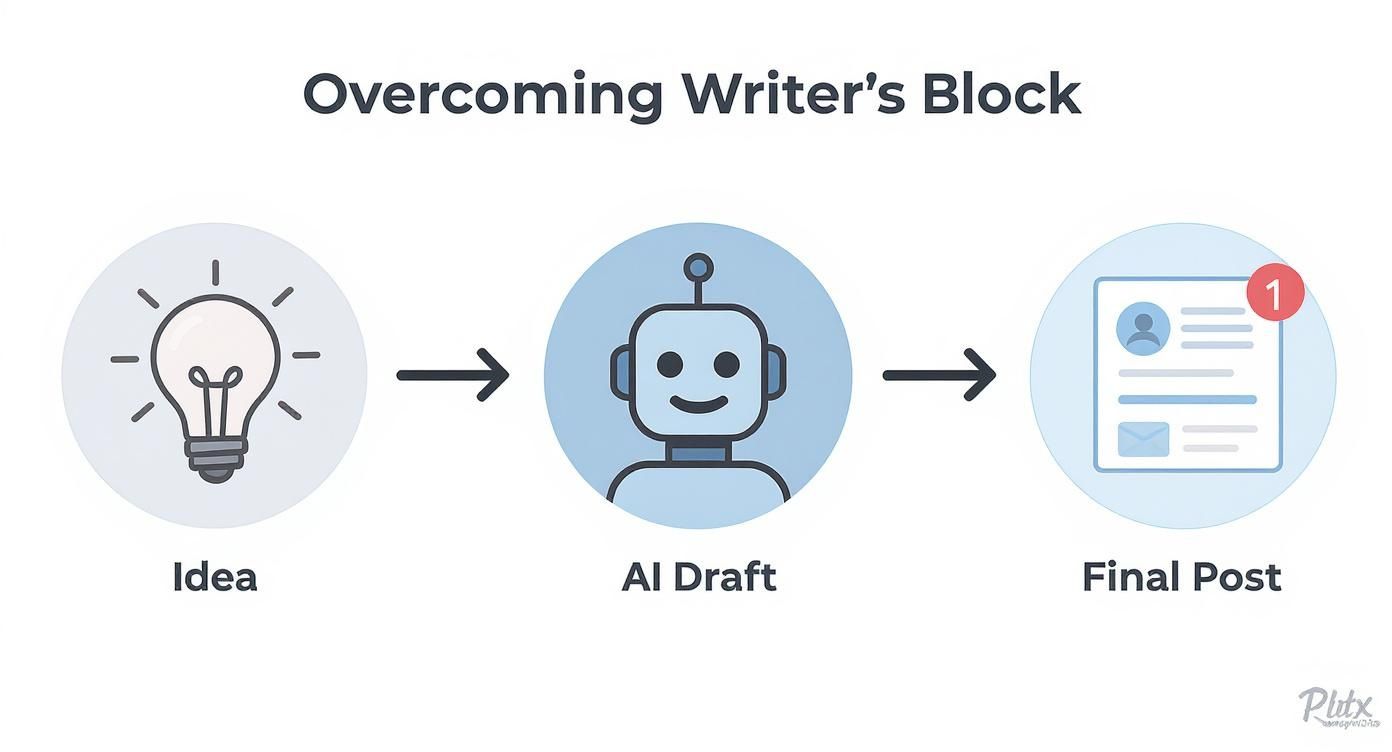
As you can see, the AI-generated draft is just an intermediate step, not the final destination. The human element is what makes it truly great.
The Human Touch: Finalizing Your Post
Let's be real: the AI’s first draft is almost never the final version. Think of it as a solid foundation—maybe an 80% solution—that saves you from staring at a terrifyingly blank page. Now it's your turn to step in and make it shine. This human editing phase is completely non-negotiable if you want to create authentic content.
Your refinement process should always include a few key moves:
- Inject Personal Anecdotes: Where can you add a small, personal story that brings the main point to life? AI can't tap into your lived experiences.
- Tweak the Tone: Read the draft out loud. Seriously. Does it sound like you? Adjust words, phrasing, and sentence flow until it matches your natural voice.
- Verify Authenticity: Does this post genuinely reflect what you believe and your real expertise? Hunt down and destroy any AI-generated phrases that feel hollow or cliché.
The goal is a human-led, AI-assisted workflow. This approach makes sure your content isn't just well-structured and engaging, but also deeply and unmistakably you. If you want to dive deeper into the nuts and bolts of crafting great content, our complete guide on how to write LinkedIn posts has tons of extra frameworks and examples.
You're not just hitting 'generate' and walking away. You're using a powerful tool to bring your best ideas to life, only faster.
How to Master the LinkedIn Algorithm with AI
Let's be honest, creating fantastic content is only half the battle on LinkedIn. If your posts don't play nice with the algorithm, even your best ideas will get buried in the digital noise. What worked last year probably doesn't work today—the platform's distribution system is always shifting.
This is exactly where an AI LinkedIn post generator becomes your strategic partner. It’s not just about spitting out words; it's about deliberately structuring your content to get the visibility it deserves. You can use it to craft posts in a way the algorithm currently favors, giving your hard work a much better shot at being seen.
The New Rules of Reach
We've seen a massive shift in what LinkedIn rewards lately. A recent analysis of over 223,000 posts showed that while overall platform reach has taken a nosedive since 2023, long-form text posts are getting a serious boost.
Believe it or not, posts that are over 2,500 characters are now seeing 45% better reach than shorter ones. This is a complete flip from a few years ago when brevity was king. You can dig into the full research about these LinkedIn algorithm changes to see the data for yourself.
This is a perfect job for an AI tool. Trying to write a post that long from scratch is a heavy lift for anyone. But with the right prompt, you can generate a solid draft that hits that ideal character count without the headache.
Prompt Example: "Generate a 2,500-character LinkedIn post from these bullet points [insert your notes]. Structure it with a strong hook, three main sections separated by line breaks for readability, and a concluding question. Make the tone expert yet approachable."
Structuring for Scannability and Engagement
Length isn't the only thing that matters. The algorithm is also watching how readers interact with your content. A dense wall of text is an instant "scroll-past" for most people. Your AI generator can help you format for maximum engagement.
Use it to build posts that are easy for people to scan and absorb quickly.
- Craft Scroll-Stopping Hooks: Prompt the AI to generate five different opening lines for your post. Pick the one that grabs you the most.
- Generate Scannable Lists: Ask the AI to turn a complex idea into a simple numbered or bulleted list. This breaks up the text and makes your key points pop.
- Strategically Place Hashtags: You can prompt the AI to suggest 3-5 relevant, niche hashtags. This helps your content get discovered by the right audience without looking spammy.
Think of your AI tool as your algorithm whisperer. You bring the expertise and the human touch; it handles the structural and formatting tweaks needed to get the algorithm's attention. This partnership ensures your thoughtful content doesn't just get written—it gets seen, read, and engaged with by the people who actually matter to your professional brand.
Build a Sustainable Content Calendar with AI
Let’s be honest: inconsistent posting is the silent killer of LinkedIn growth. We’ve all been there. You get a flash of inspiration, post something great, and then a busy week torpedoes your momentum. Your profile goes dark.
An ai linkedin post generator is your secret weapon for breaking this cycle. It helps you build a posting habit that the algorithm actually rewards.
The real magic isn't just about cranking out a single post on the fly. It's about systematically planning your content weeks—or even a month—in advance. This lets you batch an entire month's worth of quality content in one focused session. Suddenly, you're free to focus on what really matters: actually talking to people in your network.
From Pillars to Published Posts
A solid content calendar starts with your core content pillars. These are the 3-5 key themes you want to own. Think about it: what do you want to be known for? Maybe it's industry insights, project wins, leadership lessons, or a peek behind the curtain of your work.
Once you’ve nailed those down, you can put your AI tool to work brainstorming post ideas for each one. This keeps your content laser-focused and constantly reinforces your expertise.
Here’s a prompt I’ve used that works wonders:
"My core content pillars are 'bootstrapped SaaS growth,' 'remote team leadership,' and 'B2B content strategy.' Generate 12 distinct LinkedIn post ideas for the next month, with four ideas for each pillar. Give me a mix of formats like personal stories, tactical tips, and industry observations."
This prompt gives the AI clear guardrails, taking you from a blinking cursor to a structured list of topics in seconds. From there, you can create a separate draft for each idea, inject your personal stories, and slot it right into your calendar.
Scheduling and Squeezing More Life Out of Your Content
With a bank of drafted posts ready to go, mapping out your month becomes a breeze. This is where integrated platforms like PostFlow really shine, letting you move from writing to scheduling without missing a beat. You can see your entire content plan at a glance and make sure you have a healthy mix of topics from your pillars.
This "batching" approach transforms content creation from a daily chore into a manageable, strategic task you do once or twice a month.
But what about those gaps in your schedule? Or when you feel like you've run out of new ideas? That’s where repurposing comes in. An AI generator can breathe new life into your greatest hits.
- Find Your Winners: First, go back and find posts from the last few months that really popped off.
- Give the AI a Fresh Angle: Feed that winning post to the AI and ask it to "Rewrite this from the perspective of a common mistake people make in this area."
- Switch Up the Format: Ask the AI to turn a great text-only post into a script for a short video or an outline for a carousel.
By repurposing content you know works, you extend its value and keep your calendar full of posts that are primed to resonate. It creates a powerful feedback loop where success fuels more success.
This whole system—from pillar-based brainstorming to smart repurposing—turns your AI tool into a true strategic partner. It helps you build a reliable content engine that drives consistent growth, saving you a ton of time while making sure you never run out of valuable things to say.
How to Choose the Right AI LinkedIn Tool

The market for AI LinkedIn post generators is exploding, and frankly, it's getting a little crowded. With so many options, it’s easy to get distracted by flashy marketing and end up with another unused monthly subscription. Let’s cut through the noise.
Choosing the right tool isn’t about finding the one with the most features; it’s about finding the one that slides right into your existing workflow. A great tool should feel less like a clunky add-on and more like a smart assistant that understands you.
For most of us, that means an all-in-one platform is the way to go. Juggling separate apps for writing, scheduling, and analytics is a recipe for frustration and lost time. You want a single place to handle everything from idea to analysis.
Core Features That Truly Matter
When you're comparing tools, ignore the hype and focus on the functions that will actually make a difference to your content. From my experience, there are a few non-negotiable features you should be looking for.
Here’s my shortlist of must-haves:
- Voice and Tone Customization: This is critical. If a tool can't learn your unique style, every post will sound generic and robotic. The best platforms, like PostFlow, let you define your "vibe" so the AI starts to sound like an extension of you, not a machine.
- Integrated Scheduling: A seamless workflow is everything. Being able to draft, tweak, and schedule your posts without ever leaving the dashboard is a massive time-saver. It keeps you in the creative zone.
- Performance Analytics: You can't get better if you don't know what's working. Built-in analytics that track impressions, engagement, and other key metrics are essential for refining your strategy and doubling down on what your audience loves.
- Idea Generation Libraries: Let's be real, one of the biggest reasons to use these tools is to beat writer's block. A good generator will help you brainstorm topics and give you creative sparks based on proven, high-performing content formats.
Matching Your Needs to the Right Tool
Your needs as a solo creator are going to be wildly different from those of a marketing agency. The solopreneur is probably chasing speed and simplicity, while an agency needs collaboration features and in-depth client reporting.
The pricing for these tools reflects that reality. In 2025, you'll see plans ranging anywhere from $19 to $199 per month. The higher-end plans usually unlock things like unlimited posts, access to viral post databases, and advanced analytics—a solid investment if you're serious about your LinkedIn presence.
To help you decide what's right for your situation, I've put together a quick comparison table. This should give you a clear idea of what to prioritize based on who you are.
Feature Comparison for AI LinkedIn Post Generators
| Feature | What to Look For (Solo Creator) | What to Look For (Marketing Team/Agency) |
|---|---|---|
| Voice Customization | Simple settings to define personal tone and style. | Multiple brand voice profiles, sharable with the team. |
| Content Generation | Quick idea generation, post hooks, and drafts. | Advanced content repurposing, campaign-level generation. |
| Scheduling | Basic, intuitive scheduler with a content calendar view. | Multi-account scheduling, approval workflows, team calendar. |
| Analytics | Key metrics like engagement and impressions per post. | In-depth reporting, client-ready dashboards, ROI tracking. |
| Collaboration | Not a primary concern, but sharing drafts might be useful. | Team workspaces, comment/feedback loops, user permissions. |
| Integrations | Simple connections to other marketing tools if needed. | Robust API access, integrations with CRM and project management tools. |
| Pricing | Affordable monthly plans with a clear path to scale. | Tiered pricing that supports multiple users and clients. |
Ultimately, the best tool is the one that saves you time and helps you create better, more authentic content. While exploring options, you might come across niche products like the aibusted AI content tool which are worth a look for their unique angles.
And if you want to go really deep and compare a bunch of different platforms, our definite LinkedIn AI tools directory is the perfect place to start. It breaks down what's out there so you can make a choice you won't regret.
Common Questions About AI Post Generators
Dipping your toes into the world of AI-assisted content creation always brings up a few questions. It’s smart to be skeptical and to wonder how these tools really work, how to squeeze the most value out of them, and if they actually live up to the hype.
Let's cut through the noise and address some of the most common things on professionals' minds when they think about using an ai linkedin post generator.
Will an AI Generator Make My Posts Sound Robotic?
This is the big one, and it's a completely valid concern. The honest answer? It absolutely can, but only if you let it. If you just toss in a vague prompt and copy-paste whatever comes out, you're going to get a generic, soulless post.
The trick is to stop thinking of AI as a replacement for your brain and start treating it like a creative partner. A good tool can be trained on your unique voice by analyzing your past posts, learning your cadence, and picking up on your style.
Think of the AI's output as a solid first draft, not the final product. Your job is to come in and add the magic—your personal stories, your unique perspective, and those timely insights that only you have. The goal isn’t to outsource your thinking, it’s to kill the blank page and speed up the grunt work of drafting.
That final human touch is what makes the post authentically you and connects with your audience. For a deeper dive, you can explore more on whether AI helps or harms your content creation efforts.
How Do I Measure the ROI of an AI Tool?
Measuring the return on an AI content tool isn't just about one number. It’s a mix of hard data and the softer, but equally important, qualitative wins. It's about both efficiency and impact.
On the quantitative side, you need to track:
- Time Saved: How many hours a week are you getting back from brainstorming, writing, and scheduling? This is real, tangible value.
- Posting Frequency: Are you showing up more consistently? Consistency is a massive driver of growth on LinkedIn.
- Engagement Rates: Look at the raw data—likes, comments, shares, and impressions. A solid tool should have built-in analytics to make this easy.
But don't forget the qualitative side—the impact on your brand:
- Inbound Opportunities: Are more connection requests or DMs from ideal clients landing in your inbox?
- Network Buzz: Are people in your network starting to mention how you're "everywhere" with great content?
The real ROI is where these two meet: the time you save combined with your growing visibility and authority on the platform.
What Prompts Create the Best LinkedIn Posts?
Here’s the golden rule: garbage in, garbage out. Vague, lazy prompts will always give you bland, generic results. The secret to getting incredible output from an AI is to give it specific, context-rich instructions. You're not giving an order; you're writing a creative brief.
So, instead of a weak-sauce prompt like, "write a post about leadership," you need to get way more specific.
Try this on for size: "Write a 2,000-character LinkedIn post about a time I learned the importance of transparent communication. Start with a personal story about a project that went sideways, list three key lessons I took away, and end with a question asking my network how they handle difficult team conversations. The tone should be reflective and encouraging."
See the difference? You’ve given the AI guardrails for format, tone, story, and the call to action. That’s how you get a stellar draft to work with. And when you're using AI for any content, originality is key. It's always a good idea to understand how to avoid plagiarism to keep your work unique.
Ready to stop staring at a blank page and start posting consistently? PostFlow is your all-in-one AI content strategist. It helps you capture ideas, generate authentic drafts, and schedule your entire content calendar in a fraction of the time. Start your free trial today and see the difference.

